

CrossPoint Sync
Zohaib Rauf · Books
Independent analytics for this App Store listing. AppTracker is not affiliated with Zohaib Rauf.
Chart standing · US
What changed · US
Listing changes AppTracker has observed for this app in this storefront — new versions, price moves, rating shifts, and store copy.
Price & rating history · US
Reconstructed from the listing changes AppTracker has observed in this storefront. A field is charted once it has changed more than once, and each line starts at the value it moved from.
Average rating · ★ 4.67 now · 6 changes on record
Ratings breakdown · US
The star breakdown behind this app's rating in this storefront.
In-app purchases · US
No in-app purchases.
Screenshots



Keywords this app targets
Search terms AppTracker associates with this app — estimates, not search volume. ❝ = in the app's title; a highlighted number is its current position for that term.
Similar apps
Competitors and close alternatives, as estimated by AppTracker.
 CrossPort
Snacks After Midnight
1 shared topic
CrossPort
Snacks After Midnight
1 shared topic
 ComicShare - Streaming Reader
yoshitaka haneda
1 shared topic
ComicShare - Streaming Reader
yoshitaka haneda
1 shared topic
 Phone Drive Pro: File Sync
Yew Chen Chung
1 shared topic · 1 shared title word
Phone Drive Pro: File Sync
Yew Chen Chung
1 shared topic · 1 shared title word
 SideBooks
Tatsumi-System Co., Ltd.
1 shared topic
SideBooks
Tatsumi-System Co., Ltd.
1 shared topic
 Perfect Viewer X
TA-YU LIN
1 shared topic
Perfect Viewer X
TA-YU LIN
1 shared topic
 BookFusion
 Inc.
1 shared topic
BookFusion
BookFusion Inc.
1 shared topic
 eBoox - fb2 ePub book reader
REDIT, OOO
1 shared topic
eBoox - fb2 ePub book reader
REDIT, OOO
1 shared topic
 Booklover - eBook Reader
Plastic Software, Inc.
1 shared topic
Booklover - eBook Reader
Plastic Software, Inc.
1 shared topic
About
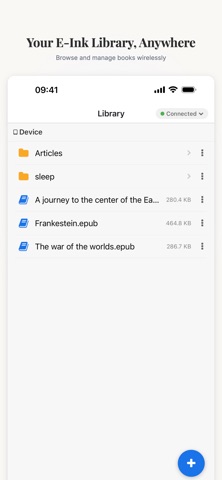
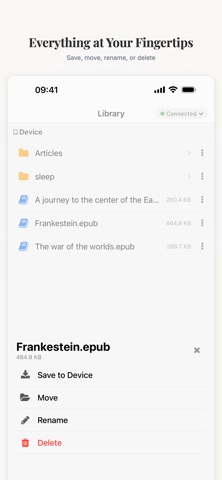
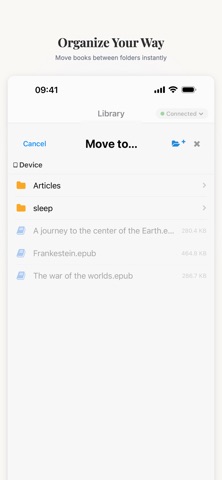
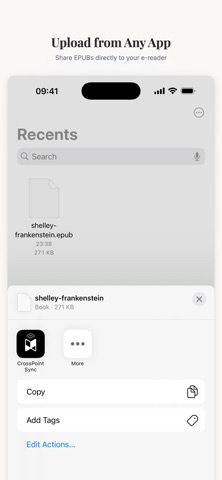
CrossPoint Sync is a wireless companion app for the XTEink X4 e-ink reader. Transfer books, manage your device library, and clip web articles — all over your local WiFi network, no cables required. WIRELESS FILE TRANSFER Send EPUBs to your e-ink reader over WiFi. Uploads are chunked and streamed over for reliable, fast transfers. DEVICE FILE BROWSER Browse the full file system on your e-ink reader directly from your iPhone. Navigate folders, create new folders, delete files, rename files, move files and download books back to your phone. Swipe actions make file management quick and intuitive. SAFARI WEB CLIPPER Save any web article for your e-ink reader with the built-in Safari extension. CrossPoint Web Clipper extracts the article text, downloads images, and converts everything into a clean EPUB that's ready to read on your device. Clips sync automatically the next time you open the app. UPLOAD QUEUE Queue multiple books for transfer and watch them upload one by one with real-time progress tracking. The queue persists across app launches — add books now and they'll transfer automatically when your device connects later. iOS SHARE EXTENSION Share EPUBs from any app — Files, Safari, email — directly into CrossPoint Sync's upload queue. Files are picked up automatically and transferred to your device. SLEEP BACKGROUND CUSTOMIZATION Set a custom sleep screen image on your e-ink reader. Pick any photo from your library, preview it, and upload it to your device as the sleep background. ADDITIONAL FEATURES • Configurable upload paths for books and clipped articles • Dark mode support • Swipe-to-delete and swipe-to-save file actions • Breadcrumb navigation with swipe-back gesture • Device info display: hostname, IP, firmware version
What's new · v1.2.1
- Fixed deleting files for new CrossPointer reader version 1.2.0 and onwards
Details