

Cmux Remote
jaehyun jang · Developer Tools
Independent analytics for this App Store listing. AppTracker is not affiliated with jaehyun jang.
Chart standing · US
What changed · US
Listing changes AppTracker has observed for this app in this storefront — new versions, price moves, rating shifts, and store copy.
- Adds an Option + Up Arrow shortcut for faster terminal input. - Keeps the shortcut bar compact by placing the new key in the existing bottom row. - Replaces the Space label with a compact symbol.
Ratings breakdown · US
The star breakdown behind this app's rating in this storefront.
In-app purchases · US
No in-app purchases.
Screenshots



Keywords this app targets
Search terms AppTracker associates with this app — estimates, not search volume. ❝ = in the app's title; a highlighted number is its current position for that term.
Similar apps
Competitors and close alternatives, as estimated by AppTracker.
 Agentmux
HSINWEI LIAO
2 shared topics
Agentmux
HSINWEI LIAO
2 shared topics
 Tmux Term
Erdinc Curebal
1 shared topic
Tmux Term
Erdinc Curebal
1 shared topic
 iTmux: SSH & tmux Terminal
邵伟 黄
1 shared topic
iTmux: SSH & tmux Terminal
邵伟 黄
1 shared topic
 Cuevello Remote Menu & Screen
HOsy - intelligent software.
2 shared topics · 1 shared title word
Cuevello Remote Menu & Screen
HOsy - intelligent software.
2 shared topics · 1 shared title word
 Muxly: Native tmux & SSH
Whale shark s. r. o.
Muxly: Native tmux & SSH
Whale shark s. r. o.
 Muxy
Saeed Vaziry
1 shared topic
Muxy
Saeed Vaziry
1 shared topic
 CosmoRemote AI Control
Matheus Weber
CosmoRemote AI Control
Matheus Weber
 Claude Remote Control
ibiz tech company limited
Claude Remote Control
ibiz tech company limited
About
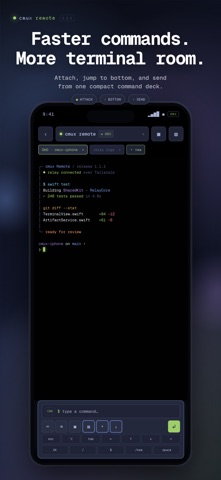
Cmux Remote is a private remote-control client for the cmux terminal multiplexer running on your own computer. Connect over your Tailscale network — your traffic never touches a third-party relay. WHAT IT IS Cmux (https://cmux.com) is a modern terminal multiplexer with native splits, workspaces, and rich integrations for AI agents like Claude Code, Codex, omx, and Cursor. Cmux Remote mirrors the cmux surface you choose, lets you type into it, send keys, manage workspaces, upload photos and documents, preview images, and receive notifications — all from this mobile app. WHO IT IS FOR - Developers who run long-lived agents such as Claude Code, Codex, and omx and want to check or control them away from their desk - People who access their own development machine remotely and want a focused terminal experience - Anyone already using Tailscale and looking for a private way to reach their terminal HOW IT WORKS 1. Install the open-source cmux-relay binary on the computer that runs cmux. 2. Make sure that computer is connected to Tailscale. 3. Open this app, enter the computer’s Tailscale hostname, and tap Connect. 4. Your cmux workspaces appear. Select a surface and start working. The relay communicates directly with cmux through its local Unix socket. This app communicates with the relay over a WireGuard-encrypted Tailscale tunnel. Nothing leaves your private network. FEATURES - Performance-tuned live mirroring of cmux terminal surfaces with Korean/CJK width support, an opaque-black viewport, and ANSI truecolor - Long-press drag selection with adjustable handles and one-tap copy - Keyboard accessory controls for Esc, Enter, Tab, arrows, Ctrl-C, other Ctrl combinations, /new, and Space - Keyboard-safe command layout with automatic dismissal after sending and an inline scroll-to-bottom control - Paste text and securely upload photos or documents to Downloads/cmux-remote - Browse recent uploads and terminal-visible files with image thumbnails and a full-screen zoom viewer - Local notifications and a native Inbox for cmux events and AI-agent needs-input prompts - Create, rename, and close workspaces and switch between multiple surfaces - Connected computer battery status when provided by the relay - Pinch-to-zoom terminal font sizing - Demo Mode with populated sample data so you can try the app before setting up a relay PRIVACY No analytics. No advertising. No third-party tracking SDKs. The bearer token issued by your relay is stored only in secure credential storage on your device. Source code and privacy details: https://github.com/NewTurn2017/cmux-remote REQUIREMENTS - A personal computer running cmux 0.64 or later and cmux-relay - Both devices signed in to the same Tailscale tailnet - iOS 17 or later Cmux Remote is open source under the MIT license. Issues and pull requests are welcome.
What's new · 1.1.2
- Adds an Option + Up Arrow shortcut for faster terminal input. - Keeps the shortcut bar compact by placing the new key in the existing bottom row. - Replaces the Space label with a compact symbol.
Details