

Cuevello Remote Menu & Screen
HOsy - intelligent software. · Developer Tools
Independent analytics for this App Store listing. AppTracker is not affiliated with HOsy - intelligent software.
Chart standing · US
What changed · US
Listing changes AppTracker has observed for this app in this storefront — new versions, price moves, rating shifts, and store copy.
Cuevello 1.6 introduces the AI Assistant, makes workflows more flexible, and makes screen sharing easier. - Describe what your Mac should do in your own words. The AI Assistant turns single or multi-step requests into a workflow that you can review, edit, run, or save. - Edit generated step parameters directly before running, including apps, displays, paths, URLs, shortcuts, and nested workflows. Workflow choices are organized by their existing groups. - Choose whether AI requests are processed on this device, by a compatible Cuevello Server, automatically using the best available option, or disabled completely. - Open the AI Assistant from Cuevello, the app menu, a keyboard shortcut, or Shortcuts and Siri. The built-in “What Can I Say?” guide explains every supported action. - Natural-language recognition is more reliable across supported languages, including multi-action requests, app and menu commands, screenshots, audio, URLs, and workflows whose target should be chosen when run. - Run Mac shortcuts as workflow steps. Browse the shortcut library by folder, choose a shortcut when the workflow runs, and pass text, files, or photos as Shortcut Input. - Use the new Run Step action to execute an individual action immediately without saving a complete workflow first. - Workflows launched from Shortcuts or Spotlight can now request more input at runtime, including Mac shortcuts, files, URLs, clipboard text, folder paths, displays, app windows, and nested workflows. - Share a display or app window with a secure one-time guest link—no pairing required. Choose view-only or control access, Mac audio, an optional temporary password, and an expiration time. - Optionally show current Mac notifications on your iPhone or iPad while Cuevello is open and connected. Tap a notification to open it on the Mac. - The software keyboard can now appear automatically when a text field is focused in the streamed Mac app. - Stream source selection, app-window capture, reconnection, handoffs, pointer gestures, clicks, and secondary clicks are now more reliable. Install the latest compatible Cuevello Server build to use all new Mac-side features.
Screenshots




Keywords this app targets
Search terms AppTracker associates with this app — estimates, not search volume. ❝ = in the app's title; a highlighted number is its current position for that term.
Similar apps
Competitors and close alternatives, as estimated by AppTracker.
 Cmux Remote
jaehyun jang
2 shared topics · 1 shared title word
Cmux Remote
jaehyun jang
2 shared topics · 1 shared title word
 Remoter VNC - Remote Desktop
Remoter Labs LLC
1 shared title word
Remoter VNC - Remote Desktop
Remoter Labs LLC
1 shared title word
 Remote, Mouse & Keyboard Pro
Remote Sunrise LTD
1 shared topic · 1 shared title word
Remote, Mouse & Keyboard Pro
Remote Sunrise LTD
1 shared topic · 1 shared title word
 JetRemote
German Alfonso Torres
1 shared topic
JetRemote
German Alfonso Torres
1 shared topic
 Remote for Mac
Aexol sp. z o.o.
1 shared topic · 1 shared title word
Remote for Mac
Aexol sp. z o.o.
1 shared topic · 1 shared title word
 Macky: Remote Mac & Terminal
Velosify Private Limited
1 shared topic
Macky: Remote Mac & Terminal
Velosify Private Limited
1 shared topic
 DualMac: VNC Remote Desktop
MARIUS LABS
DualMac: VNC Remote Desktop
MARIUS LABS
 CosmoRemote AI Control
Matheus Weber
CosmoRemote AI Control
Matheus Weber
About
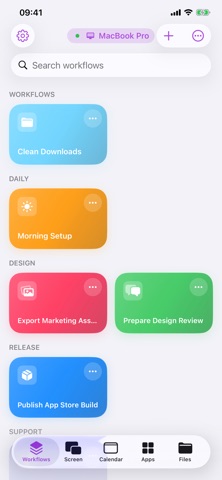
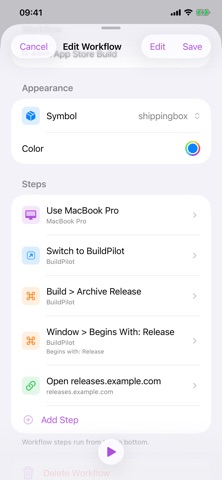
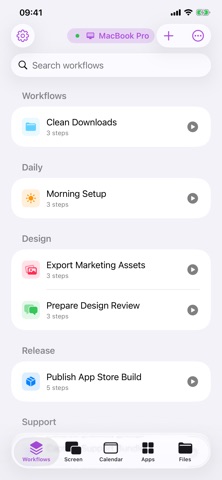
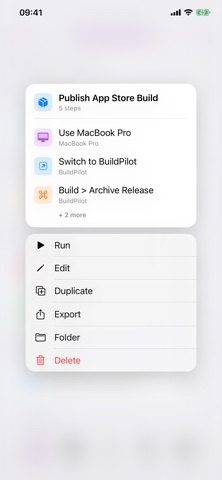
Cuevello turns your device into a fast local control surface for the Mac you already use. Pair your Mac locally, stream a monitor or app window, browse the menu of the active app, run menu commands, trigger keyboard shortcuts, open URLs, send text to the Mac clipboard, switch apps, and save repeatable routines as workflows. Cuevello is made for the small Mac actions that interrupt your flow: checking a build, watching the iOS Simulator from iPad, opening a project URL, exporting a file, pasting text into a Mac app, dismissing a blocking dialog, or starting a prepared automation from across the room. What Cuevello does: - Stream and control a paired Mac screen - View a monitor, app window, or selected app - Use fullscreen or Picture in Picture for live streams - Run Mac menu commands from your device - Browse the active app's menus and submenus - Trigger keyboard shortcuts from the app menu - Build workflows with screen streams, menu commands, app actions, URLs, dynamic menu choices, clipboard text, and prompts - Launch saved workflows from shortcuts and widgets - Sync workflows between your devices - Open URLs on the paired Mac - Send text to the Mac clipboard - Switch, open, or quit Mac apps - Keep separate setups for multiple Macs - Detect modal windows that block automation Cuevello works locally. The Mac app publishes a local service, and your device connects on the same local network or through your VPN. Use it for: - Following up after AI-assisted work - Checking local builds away from the desk - Running saved shortcuts and Cuevello widgets from your device - Sending text snippets to the macOS Clipboard before pasting - Sending files to the Mac or downloading local Mac files - Checking monitor screenshots before the next remote step - Driving demos without breaking presentation focus - Repeating export, share, archive, or render workflows - Controlling a desk Mac, build Mac, or media Mac from one device Requirements: - Cuevello Mac app running on the Mac - Device on the same local network as the Mac - Accessibility permission on macOS so Cuevello can read and trigger menu items - Local Network permission on the device for discovery and pairing - Secure pairing for end-to-end encrypted transfers between paired devices
What's new · 1.6
Cuevello 1.6 introduces the AI Assistant, makes workflows more flexible, and makes screen sharing easier. - Describe what your Mac should do in your own words. The AI Assistant turns single or multi-step requests into a workflow that you can review, edit, run, or save. - Edit generated step parameters directly before running, including apps, displays, paths, URLs, shortcuts, and nested workflows. Workflow choices are organized by their existing groups. - Choose whether AI requests are processed on this device, by a compatible Cuevello Server, automatically using the best available option, or disabled completely. - Open the AI Assistant from Cuevello, the app menu, a keyboard shortcut, or Shortcuts and Siri. The built-in “What Can I Say?” guide explains every supported action. - Natural-language recognition is more reliable across supported languages, including multi-action requests, app and menu commands, screenshots, audio, URLs, and workflows whose target should be chosen when run. - Run Mac shortcuts as workflow steps. Browse the shortcut library by folder, choose a shortcut when the workflow runs, and pass text, files, or photos as Shortcut Input. - Use the new Run Step action to execute an individual action immediately without saving a complete workflow first. - Workflows launched from Shortcuts or Spotlight can now request more input at runtime, including Mac shortcuts, files, URLs, clipboard text, folder paths, displays, app windows, and nested workflows. - Share a display or app window with a secure one-time guest link—no pairing required. Choose view-only or control access, Mac audio, an optional temporary password, and an expiration time. - Optionally show current Mac notifications on your iPhone or iPad while Cuevello is open and connected. Tap a notification to open it on the Mac. - The software keyboard can now appear automatically when a text field is focused in the streamed Mac app. - Stream source selection, app-window capture, reconnection, handoffs, pointer gestures, clicks, and secondary clicks are now more reliable. Install the latest compatible Cuevello Server build to use all new Mac-side features.
Details