

Taxsy: Expense Receipt Scanner
Peter Mankarious · Finance
Independent analytics for this App Store listing. AppTracker is not affiliated with Peter Mankarious.
Chart standing · US
What changed · US
Listing changes AppTracker has observed for this app in this storefront — new versions, price moves, rating shifts, and store copy.
• Scan a screenshot of your banking app or Apple Wallet transactions and each payment becomes its own record, with the right date. Money coming in is left out. • Set a receipt's date to today with one tap. • Create a new category straight from the category menu. • A receipt with no date on it now gets today's date. • Items and prices are matched up more reliably, especially on receipts photographed at an angle. • Duplicate spotting is much better. It checks every year you've saved, and recognises the same receipt even when the shop's name comes back slightly different. • Tap anywhere on a scan in Ready to Save to edit it.
Screenshots



Similar apps
Competitors and close alternatives, as estimated by AppTracker.
 Receipt Scanner: Money Tracker
Suzait Ali
Receipt Scanner: Money Tracker
Suzait Ali
 Receipt Scanner: Expenses
Artiom Gaureac
Receipt Scanner: Expenses
Artiom Gaureac
 1tap receipts: Tax & Expenses
1TAP APP LIMITED
1tap receipts: Tax & Expenses
1TAP APP LIMITED
 Receeto: AI Receipt Scanner
Mohit Gaddam
Receeto: AI Receipt Scanner
Mohit Gaddam
 Smart Receipts: Expenses & Tax
REACTIVE APPS CORP.
Smart Receipts: Expenses & Tax
REACTIVE APPS CORP.
 Smart Receipt Scan: Receiptly
Karmjit Singh
Smart Receipt Scan: Receiptly
Karmjit Singh
 Receipt Organizer・ReceiptGenie
Botisan AI Pte. Ltd.
Receipt Organizer・ReceiptGenie
Botisan AI Pte. Ltd.
 Smart Receipts: Scan & Track
Ramkumar Vellaisamy
Smart Receipts: Scan & Track
Ramkumar Vellaisamy
About
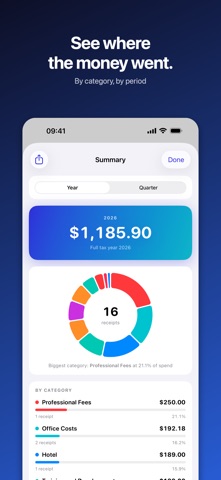
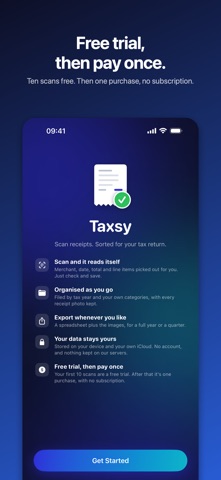
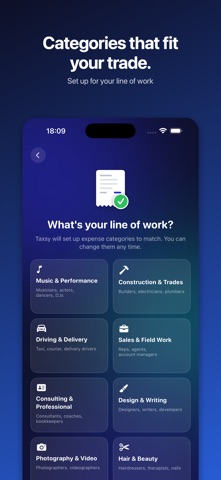
Taxsy turns a photo of a receipt into a tidy expense record, then gets out of your way. Point your camera at a receipt and Taxsy reads the merchant, date, total and individual items for you. Check it and save it. Everything is filed by tax year and category with the original photo kept alongside, so at tax time you export one file and hand it to your accountant or drop it into your bookkeeping. FREE TRIAL, THEN PAY ONCE Your first ten scans are free, so you can see how Taxsy reads your own receipts before you spend anything. After that, buy it once and it's yours. Scan one receipt a week or twenty a day, the price is the same. There's no subscription, and you're never charged per scan. There's no account to set up, and no ads. HOW IT WORKS Scan. Use the camera, or import photos you've already taken. Check. The details are filled in for you. Fix anything that looks wrong. Export. A spreadsheet plus all your receipt images, whenever you need it. WHAT YOU GET • Reads receipts for you Merchant, date, total and line items are picked out automatically, so you're checking rather than typing. • Only what counts as business Split a mixed receipt by unticking the personal items. The total updates as you go. • Your categories, your trade Choose your line of work at setup and Taxsy starts you off with categories that fit: musician, contractor, driver, photographer, consultant and more. Add, rename, reorder or remove any of them. • Every receipt photo kept Records are filed by tax year with the image attached, so you have the proof as well as the numbers. • Set up for where you file Pick your country at setup and Taxsy uses its tax year and currency. In the US you also get the four estimated-tax periods, with each payment's due date. • Foreign receipts converted Bought something abroad? Taxsy converts it at the European Central Bank's reference rate for that day and shows you the rate, which you can change to your card's if required. • Duplicate spotting Scanned the same receipt twice? Taxsy flags it before it reaches your records. • Syncs across your devices Your receipts stay on your device and in your own iCloud Drive, and appear on your iPhone and iPad, or on your Mac in the Finder. WHO IT'S FOR Freelancers, contractors, gig workers and anyone self-employed who'd rather not spend an evening with a shoebox of receipts. Taxsy keeps the paperwork straight so your accountant, or your future self, has everything to hand. YOUR DATA STAYS YOURS Taxsy has no user accounts and keeps nothing on our servers. Your receipts live on your device and in your own iCloud. To read a scan, only the recognized text is sent for processing, never the photo, and it isn't kept. Exports go wherever you send them and nowhere else. ONE PURCHASE, NOTHING AFTER IT Once your free trial is used, you pay for Taxsy once and never again. Scanning isn't metered, and there's no pro version waiting behind another payment. Taxsy helps you keep records. It doesn't file anything with the IRS or any other tax authority, and isn't tax advice.
What's new · 1.3.0
• Scan a screenshot of your banking app or Apple Wallet transactions and each payment becomes its own record, with the right date. Money coming in is left out. • Set a receipt's date to today with one tap. • Create a new category straight from the category menu. • A receipt with no date on it now gets today's date. • Items and prices are matched up more reliably, especially on receipts photographed at an angle. • Duplicate spotting is much better. It checks every year you've saved, and recognises the same receipt even when the shop's name comes back slightly different. • Tap anywhere on a scan in Ready to Save to edit it.
Details