

Exposure Check
Game Night Films · Photo & Video
Independent analytics for this App Store listing. AppTracker is not affiliated with Game Night Films.
Chart standing · US
Ratings breakdown · US
The star breakdown behind this app's rating in this storefront.
In-app purchases · US
No in-app purchases.
Screenshots



Keywords this app targets
Search terms AppTracker associates with this app — estimates, not search volume. ❝ = in the app's title; a highlighted number is its current position for that term.
Similar apps
Competitors and close alternatives, as estimated by AppTracker.
 Exposir
Riku Kuse
Exposir
Riku Kuse
 CINE WHITE BALANCE
KARL HENRY WEINREICH III
1 shared topic
CINE WHITE BALANCE
KARL HENRY WEINREICH III
1 shared topic
 PocketMeter Pro
Studio C-41 Productions, LLC
PocketMeter Pro
Studio C-41 Productions, LLC
 CameraPixels PRO
Natalya Petrenko
1 shared topic
CameraPixels PRO
Natalya Petrenko
1 shared topic
 Cine Meter II
Adam Wilt
1 shared topic
Cine Meter II
Adam Wilt
1 shared topic
 SpotmaticMagic
Erich Champion
1 shared topic
SpotmaticMagic
Erich Champion
1 shared topic
 Light Meter by WBPhoto
William Blaschko
Light Meter by WBPhoto
William Blaschko
 Halide Mark III - Pro Camera
Lux Optics Incorporated
1 shared topic
Halide Mark III - Pro Camera
Lux Optics Incorporated
1 shared topic
About
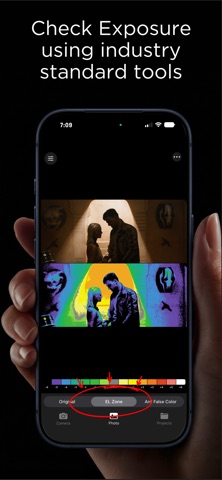
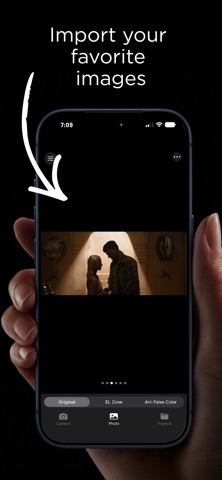
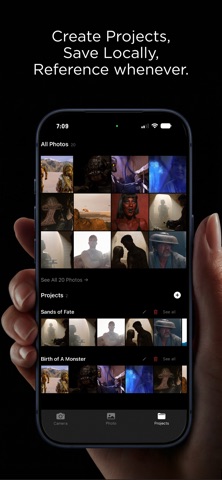
Exposure Check brings professional-grade exposure analysis to your iPhone, iPad, and Mac for 1 low price! False color imaging — used by cinematographers on set worldwide — reveals exactly where your highlights clip and shadows crush before it's too late. Use this tool to import images from Movies, TV Shows, and more to reveal how professional cinematographers exposed their final graded images. SHOOT IN APPLE LOG Capture with the in-app camera in Apple Log and read exposure the way you would on a pro monitor. Zone and False Color overlays follow the exact Apple Log curve, so every zone lines up with true scene stops — the full dynamic range of your sensor, measured in real light. REAL-TIME FALSE COLOR CAMERA See your scene through a live false color overlay as you shoot. Instantly identify overexposed highlights, underexposed shadows, and perfectly exposed midtones — the same tools used on professional film sets, now in your pocket. TAP TO METER Tap anywhere in the frame for an instant zone readout and a recommended f-stop. Simulate any lens aperture with the IRIS control and get a recommendation to place your subject at 18% middle gray — before you roll. ZONE SYSTEM ANALYSIS Exposure Check maps your image into distinct one-stop tonal zones so you can evaluate exposure with precision and intent. MANUAL CAMERA CONTROLS Take full control with manual ISO, shutter angle, white balance, frame rate, and lens selection — plus pinch-to-zoom lens switching and a live, draggable histogram. ANALYZE ANY PHOTO Import photos from your library and run Zone or False Color analysis instantly. The stacked compare view shows your original and analyzed image together so you can see exactly what the exposure is doing. ORGANIZE WITH PROJECTS Create projects to keep your shots organized. Import directly from your photo library, move and copy images between projects, and review your work in a clean full-screen viewer with smooth swipe navigation. KEY FEATURES -Live Apple Log capture with real-time Zone and False Color overlays -Exact Apple Log curve — every zone is a true scene stop -Tap to meter: zone readout + recommended f-stop anywhere in the frame -Simulated IRIS with 18% gray recommendations -Manual ISO, shutter angle, white balance, FPS, and lens controls -Pinch-to-zoom lens switching and a live, draggable histogram -Import and analyze photos from your library -Stacked compare view — original above, analyzed below -Adjustable color reference bar -Project organization with multi-select, move, and copy -Full-screen image viewer with smooth swipe navigation -Share processed images directly from the app -iPhone, iPad, and Mac supported A note on accuracy: On graded or imported images, overlays reflect the how the image was graded — not the exposure captured on set. For true scene-stop readings, shoot in Apple LOG with the built-in camera. Whether you're on set, shooting in the field, or reviewing work in post — Exposure Check gives you the exposure tools professionals rely on.
What's new · 4
The biggest update to Exposure Check yet. Recalibrated exposure engine • Zone and False Color overlays now follow the exact Apple Log curve — every zone lines up with true scene stops. • Tap anywhere for a zone readout and a recommended f-stop. • Simulated IRIS: preview any aperture and get a recommendation to place your subject at 18% gray. • New ISO steps (250 / 500) for finer exposure control. A smoother, cleaner app • Overlays renamed to simply "Zone" and "False Color," with clearer readouts. • Project photos now open full screen on iPad and swipe smoothly between images — just like the Photo tab. • Faster thumbnails and browsing throughout. • New What's New screen and About section with quick access to support. Reminder: true Zone readings require a LOG image from a camera. iPhones Pro models with Apple log are capable of this. On graded or imported images, overlays are for reference only based on the final grade.
Details