

CINE WHITE BALANCE
KARL HENRY WEINREICH III · Photo & Video
Independent analytics for this App Store listing. AppTracker is not affiliated with KARL HENRY WEINREICH III.
Chart standing · US
What changed · US
Listing changes AppTracker has observed for this app in this storefront — new versions, price moves, rating shifts, and store copy.
A DIRECTOR'S VIEWFINDER New, and the reason for this release. Pick a body, its shooting mode and a lens set, and the live picture shows what that combination would see. The frame is the sensor's native shape and holds still; changing lenses ramps the phone's zoom so the picture moves behind it the way it would if you swapped glass. 81 bodies and 124 imaging modes across ARRI, RED, Sony, Canon, Blackmagic, Panasonic, Fujifilm, Nikon, Leica and Z CAM. 103 lens series, cine and stills, with mount adapters, speed boosters, extenders and anamorphic squeeze. Framelines, a thirds grid, and shading you control. The white balance now reads out inside the viewfinder in the units of the body you picked — not whatever the meter screen was left on — and says NEAREST K or CC CLIPS when the body cannot actually be set to what the light is. AE lock and an exposure trim. A luminance histogram. A three-way grade previsualised over the live picture, written as ASC CDL so the numbers on screen are the numbers a colourist would type. Capture stills or walkthrough clips. Every frame carries the camera, lens, frame shape, angles of view, white balance and place — burned across the picture and listed on its own page. Group them by job and send a shotlist PDF. SCOUT The four tools for standing somewhere before the camera does — the viewfinder, your captured frames, the sun tracker and predicted colour — are together on the tool row now, under their real names. ON THE METER Zoom steps through 0.5x, 1x, 2x, 3x, 5x and 8x instead of flipping between 1x and 2x, so you can take a whole room in or meter a practical across it. Place names and coordinates can now be kept out of every export — the CSV, the PDF, the shotlist and the strip burned onto a captured frame. In Calibration, under PRIVACY. The Kelvin reading is steadier. The sun tracker gained solstice tracks, a sky grid and any date. Framing answers the questions people actually arrive with, and gives the custom marker number your monitor asks for. FIXED Buttons that sometimes needed a second press before they would take. Info and the walkthrough now cover everything above.
Ratings breakdown · US
The star breakdown behind this app's rating in this storefront.
In-app purchases · US
No in-app purchases.
Screenshots


Keywords this app targets
Search terms AppTracker associates with this app — estimates, not search volume. ❝ = in the app's title; a highlighted number is its current position for that term.
Similar apps
Competitors and close alternatives, as estimated by AppTracker.
 Lenset
Eyvin Studios AB
Lenset
Eyvin Studios AB
 ProFilm Meter
Scott Henderson
ProFilm Meter
Scott Henderson
 LightTemp – Color Meter
DOMINIC WALSER
LightTemp – Color Meter
DOMINIC WALSER
 Cine Meter II
Adam Wilt
1 shared topic · 1 shared title word
Cine Meter II
Adam Wilt
1 shared topic · 1 shared title word
 Light Meter by WBPhoto
William Blaschko
Light Meter by WBPhoto
William Blaschko
 CALM: Cinema Lighting Matcher
MANABU KATOH
CALM: Cinema Lighting Matcher
MANABU KATOH
 Barite — Black & White Camera
Denys Sudilkovskyi
Barite — Black & White Camera
Denys Sudilkovskyi
 PocketMeter Pro
Studio C-41 Productions, LLC
PocketMeter Pro
Studio C-41 Productions, LLC
About
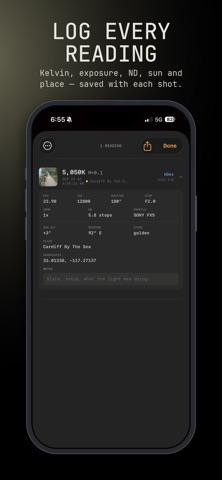
A color meter that speaks your camera's menu, and a director's viewfinder that shows the shot before the camera arrives. Point the phone at the light. It reads a color temperature and a tint, then translates that one measurement into what your body actually asks for — in its own wording, in its own step size. An ALEXA wants a tint value. A VENICE wants something else. A LUMIX calls it something else again. You get the number to dial, not a conversion to do in your head. DIRECTOR'S VIEWFINDER Pick a body, its shooting mode and a lens set, and the live picture shows what that combination would see. The frame is the sensor's native shape and it holds still — changing lenses moves the picture behind it, because the phone ramps its own zoom so a 24 pulls out and a 135 pushes in, the way swapping glass would. • 81 bodies, 124 imaging modes, 103 lens series — ARRI, RED, Sony, Canon, Blackmagic, Panasonic, Fujifilm, Nikon, Leica, Z CAM, cine and stills glass • Framelines for your delivery crop, with the surround shaded as much or as little as you like • Prime turrets and zoom barrels stepped through real focal marks, naming the lens you are on • Mount adapters, speed boosters, extenders and anamorphic squeeze • AE lock, an exposure trim, a luminance histogram, and a three-way ASC CDL grade previsualised over the live picture • Capture stills or walkthrough clips, with the camera, lens, frame, angles of view, white balance and place burned onto the frame • Group frames by job and send a shotlist PDF THE METER • 19 camera families, each with its own translation and its own step size • Spot or full-frame metering, with a reticle you place by tapping • Lock a reading as an anchor and see everything else as a difference from it — how you match a second setup to the first, or catch the light drifting after lunch • Calibrate the tint scale to your own body, once LIGHT YOU HAVE NOT MET YET • Sun tracker: the sun's whole path for any date and place, drawn over the live picture • Predicted colour: what the light will be where you are going, with cloud cover from the forecast — and a badge saying how far to trust the figure • The day: every reading you pinned, plotted against night, blue hour, golden hour and full sun GELS, ND AND FRAMING • CORRECT takes a source to a target, names the LEE or Rosco gel that gets closest, what you actually land on, and what it costs you in stops • MATCH makes two sources agree • An ND calculator, and a density-to-stops table for when somebody calls a filter by the other name • Delivery ratios, the pixel dimensions to set a timeline to, what a resolution somebody handed you actually is, and the custom marker number your monitor asks for WHAT LEAVES THE PHONE IS YOURS Scenes export as CSV for the editor or PDF for the gaffer. Frames export as a shotlist. Place names and coordinates can be kept out of all of it. One payment. No subscription, no account, no ads. Nothing is uploaded except the coordinate used to fetch a cloud-cover forecast, when you ask for one. A phone is not a spectrometer. Under a narrow-band source the app says so rather than pretending otherwise, and every predicted figure carries the basis it rests on.
What's new · 5.2
A DIRECTOR'S VIEWFINDER New, and the reason for this release. Pick a body, its shooting mode and a lens set, and the live picture shows what that combination would see. The frame is the sensor's native shape and holds still; changing lenses ramps the phone's zoom so the picture moves behind it the way it would if you swapped glass. 81 bodies and 124 imaging modes across ARRI, RED, Sony, Canon, Blackmagic, Panasonic, Fujifilm, Nikon, Leica and Z CAM. 103 lens series, cine and stills, with mount adapters, speed boosters, extenders and anamorphic squeeze. Framelines, a thirds grid, and shading you control. The white balance now reads out inside the viewfinder in the units of the body you picked — not whatever the meter screen was left on — and says NEAREST K or CC CLIPS when the body cannot actually be set to what the light is. AE lock and an exposure trim. A luminance histogram. A three-way grade previsualised over the live picture, written as ASC CDL so the numbers on screen are the numbers a colourist would type. Capture stills or walkthrough clips. Every frame carries the camera, lens, frame shape, angles of view, white balance and place — burned across the picture and listed on its own page. Group them by job and send a shotlist PDF. SCOUT The four tools for standing somewhere before the camera does — the viewfinder, your captured frames, the sun tracker and predicted colour — are together on the tool row now, under their real names. ON THE METER Zoom steps through 0.5x, 1x, 2x, 3x, 5x and 8x instead of flipping between 1x and 2x, so you can take a whole room in or meter a practical across it. Place names and coordinates can now be kept out of every export — the CSV, the PDF, the shotlist and the strip burned onto a captured frame. In Calibration, under PRIVACY. The Kelvin reading is steadier. The sun tracker gained solstice tracks, a sky grid and any date. Framing answers the questions people actually arrive with, and gives the custom marker number your monitor asks for. FIXED Buttons that sometimes needed a second press before they would take. Info and the walkthrough now cover everything above.
Details