

SpotmaticMagic
Erich Champion · Photo & Video
Independent analytics for this App Store listing. AppTracker is not affiliated with Erich Champion.
Chart standing · US
What changed · US
Listing changes AppTracker has observed for this app in this storefront — new versions, price moves, rating shifts, and store copy.
Auto, Rebuilt - Auto adjustments now solve the whole chain at once instead of guessing each slider separately — and Exposure works in true photographic stops, so +1 EV doubles the light on any image. Per-slider Auto respects the sliders you’ve already set yourself. RAW, Rebuilt - RAW import runs on Apple’s latest decoder, with new Sharpness and Noise Reduction controls that drive the RAW engine directly. Re-opening RAW files is faster, and a file that can’t decode now says so instead of exporting black. Astrophotography That Aligns Everything - Star alignment now fits frames it used to give up on — even thin-overlap pairs — and a run of calibration fixes (inverted flat and dark subtraction among them) makes stacks cleaner and correctly exposed. Painterly Filters, Retuned - Paper texture and pigmentrender in the tonal range they were designed for, so watercolor, oil, ink, line drawing, impressionist, and pastel looks come out with truer brightness and cleaner brushwork. Watercolor’s Quick preset now does wet-in-wet bleeding and granulation. Subject Detection That Actually Finds Your Subject - Fixed three bugs: landscape photos could return no subject, edge-touching subjects were faded out, and cropped images picked the wrong region. Selective Focus, color splash, and spotlight are all more reliable. A More Trustworthy Library - Choosing a different folder can no longer strand your working set; a folder that won’t open offers Retry or Choose Another; and each Mac window remembers its own folder. TIFF exports are properly compressed again, and large exports no longer risk tile corruption. Steadier - Fixed hangs that could occur when several subject-detection or RAW-decode passes ran at once, and a broad correctness pass across the shared engine: HDR fusion, focus stacking, alignment, long exposure, and motion removal all produce measurably truer results.
Price & rating history · US
Reconstructed from the listing changes AppTracker has observed in this storefront. A field is charted once it has changed more than once, and each line starts at the value it moved from.
Price · 34.99 USD now · 2 changes on record
Average rating · ★ 5.00 now · 3 changes on record
In-app purchases · US
No in-app purchases.
Screenshots



Keywords this app targets
Search terms AppTracker associates with this app — estimates, not search volume. ❝ = in the app's title; a highlighted number is its current position for that term.
Similar apps
Competitors and close alternatives, as estimated by AppTracker.
 Photomator – Photo Editor
Apple Inc.
1 shared topic
Photomator – Photo Editor
Apple Inc.
1 shared topic
 Camera+ Legacy
LateNite Apps
1 shared topic
Camera+ Legacy
LateNite Apps
1 shared topic
 CameraPixels PRO
Natalya Petrenko
1 shared topic
CameraPixels PRO
Natalya Petrenko
1 shared topic
 Brightly - Fix Dark Photos
Code Organa
1 shared topic
Brightly - Fix Dark Photos
Code Organa
1 shared topic
 ProCam - Pro Camera
Tinkerworks Apps
1 shared topic
ProCam - Pro Camera
Tinkerworks Apps
1 shared topic
 Handy Photo
Adva-Soft
1 shared topic
Handy Photo
Adva-Soft
1 shared topic
 DSLR Camera
Fulvio Scichilone
1 shared topic
DSLR Camera
Fulvio Scichilone
1 shared topic
 ACDSee Pro
ACD Systems International Inc.
1 shared topic
ACDSee Pro
ACD Systems International Inc.
1 shared topic
About
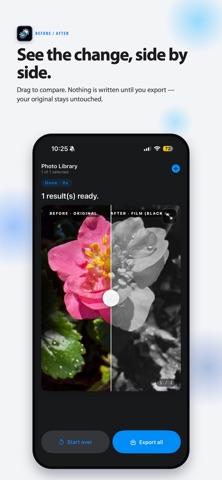
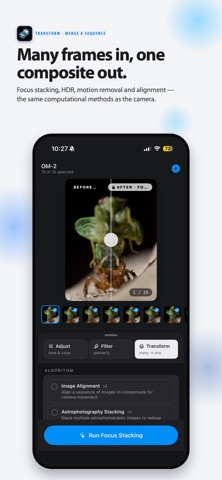
SpotmaticMagic is a complete computational photography studio for iPhone, iPad, and Mac. Three tools in one place — Adjust tone and color with a live preview, apply a creative Filter like Watercolor or a classic film stock, or Transform a whole sequence with desktop-class algorithms like Focus Stacking, HDR Fusion, and Astrophotography Stacking. Adjust in Real Time Fine-tune every image on a live canvas with an on-screen luminance histogram. Drag Exposure, Highlights, Shadows, Contrast, Black & White Point, Brilliance, Saturation, Vibrance, Warmth, and Tint — plus a true vignette. Every slider starts on a smart Auto value that solves the whole adjustment chain at once — in true photographic stops — correcting color casts without blowing out highlights; take manual control whenever you like, or tap Reset All to return to Auto. On RAW files, Adjust also drives the decoder’s own Sharpness and Noise Reduction. Nothing is written until you apply. A Creative Filter Suite Transform a single photo with ten hand-built looks: • Painterly — Watercolor (soft bleeds, pooled pigment, and granulation on both the Quick and Verisimilitude presets), Oil Painting (thick impasto relief), Ink Painting (sumi-e ink wash), Painterly Media (pastel, gouache, and acrylic), and Impressionist brushwork. • Graphic — Cartoon, Line Drawing (pen, pencil, and charcoal), and Photo Abstraction. • Selective Focus — color splash, background blur, and spotlight effects driven by automatic subject detection. • Film — authentic color and black-and-white film-stock emulation, including Kodak Portra, Ektar, and Kodachrome; Fujifilm Velvia, Provia, and Astia; and Ilford and Fujifilm B&W stocks like Tri-X, HP5 Plus, T-Max, Delta, and Neopan Acros — each with real grain, sharpness, and halation. Every painterly look is built on a real simulation, not a preset stack — watercolor runs an actual shallow-water fluid solver, and paper and pigment are sampled and composited in physically meaningful units. Pro Stacking & Transform Combine an image sequence with hardware-accelerated algorithms: • Focus Stacking — merge images shot at different focus distances into a single edge-to-edge sharp photo, with optional per-pixel optical-flow refinement. • HDR Fusion (Natural & Vibrant) — blend exposure brackets for the full dynamic range of a scene, in realistic or punchy styles. • Astrophotography Stacking — reduce noise and reveal deep-sky detail, with full bias, dark, flat, and dark-flat calibration support and star alignment that fits even thin-overlap frames. • Motion Removal — erase passing tourists or cars from a burst of otherwise identical frames. • Long Exposure & Motion Blur — simulate silky water and light trails without an ND filter. • Image Alignment — scale-robust feature-based alignment built for handheld and macro sequences. Any Camera, Any Format Import from your Photo Library, or choose individual files or a whole folder. SpotmaticMagic reads full-resolution RAW from every major manufacturer — Canon, Nikon, Sony, Fujifilm, Olympus / OM System, Panasonic, and more, plus universal DNG — decoded on Apple’s latest RAW engine. Export as HEIF, JPEG, PNG, or 16-bit TIFF in wide-gamut Display P3, at the quality and resolution you choose, with your original EXIF, GPS, and IPTC metadata preserved. Inspect Every Detail Tap any result to open a fullscreen Zoom Inspector. Pan and zoom with a navigator minimap, and press and hold to compare your edit against the original. Who It’s For For macro and landscape shooters, astrophotographers, and any creative who wants real control over how their photos look — from a quick live adjustment to a painterly filter to a precision focus stack. The perfect companion for a dedicated camera, and a powerful way to elevate the photos you already have.
What's new · 1.2.0
Auto, Rebuilt - Auto adjustments now solve the whole chain at once instead of guessing each slider separately — and Exposure works in true photographic stops, so +1 EV doubles the light on any image. Per-slider Auto respects the sliders you’ve already set yourself. RAW, Rebuilt - RAW import runs on Apple’s latest decoder, with new Sharpness and Noise Reduction controls that drive the RAW engine directly. Re-opening RAW files is faster, and a file that can’t decode now says so instead of exporting black. Astrophotography That Aligns Everything - Star alignment now fits frames it used to give up on — even thin-overlap pairs — and a run of calibration fixes (inverted flat and dark subtraction among them) makes stacks cleaner and correctly exposed. Painterly Filters, Retuned - Paper texture and pigmentrender in the tonal range they were designed for, so watercolor, oil, ink, line drawing, impressionist, and pastel looks come out with truer brightness and cleaner brushwork. Watercolor’s Quick preset now does wet-in-wet bleeding and granulation. Subject Detection That Actually Finds Your Subject - Fixed three bugs: landscape photos could return no subject, edge-touching subjects were faded out, and cropped images picked the wrong region. Selective Focus, color splash, and spotlight are all more reliable. A More Trustworthy Library - Choosing a different folder can no longer strand your working set; a folder that won’t open offers Retry or Choose Another; and each Mac window remembers its own folder. TIFF exports are properly compressed again, and large exports no longer risk tile corruption. Steadier - Fixed hangs that could occur when several subject-detection or RAW-decode passes ran at once, and a broad correctness pass across the shared engine: HDR fusion, focus stacking, alignment, long exposure, and motion removal all produce measurably truer results.
Details