

MT — Mosh Terminal
Jaga Studio · Developer Tools
Independent analytics for this App Store listing. AppTracker is not affiliated with Jaga Studio.
Chart standing · US
What changed · US
Listing changes AppTracker has observed for this app in this storefront — new versions, price moves, rating shifts, and store copy.
Agent improvements plus display and connection fixes. • On the iPhone Duo's inner display, the sidebar sits beside the terminal like on iPad — drag its edge to resize (the width is remembered), double-tap to reset. • While a terminal is shared with a computer and the keyboard and input bar are closed, spare room at the top lists the sharing agents instead of stretching rows. • Herdr agent sessions reconnect on their own after a recoverable Mosh drop — no Retry tap needed. • Keys in the waiting-agent peek panel no longer reopen a connection per press — the panel keeps one connection while open and drops it on close. • Accept the gray command suggestion with Tab (new opt-in setting), or push the joystick right as the first move after a suggestion appears. • Fewer moments of content drawn at a stale size right after rotation, splits, or sidebar changes. • On iPad, the status-bar strip now uses the app's colors so the indicators stay readable.
Ratings breakdown · US
The star breakdown behind this app's rating in this storefront.
In-app purchases · US
What this app sells inside itself, grouped by kind and priced for this storefront.
Screenshots



Keywords this app targets
Search terms AppTracker associates with this app — estimates, not search volume. ❝ = in the app's title; a highlighted number is its current position for that term.
Similar apps
Competitors and close alternatives, as estimated by AppTracker.
 ShadowTerm ssh & mosh Terminal
Carlos Savcic
2 shared topics · 3 shared title words
ShadowTerm ssh & mosh Terminal
Carlos Savcic
2 shared topics · 3 shared title words
 Moshi: herdr/tmux on SSH/MOSH
Moshi Tech Ltd.
2 shared topics · 1 shared title word
Moshi: herdr/tmux on SSH/MOSH
Moshi Tech Ltd.
2 shared topics · 1 shared title word
 MTerm - SSH Terminal
kazuki oinuma
1 shared topic · 1 shared title word
MTerm - SSH Terminal
kazuki oinuma
1 shared topic · 1 shared title word
 La Terminal: Mosh & SSH Client
Xibbon, Inc
2 shared topics · 2 shared title words
La Terminal: Mosh & SSH Client
Xibbon, Inc
2 shared topics · 2 shared title words
 Tmux Term
Erdinc Curebal
2 shared topics
Tmux Term
Erdinc Curebal
2 shared topics
 iTmux: SSH & tmux Terminal
邵伟 黄
2 shared topics · 1 shared title word
iTmux: SSH & tmux Terminal
邵伟 黄
2 shared topics · 1 shared title word
 SSH Term X
Haga Kunihiko
1 shared topic
SSH Term X
Haga Kunihiko
1 shared topic
 Moshpit: Terminal for Agents
文隆 胡
Moshpit: Terminal for Agents
文隆 胡
About
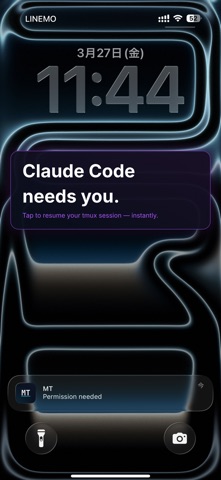
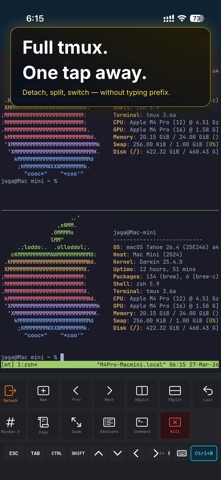
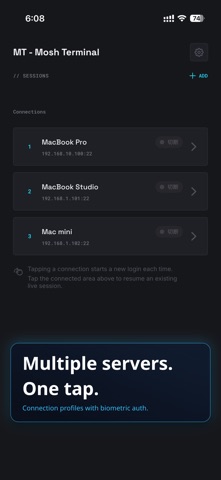
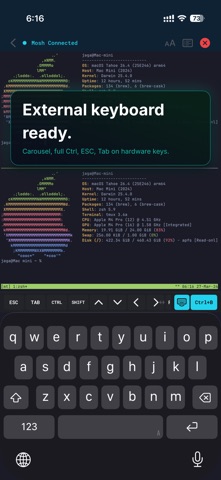
Never miss an AI agent prompt again. Ever stepped away from your Mac, checked your phone, and realized Claude Code had been waiting for you to approve a change for 20 minutes? That's the frustration MT fixes. MT - Mosh Terminal is the mobile companion for AI coding agents such as Claude Code and Codex, running in tmux or Herdr. The moment an agent needs input, a push notification reaches your iPhone. Tap it — MT instantly resumes the exact tmux session over rock-solid Mosh. With Herdr, you can also see every agent at a glance and jump straight to the one that is waiting. Not just SSH — a pro terminal for mobile developers. With an external keyboard, iPad becomes a Mac-level terminal experience. AI AGENT MONITORING • Herdr support: see your agents across Herdr workspaces, which ones are waiting for you, and jump to the right pane • Check button on a waiting agent: peek at what it is asking and answer with arrow keys, Enter, and Esc without leaving your current screen • System-level push notifications via Claude Code and Codex CLI hooks • Task completion and permission requests reach your iPhone and Apple Watch instantly • Tap a notification → MT auto-resumes the exact tmux session (host, user, and session name are matched automatically) • Paste two hook entries and you're done — no CLAUDE.md hacks • Self-hosted push relay supported — no vendor lock-in CONNECT ANYWHERE • SSH — Secure shell connections to any remote server • Mosh — Mobile-optimized sessions that survive network changes, Wi-Fi handoffs, and sleep/wake cycles. Your session stays alive, even on the subway • Automatic SSH fallback when Mosh UDP is blocked • Configurable connection timeout and quick-connect mode POWERFUL ON IPAD • Stage Manager multi-window support — resize and run multiple terminals side by side • External keyboard, mouse, and trackpad support • Multi-pane tmux layouts on the large screen KEYBOARD-FIRST DESIGN • Full keyboard-only operation with Magic Keyboard, split ergonomic boards, or custom ZMK builds • Software key bar auto-minimizes when an external keyboard is detected • Keyboard shortcuts: ⌘1-9 tab switch, ⌘N new connection, ⌘W close, ⌘D split pane • JIS keyboard auto-detection with ¥→\ conversion • Full CJK input: Japanese, Chinese, and Korean IME with inline pre-edit composition ONE-TAP TMUX • Split panes, switch windows, and manage sessions from the bottom action bar • No need to memorize prefix key combos — tmux power, mobile simplicity • Your server's tmux config (prefix key and key bindings) is automatically imported • 15+ built-in actions with customizable ordering and visibility FILE TRANSFER & COMMANDS • SFTP remote browser — walk directories and pick files, no hand-typed paths • SFTP upload and download using the connection profile you are already on • Command Library — save and search frequent commands, insert from the key bar • Custom key bar keys — assign any text or escape sequence you need BEAUTIFUL & CUSTOMIZABLE • Built-in themes: Dracula, Tokyo Night, Gruvbox, Catppuccin, Solarized, and more • Custom fonts: Built-in Menlo, JetBrains Mono. Import your own .ttf/.otf • Pinch-to-zoom font size adjustment SECURE BY DESIGN • SSH keys stored in iOS Keychain, protected by Secure Enclave • Face ID / Touch ID protection for SSH keys • Host key verification (TOFU) with fingerprint display • iCloud Sync with end-to-end encryption (optional, off by default) • No analytics, no tracking, no ads. All data stays on your device GPU-RENDERED • Metal-accelerated terminal rendering powered by Ghostty • Smooth scrolling at 60fps • Touch, trackpad, and mouse scroll support NETWORKING MT connects directly to your servers via SSH (TCP port 22) and Mosh (UDP ports 60000-61000). This app does NOT function as a VPN, proxy, or network tunnel. All connections are direct terminal sessions to servers you configure. Available in English, Japanese, Chinese (Simplified & Traditional), and Korean. Requires iOS 18 or later. iPhone and iPad.
What's new · 1.6.4
Agent improvements plus display and connection fixes. • On the iPhone Duo's inner display, the sidebar sits beside the terminal like on iPad — drag its edge to resize (the width is remembered), double-tap to reset. • While a terminal is shared with a computer and the keyboard and input bar are closed, spare room at the top lists the sharing agents instead of stretching rows. • Herdr agent sessions reconnect on their own after a recoverable Mosh drop — no Retry tap needed. • Keys in the waiting-agent peek panel no longer reopen a connection per press — the panel keeps one connection while open and drops it on close. • Accept the gray command suggestion with Tab (new opt-in setting), or push the joystick right as the first move after a suggestion appears. • Fewer moments of content drawn at a stale size right after rotation, splits, or sidebar changes. • On iPad, the status-bar strip now uses the app's colors so the indicators stay readable.
Details