

La Terminal: Mosh & SSH Client
Xibbon, Inc · Developer Tools
Independent analytics for this App Store listing. AppTracker is not affiliated with Xibbon, Inc.
Chart standing · US
What changed · US
Listing changes AppTracker has observed for this app in this storefront — new versions, price moves, rating shifts, and store copy.
* Add complete BiDi support for Arabic and Hebrew. * Extensive improvements and fixes for Korean, Thai, CJK, emoji and other bidirectional or complex text. * New Tmux Control mode: browse, switch, rename, and manage tmux sessions and windows directly from La Terminal. * Upload files to remote servers from the SFTP file browser. * Added confirmation before remote applications can request clipboard contents. * Customize which CPU, memory, disk, and network monitors appear for each host. * Improved command and snippet search, including keyboard navigation and focus handling. * Better handling of background disconnects and SSH host-key changes. * Better support for modern terminal applications, including OSC 133 shell integration, Kitty keyboard input, Kitty graphics, and synchronized output. * Improved mouse reporting, scrolling, text selection, drag behavior, and touch interaction. * Fixed rendering issues affecting scrollback, cursor updates, resized terminals, translucent backgrounds, image deletion, and alternate-screen applications. * Improved VoiceOver and accessibility support. * Enhanced stability and performance in the Metal renderer, glyph cache, terminal buffer, hyperlink detection, local-process I/O, and network handling. * Modernized SSH and network handling, including an updated libssh2/OpenSSL stack, more resilient asynchronous socket I/O, improved connection error handling, and safer recovery from background disconnects. * Improved SSH host verification when servers offer different host-key algorithms, with clearer key-change details and an option to reset saved known hosts.
Ratings breakdown · US
The star breakdown behind this app's rating in this storefront.
In-app purchases · US
What this app sells inside itself, grouped by kind and priced for this storefront.
Screenshots





Keywords this app targets
Search terms AppTracker associates with this app — estimates, not search volume. ❝ = in the app's title; a highlighted number is its current position for that term.
Similar apps
Competitors and close alternatives, as estimated by AppTracker.
 Terminal - SSH Client
Serhan Cetin
2 shared topics · 4 shared title words
Terminal - SSH Client
Serhan Cetin
2 shared topics · 4 shared title words
 ShadowTerm ssh & mosh Terminal
Carlos Savcic
3 shared topics · 3 shared title words
ShadowTerm ssh & mosh Terminal
Carlos Savcic
3 shared topics · 3 shared title words
 Mobile SSH Terminal
Binaryscript Private Limited
3 shared topics · 2 shared title words
Mobile SSH Terminal
Binaryscript Private Limited
3 shared topics · 2 shared title words
 MTerm - SSH Terminal
kazuki oinuma
2 shared topics · 2 shared title words
MTerm - SSH Terminal
kazuki oinuma
2 shared topics · 2 shared title words
 Termify - AI SSH Terminal
Maple Labs Co., Ltd
3 shared topics · 2 shared title words
Termify - AI SSH Terminal
Maple Labs Co., Ltd
3 shared topics · 2 shared title words
 MT — Mosh Terminal
Jaga Studio
2 shared topics · 2 shared title words
MT — Mosh Terminal
Jaga Studio
2 shared topics · 2 shared title words
 Moshi: herdr/tmux on SSH/MOSH
Moshi Tech Ltd.
3 shared topics · 2 shared title words
Moshi: herdr/tmux on SSH/MOSH
Moshi Tech Ltd.
3 shared topics · 2 shared title words
 SSH Client - Terminal & Termux
Moon Technolabs Pvt Ltd
1 shared topic · 4 shared title words
SSH Client - Terminal & Termux
Moon Technolabs Pvt Ltd
1 shared topic · 4 shared title words
About
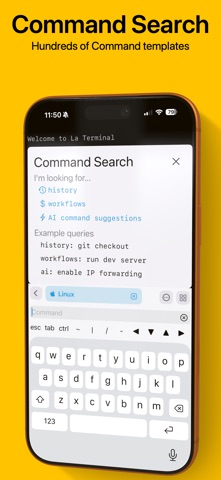
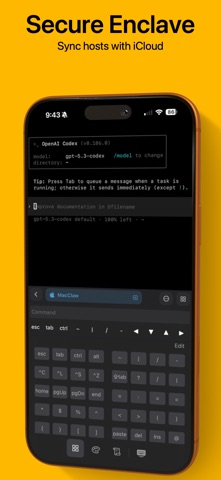
Welcome to La Terminal, your mobile command center for AI coding agents. Connect to OpenAI Codex, Claude Code, GitHub Copilot CLI, or OpenClaw from anywhere, with full SSH and Mosh support for resilient, always-on sessions. More than just a simple command-line shell, La Terminal provides a fully-native, first-class touch experience for command-line hackers on iPhone and iPad. Built on Open Source: From the original developer of Midnight Commander, the open source visual file manager for Linux, La Terminal provides a comprehensive Xterm/DEC VT terminal emulator experience based on the popular open source SwiftTerm library with powerful client amenities for serious command-line aficionados. Command Search: Use Command Search to quickly find the command you are looking for. Search your own command history and our comprehensive workflow gallery to find and execute commands. Create and edit your own workflows for a variety of tasks, including running frequently used commands, automating a series of commands, or just tracking down a complex command that might be difficult to recall. AI-powered assistant: Get help writing Linux, Mac, or Windows terminal commands using plain English, such as “extract the name property inside the article element from a json file” or “list the most CPU consuming Kubernetes pods”. Eye candy: La Terminal sports a fully themeable experience accented with beautifully captivating live-effect backgrounds powered by Metal Performance Shaders. Secure Enclave: Your private keys are stored in the secure enclave so your private key can never be found in plain text. Powerful status visualizations: La Terminal’s resource monitoring tools put powerful CPU and memory use visualizations, as well as a native process explorer, right at your fingertips. Resource monitoring visualizations are accessible from the top of any connected terminal, and process explorer tools provide multiple views into CPU, memory, and disk utilization. Thumbnail snapshots show previews of connected hosts along with system load over time in the active Terminals view. Network monitoring plots data traffic on a world map to help you understand the sources and targets of connections to and from your connected hosts. iCloud for everyone: La Terminal makes it easy to switch between your iPhone, iPad, and Mac by syncing your settings and keys over iCloud - like magic! Host platform aware: Whether you’re managing a dozen Linux VMs on AWS or Azure, logging into zsh on your Mac desktop, or configuring your latest IoT Raspberry Pi project via bash, La Terminal provides the most productive experience possible on a mobile device. La Terminal is even Windows-aware to ensure PowerShell power users can enjoy a delightful ssh experience, too. International support: La Terminal delivers extensive support for international terminals, including rendering internationalized output as well as support for internationalized input methods from native iOS dictation and international keyboards. La Terminal Pro features - Complete SFTP File Manager - Upload, download and navigate remote filesystems with our native SFTP client. - Files can be uploaded or downloaded to the local device via the iOS Files app, or copied between remote hosts. - Files app support - Access files on any configured La Terminal host using Apple’s Files app and other File Provider-enabled apps. - SSH Agent Forwarding - Use locally configured keys to authorize connections when SSHing between remote hosts. - All Live Backgrounds - Choose from our full library of GPU-accelerated Live Backgrounds to customize your terminal experience. Terms of Service: https://la-terminal.net/la-terminal/terms-of-service Privacy Policy: https://la-terminal.net/privacy-policy
What's new · 2.0.4
* Add complete BiDi support for Arabic and Hebrew. * Extensive improvements and fixes for Korean, Thai, CJK, emoji and other bidirectional or complex text. * New Tmux Control mode: browse, switch, rename, and manage tmux sessions and windows directly from La Terminal. * Upload files to remote servers from the SFTP file browser. * Added confirmation before remote applications can request clipboard contents. * Customize which CPU, memory, disk, and network monitors appear for each host. * Improved command and snippet search, including keyboard navigation and focus handling. * Better handling of background disconnects and SSH host-key changes. * Better support for modern terminal applications, including OSC 133 shell integration, Kitty keyboard input, Kitty graphics, and synchronized output. * Improved mouse reporting, scrolling, text selection, drag behavior, and touch interaction. * Fixed rendering issues affecting scrollback, cursor updates, resized terminals, translucent backgrounds, image deletion, and alternate-screen applications. * Improved VoiceOver and accessibility support. * Enhanced stability and performance in the Metal renderer, glyph cache, terminal buffer, hyperlink detection, local-process I/O, and network handling. * Modernized SSH and network handling, including an updated libssh2/OpenSSL stack, more resilient asynchronous socket I/O, improved connection error handling, and safer recovery from background disconnects. * Improved SSH host verification when servers offer different host-key algorithms, with clearer key-change details and an option to reset saved known hosts.
Details