

Andrea - Comics, Manga & Books
Mikel Goti · Books
Independent analytics for this App Store listing. AppTracker is not affiliated with Mikel Goti.
Chart standing · US
What changed · US
Listing changes AppTracker has observed for this app in this storefront — new versions, price moves, rating shifts, and store copy.
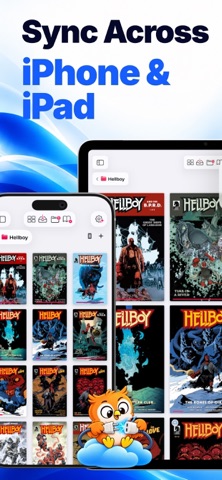
NEW IN ANDREA READER 1.1.0 - Full sync: your whole library, with its collections and sections, the same on iPhone and iPad through your own iCloud. Light or full, you choose. - Your cloud inside Andrea: connect Dropbox, Google Drive, MEGA, OneDrive or Box and download only what you read. - New comic and manga modes (experimental): Live Text translation, crop mode and bubble zoom. - Two-page and landscape EPUB. - Learn the words you look up while reading, in Activity. - A faster, smoother reader, refreshed reading profiles and polished themes. BUG FIXES - Bug fixes and improvements, mainly to sync and performance.
Price & rating history · US
Reconstructed from the listing changes AppTracker has observed in this storefront. A field is charted once it has changed more than once, and each line starts at the value it moved from.
Average rating · ★ 3.80 now · 10 changes on record
Ratings breakdown · US
The star breakdown behind this app's rating in this storefront.
Screenshots




Similar apps
Competitors and close alternatives, as estimated by AppTracker.
 Panels - Comic Reader
Produkt Software Engineering S.L.
Panels - Comic Reader
Produkt Software Engineering S.L.
 EPUB Reader, Ebook - justRead
PETR JAHODA
EPUB Reader, Ebook - justRead
PETR JAHODA
 Epub Reader with AI -Books Pro
Kairoos Solutions SL
Epub Reader with AI -Books Pro
Kairoos Solutions SL
 Leaf & Spine: Reader & Tracker
Aqeeb Rizwan
Leaf & Spine: Reader & Tracker
Aqeeb Rizwan
 Mobilis: Novels & Reading Hub
Weread
Mobilis: Novels & Reading Hub
Weread
 Island Reader: AI Read Aloud
ZHENGZHOU CREATION INFORMATION TECHNOLOGY CO., LTD.
Island Reader: AI Read Aloud
ZHENGZHOU CREATION INFORMATION TECHNOLOGY CO., LTD.
 Smart Comic Viewer
Ryo Kobayashi
Smart Comic Viewer
Ryo Kobayashi
 Booklover - eBook Reader
Plastic Software, Inc.
Booklover - eBook Reader
Plastic Software, Inc.
About
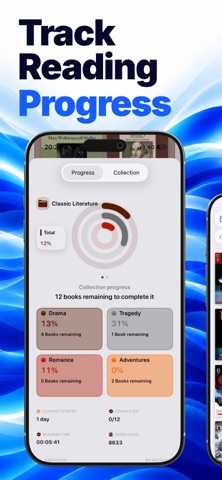
Andrea Reader is an ebook, comic, manga, manhua, webtoon and PDF reader for iPhone and iPad. A local-first reading library for your own DRM-free files: no account, no sign-up, no ads. Import your books, organize them your way, and read with deep customization across formats. COLLECTIONS & SECTIONS Create collections with their own name, color, cover and layout. Add nested collections, sort, filter, reorder and resize your library with pinch gestures. Inside each collection, create Sections: movable, collapsible blocks with their own name and color. Drag books in and out, reorder sections between books, and shape every saga, reading list or archive exactly how you want. Each collection saves its own appearance and settings. POWERFUL READING Open a book and start reading immediately with automatic settings by format, or create your own reading profiles and apply them per book or per collection. Adjust gestures, page transitions, margins, spacing, brightness, full screen, scrolling, double page mode, right-to-left manga reading, PDF/comic fit options and more. IMPORT & STORAGE - EPUB, PDF, CBZ, CBR, ZIP, RAR, 7Z, CB7, TAR and CBT - Import from Files, local storage, iTunes/Finder file sharing or cable connection - Quick Read: open a file without importing it - Scan physical pages and create digital books - Extract compressed archives with books inside - Connect to iCloud, OPDS, WebDAV, SMB and SFTP - Download multiple books, choose the target collection and section, and manage local/remote storage CUSTOMIZATION Make Andrea feel like your library, not a generic file list. Choose grid, list or showcase layouts, customize book cards, covers, thumbnails, progress display, colors, themes, Zen Mode, top shortcut icons, status bar behavior and collection history. The interface can follow each collection's color or stay clean and global. STATS & PROGRESS Reading stats are tracked quietly in the background while you read. See progress, sessions, time spent reading, speed, streaks and more at three levels: per book, per section and per collection. Clean charts turn your reading activity into something easy to understand. READER TOOLS - OCR selection and translation - EPUB highlights - Favorite pages for comics, manga and webtoons - Reader widgets for progress, brightness, chapters and favorites - View Covers: high-resolution cover gallery - Edit books: reorder or remove comic pages and adjust structure - Omnibus: merge multiple comics or books into one volume - Smart Rename: clean messy filenames with regex rules and live preview - Compress books and folders into CBZ/ZIP archives WORLD LIBRARY Discover and download free public-domain books inside Andrea. Browse a visual cover mosaic, search by title or author, filter by language or genre, and send EPUBs directly to the collection you choose. Andrea Reader is for people who love to build, shape and inhabit their own digital library. Your collections, sections and books. Your small, well-governed kingdom. Subscription Information: Andrea Reader Premium subscriptions automatically renew unless canceled at least 24 hours before the end of the current period. You can manage or cancel your subscription in your Apple Account settings. Terms of Use (EULA): https://www.apple.com/legal/internet-services/itunes/dev/stdeula/ Privacy Policy: https://andreareader.com/content/privacy
What's new · 1.1.0
NEW IN ANDREA READER 1.1.0 - Full sync: your whole library, with its collections and sections, the same on iPhone and iPad through your own iCloud. Light or full, you choose. - Your cloud inside Andrea: connect Dropbox, Google Drive, MEGA, OneDrive or Box and download only what you read. - New comic and manga modes (experimental): Live Text translation, crop mode and bubble zoom. - Two-page and landscape EPUB. - Learn the words you look up while reading, in Activity. - A faster, smoother reader, refreshed reading profiles and polished themes. BUG FIXES - Bug fixes and improvements, mainly to sync and performance.
Details