

Picasso App Screenshot Studio
ASO Ventures LLC · Developer Tools
Independent analytics for this App Store listing. AppTracker is not affiliated with ASO Ventures LLC.
Chart standing · US
What changed · US
Listing changes AppTracker has observed for this app in this storefront — new versions, price moves, rating shifts, and store copy.
Picasso 4.0 is our biggest update yet. UPLOAD TO APP STORE CONNECT • Screenshot uploads are much faster. • Large uploads no longer fail. Picasso warns you before App Store Connect's hourly limit and waits it out. • Upload iPhone Duo screenshots, plus Product Page Header and Search Results images for iPhone and Mac. AI TRANSLATION • Translate all your texts with AI in a few taps. • Set text position, size and max width per language, for longer translations and right-to-left scripts. NEW DEVICES AND FRAMES • iPhone 18 Pro, iPhone Duo, Pixel 10, Pixel 10 Pro, Pixel 10 Pro XL, Pixel 10a and Pixel Tablet. • 3D frames for iPhone 18 Pro and MacBook Pro, with free rotation. • Mac versions of the Midnight, Pair, Panorama and Zoomed templates. BETTER TEXTS • Highlight words with a tilted box, marker, pill, underline or outline. • Font weights and widths, SF Pro and line spacing. • Save your favorite text styles and reuse them. • Add SF Symbols and shapes, recolored with your palette. MORE • Export Google Play screenshots as JPEG, PNG or device only with a transparent background. • Name your screenshots and the names carry over to exported files. • Finder and Quick Look show your project's screenshots. • Remove any screenshot size, or add a platform's default size in one step. • Sharp SVG exports, and SVG import on iPhone and iPad. FIXES • Restoring a lifetime purchase on a new device now unlocks Pro. • Projects with some palette or gradient colors can be saved and duplicated again. • Panorama devices no longer cover the next screenshot's texts. • Plus many smaller fixes and a faster editor.
Price & rating history · US
Reconstructed from the listing changes AppTracker has observed in this storefront. A field is charted once it has changed more than once, and each line starts at the value it moved from.
Average rating · ★ 4.17 now · 3 changes on record
Ratings breakdown · US
The star breakdown behind this app's rating in this storefront.
In-app purchases · US
What this app sells inside itself, grouped by kind and priced for this storefront.
Screenshots



Keywords this app targets
Search terms AppTracker associates with this app — estimates, not search volume. ❝ = in the app's title; a highlighted number is its current position for that term.
Similar apps
Competitors and close alternatives, as estimated by AppTracker.
 App Screenshots: Store Maker
PROGRESSIO STUDIO COMPANY LTD
2 shared topics · 1 shared title word
App Screenshots: Store Maker
PROGRESSIO STUDIO COMPANY LTD
2 shared topics · 1 shared title word
 Screenshot Studio - App Mockup
Sarun Wongpatcharapakorn
4 shared title words
Screenshot Studio - App Mockup
Sarun Wongpatcharapakorn
4 shared title words
 Store Screenshot Maker
袁杰 张
Store Screenshot Maker
袁杰 张
 App Screenshots Maker
Hanva,LLC
1 shared title word
App Screenshots Maker
Hanva,LLC
1 shared title word
 Screen Shot App: ScreenCraft
Szymon Tadrzak
Screen Shot App: ScreenCraft
Szymon Tadrzak
 Screenshot Bro: Mockup Maker
Taras Leskiv
Screenshot Bro: Mockup Maker
Taras Leskiv
 ScreenshotResize
Linosec
ScreenshotResize
Linosec
 iCanvas - Annotate&ScreenShot
耀 陈
1 shared title word
iCanvas - Annotate&ScreenShot
耀 陈
1 shared title word
About
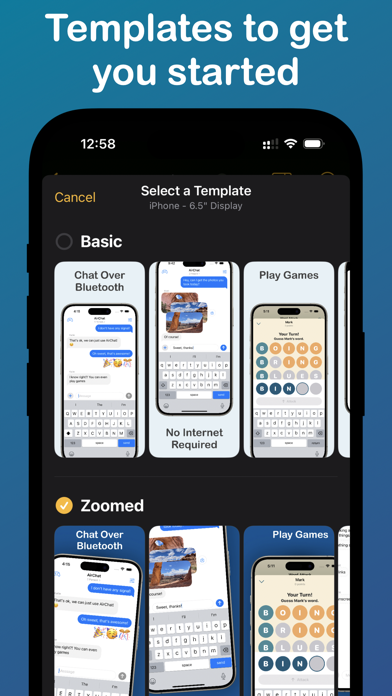
Take the headache out of generating app screenshots! 60% of users decide whether to download your app based on the screenshots. With Picasso, you can showcase your app to its fullest and increase your conversion rate. Available for iPhone, iPad, and Mac, Picasso offers everything you need to make your app stand out! ** Simple Interface ** Picasso has been optimized for Apple's platforms, taking advantage of everything your device has to offer. And with iCloud, you can edit a document on one device, and seamlessly pick it up on another. ** Device Framing ** Support for over framing 40 devices, including iPhones, iPads, Macs, and Apple Watches. Screenshots are automatically wrapped in the appropriate device frame down to the last pixel. You won't find a better app to frame your screenshots. ** Drag-and-Drop Editor ** Full drag and drop support helps streamline the editing process. ** Templates ** Choose from several templates to hit the ground running! No design skills needed. ** Easy Export ** Picasso makes exporting easy by giving you a preview of your screenshots, as well as automatic naming and ordering, making it a cinch to upload to the App Store. ** Accurate Previews ** See exactly how your screenshots will appear in the App Store, cutting out unnecessary iteration and toil. ** Power Features ** Keyboard shortcuts make navigating the app fast. -- Picasso Pro Features (In-App Purchase required) -- ** Upload Directly to App Store Connect ** Once an app is linked with an App Store Connect API Key, you can upload your screenshots directly to App Store Connect. ** Localization Support ** Simply drag an .xcstrings file into Picasso to localize your screenshots for any language! ** Add Images to Screenshots ** The ability to add any image to a screenshot. ** Gradients and Blurs ** Use captivating gradients and blurs to style your screenshots. ** Span Items across Screenshots ** Span items across multiple screenshots, and Picasso will make sure the spacing is correct. Terms of Service: https://getpicasso.com/terms Privacy Policy: https://getpicasso.com/privacy
What's new · 4.0
Picasso 4.0 is our biggest update yet. UPLOAD TO APP STORE CONNECT • Screenshot uploads are much faster. • Large uploads no longer fail. Picasso warns you before App Store Connect's hourly limit and waits it out. • Upload iPhone Duo screenshots, plus Product Page Header and Search Results images for iPhone and Mac. AI TRANSLATION • Translate all your texts with AI in a few taps. • Set text position, size and max width per language, for longer translations and right-to-left scripts. NEW DEVICES AND FRAMES • iPhone 18 Pro, iPhone Duo, Pixel 10, Pixel 10 Pro, Pixel 10 Pro XL, Pixel 10a and Pixel Tablet. • 3D frames for iPhone 18 Pro and MacBook Pro, with free rotation. • Mac versions of the Midnight, Pair, Panorama and Zoomed templates. BETTER TEXTS • Highlight words with a tilted box, marker, pill, underline or outline. • Font weights and widths, SF Pro and line spacing. • Save your favorite text styles and reuse them. • Add SF Symbols and shapes, recolored with your palette. MORE • Export Google Play screenshots as JPEG, PNG or device only with a transparent background. • Name your screenshots and the names carry over to exported files. • Finder and Quick Look show your project's screenshots. • Remove any screenshot size, or add a platform's default size in one step. • Sharp SVG exports, and SVG import on iPhone and iPad. FIXES • Restoring a lifetime purchase on a new device now unlocks Pro. • Projects with some palette or gradient colors can be saved and duplicated again. • Panorama devices no longer cover the next screenshot's texts. • Plus many smaller fixes and a faster editor.
Details