

SaveSmart: Your Daily Budget
Yuki Mizuo · Finance
Independent analytics for this App Store listing. AppTracker is not affiliated with Yuki Mizuo.
Chart standing · US
What changed · US
Listing changes AppTracker has observed for this app in this storefront — new versions, price moves, rating shifts, and store copy.
- Redesigned category spending screen: see this cycle's total, your spending breakdown and monthly trend on one screen - Deleting or editing an expense no longer breaks that day's streak - Add a Quick Entry to an expense's breakdown with one tap, right on the add-expense screen - A confirmation card now appears after you log an expense, with a shortcut to your spending share by category - Today's Spending on the Home tab now also shows this cycle's total for each category - Category colors are now consistent across charts and lists - Minor bug fixes and stability improvements
In-app purchases · US
What this app sells inside itself, grouped by kind and priced for this storefront.
Screenshots



Keywords this app targets
Search terms AppTracker associates with this app — estimates, not search volume. ❝ = in the app's title; a highlighted number is its current position for that term.
Similar apps
Competitors and close alternatives, as estimated by AppTracker.
 Smart Budget – Money Manager
Carlo Di Giuseppe
3 shared topics · 1 shared title word
Smart Budget – Money Manager
Carlo Di Giuseppe
3 shared topics · 1 shared title word
 Today's Budget: Saving is fun!
Ruttinger Software GmbH
2 shared topics · 1 shared title word
Today's Budget: Saving is fun!
Ruttinger Software GmbH
2 shared topics · 1 shared title word
 Sève : sauve ton budget
Ahcene Bensalama
3 shared topics · 1 shared title word
Sève : sauve ton budget
Ahcene Bensalama
3 shared topics · 1 shared title word
 CalendarBudget: Budget Planner
CalendarBudget Inc.
3 shared topics · 1 shared title word
CalendarBudget: Budget Planner
CalendarBudget Inc.
3 shared topics · 1 shared title word
 Spendy - Expense Tracker Diary
dasol kim
3 shared topics
Spendy - Expense Tracker Diary
dasol kim
3 shared topics
 CashJot - Expense Tracker
Jun Sheng Pierre Teo
2 shared topics
CashJot - Expense Tracker
Jun Sheng Pierre Teo
2 shared topics
 Wise budget
sebastien FOCK CHOW THO
2 shared topics · 1 shared title word
Wise budget
sebastien FOCK CHOW THO
2 shared topics · 1 shared title word
 Let's Save: Private Budgeting
Jonathan Solichin
2 shared topics
Let's Save: Private Budgeting
Jonathan Solichin
2 shared topics
About
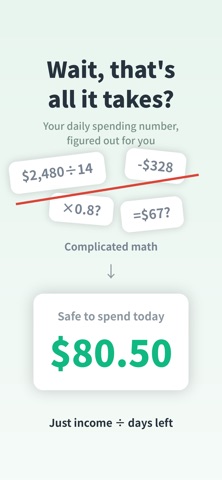
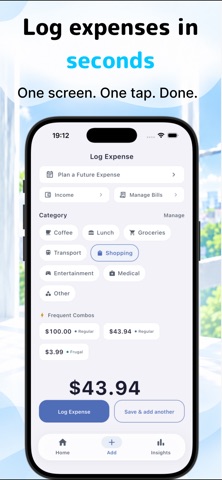
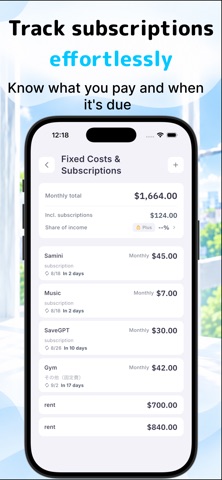
SaveSmart is a budgeting app that shows your Today's Allowance at a glance. Keeping a budget rarely stops overspending on its own, because the records only tell you about money that's already gone. What SaveSmart shows you every day is the money you can still spend. Who SaveSmart is for 1. You want to keep track of your spending pace SaveSmart shows how much you can spend each day, based on the money you have left. Keeping that one number in mind naturally steadies your pace. 2. You want to cut back on overspending and wasteful spending Add the Home Screen widget and see your Today's Allowance without opening the app. A quick glance before you shop is enough to notice when you're about to overspend. 3. You want to know where your money goes A pie chart shows how much went to each category, and each category shows how often and how much you spent. With SaveSmart Plus (paid), you can also set category budgets and check your spending pace on a chart. 4. You prefer logging expenses by hand Pick a category and an amount to log an expense, and optionally tag it Frugal, Regular or Treat. SaveSmart suggests amounts you've used before in that category, and Quick Entry logs your usual expenses with a single tap. --- ### Your Today's Allowance, set every day Take your income, subtract your fixed costs, and divide what's left by the days remaining in your cycle. That's your Today's Allowance. Whatever you don't spend today is spread across the days ahead and raises them a little. Overspend, and the days ahead go down a little. Instead of scrambling to balance things at the end of the month, you get through it with small daily adjustments. Each expense you log updates your Tomorrow's Allowance on the spot. Start your cycle on payday or on the 1st of the month. --- ### Logging that's easy to keep up To log, pick a category and enter the amount. Save your usual expenses as Quick Entries and they take one tap. When receipts pile up, "Save & add another" lets you keep entering without leaving the screen. Log every day and your streak grows. Missed a day? For up to the last 3 days, a streak recovery ticket keeps your streak going. --- ### Other features - See your spending by category in a pie chart - Subscriptions are only counted in the cycle they renew in. Your next renewal date appears on the Home tab, and you get a reminder beforehand --- ### SaveSmart Plus Plus shows you the whole cycle ahead, beyond your Today's Allowance. Two features are at its core: - Spending pace and where it lands: see your total spending for the cycle before the cycle ends - Category Budget: set a limit for any category and track what you've used with a bar You also get these 10 features: This week's spendable money / Average daily spending / Category spending patterns / Subscriptions, day by day / Planned expenses / Past cycle comparison / Unlimited quick entries / Unlimited categories / Export your budget data as CSV / Ongoing streak recovery tickets --- Start free and see your own Today's Allowance. --- ■ About SaveSmart Plus (auto-renewable subscription) - Plans: Monthly (renews every month) and Yearly (renews every year) - Payment will be charged to your Apple ID account at confirmation of purchase - Your subscription renews automatically at the same price unless auto-renew is turned off at least 24 hours before the end of the current period - You can manage or cancel your subscription anytime in Settings > Apple ID > Subscriptions on your device - If a free trial is offered, any unused portion is forfeited when you purchase a subscription Terms of Use: https://www.apple.com/legal/internet-services/itunes/dev/stdeula/ Privacy Policy: https://yuki-programmer.github.io/savesmart-pages/privacy.html
What's new · v1.2.7
- Redesigned category spending screen: see this cycle's total, your spending breakdown and monthly trend on one screen - Deleting or editing an expense no longer breaks that day's streak - Add a Quick Entry to an expense's breakdown with one tap, right on the add-expense screen - A confirmation card now appears after you log an expense, with a shortcut to your spending share by category - Today's Spending on the Home tab now also shows this cycle's total for each category - Category colors are now consistent across charts and lists - Minor bug fixes and stability improvements
Details