

Smart Budget – Money Manager
Carlo Di Giuseppe · Finance
Independent analytics for this App Store listing. AppTracker is not affiliated with Carlo Di Giuseppe.
Chart standing · US
What changed · US
Listing changes AppTracker has observed for this app in this storefront — new versions, price moves, rating shifts, and store copy.
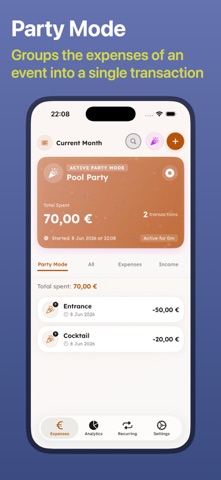
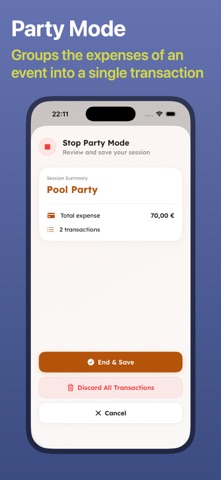
Smart Budget now works without opening Smart Budget. • ASK SIRI — “Add an expense to Smart Budget” or “How much is left?” Expenses and your remaining budget now work from Siri, Spotlight and the Shortcuts app. • CONTROL CENTRE & ACTION BUTTON — add an expense in one press, from anywhere. • LOCK SCREEN WIDGETS — keep what's left to spend, and your daily allowance, right on the Lock Screen. • PARTY MODE GOES LIVE (Pro) — start an evening or a trip and the running total follows you on the Lock Screen and in the Dynamic Island. • SPLIT WITH FRIENDS (Pro) — add who's in, note who paid, and we work out who owes what with the fewest payments to settle up. Only your own share goes into your budget. • SMARTER RECEIPT SCANNING (Pro) — we now read the shop, the date and a suggested category too, not just the amount. Still entirely on your device. • IMPORT FROM CSV — coming from another app? Bring your history with you. Duplicates are skipped automatically. • REDESIGNED FOR iPAD — a real sidebar replaces the tab bar, so the whole screen is used. Also: faster expense entry and a pile of small fixes. Thanks for using Smart Budget — we read every review!
In-app purchases · US
What this app sells inside itself, grouped by kind and priced for this storefront.
Screenshots


Keywords this app targets
Search terms AppTracker associates with this app — estimates, not search volume. ❝ = in the app's title; a highlighted number is its current position for that term.
Similar apps
Competitors and close alternatives, as estimated by AppTracker.
 Expense Tracker• Money Manager
Devarsh Patel
3 shared topics · 3 shared title words
Expense Tracker• Money Manager
Devarsh Patel
3 shared topics · 3 shared title words
 Money Tracker: Budget Manager
Pham Thi Hong Nhung
3 shared topics · 3 shared title words
Money Tracker: Budget Manager
Pham Thi Hong Nhung
3 shared topics · 3 shared title words
 Money manager, expense tracker
Orange dog d.o.o.
3 shared topics · 3 shared title words
Money manager, expense tracker
Orange dog d.o.o.
3 shared topics · 3 shared title words
 Money Manager Budget Planner
Hastik Mangukiya
2 shared topics · 4 shared title words
Money Manager Budget Planner
Hastik Mangukiya
2 shared topics · 4 shared title words
 Money Pro
iBear LLC
3 shared topics · 1 shared title word
Money Pro
iBear LLC
3 shared topics · 1 shared title word
 Budget & Expense: Moneyboard
Damien Vieira
3 shared topics · 1 shared title word
Budget & Expense: Moneyboard
Damien Vieira
3 shared topics · 1 shared title word
 Budjetly: Budget Planner
Abdullox Abduvosilov
3 shared topics · 1 shared title word
Budjetly: Budget Planner
Abdullox Abduvosilov
3 shared topics · 1 shared title word
 Budget Planner - Money Flow
Hermann Wagenleitner
2 shared topics · 2 shared title words
Budget Planner - Money Flow
Hermann Wagenleitner
2 shared topics · 2 shared title words
About
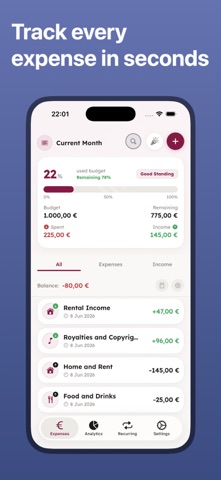
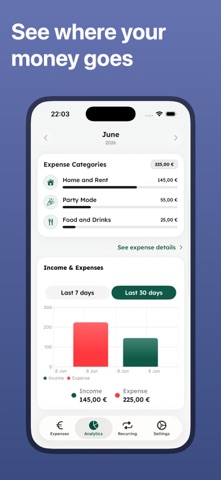
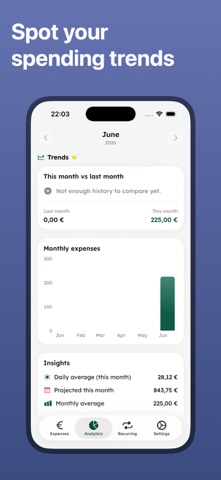
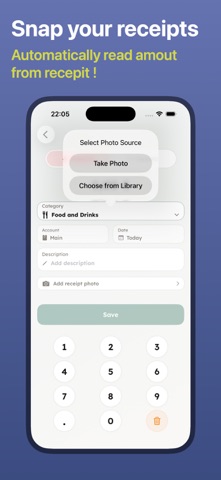
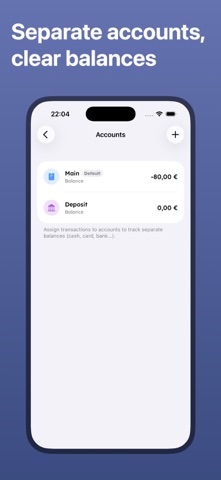
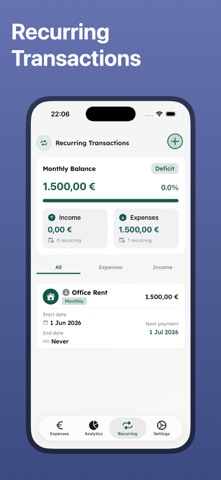
Smart Budget is the simplest way to track your spending, stick to a budget and finally understand where your money goes — now 100% ad-free. Log an expense in seconds, set a monthly budget, and see at a glance how much you have left to spend each day. WHY YOU'LL LOVE IT • No ads, ever — clean and distraction-free • Add expenses and income in seconds with a fast keypad • Monthly budget with a clear "left to spend" and daily allowance • Beautiful analytics: categories, charts and month-by-month trends • iCloud sync — your data on all your Apple devices, private and secure • Home Screen widgets to add and track on the go • Add an expense with Siri, from Control Centre or your Action Button • Lock Screen widgets with what's left to spend • Import your history from another app via CSV DO MORE WITH PRO • Spending trends: see if you're spending more than last month • Per-category budgets with smart alerts before you overspend • Multiple accounts (cash, card, bank) with separate balances • Scan receipts: snap a photo and the shop, date and amount are filled in for you • Smart notifications: daily reminders, recurring bills, weekly recap • Party Mode live on the Lock Screen, with split-the-bill and settle-up • Unlimited recurring transactions, CSV export and premium themes PRIVATE BY DESIGN Your financial data stays in your private iCloud account. We never see it. No tracking, no third-party ads. Try Pro free for 7 days, then keep it with a subscription or a one-time Lifetime purchase. Start today — your future self will thank you. ================================================================= LICENSED APPLICATION END USER LICENSE AGREEMENT https://www.apple.com/legal/internet-services/itunes/dev/stdeula/
What's new · 2.1.0
Smart Budget now works without opening Smart Budget. • ASK SIRI — “Add an expense to Smart Budget” or “How much is left?” Expenses and your remaining budget now work from Siri, Spotlight and the Shortcuts app. • CONTROL CENTRE & ACTION BUTTON — add an expense in one press, from anywhere. • LOCK SCREEN WIDGETS — keep what's left to spend, and your daily allowance, right on the Lock Screen. • PARTY MODE GOES LIVE (Pro) — start an evening or a trip and the running total follows you on the Lock Screen and in the Dynamic Island. • SPLIT WITH FRIENDS (Pro) — add who's in, note who paid, and we work out who owes what with the fewest payments to settle up. Only your own share goes into your budget. • SMARTER RECEIPT SCANNING (Pro) — we now read the shop, the date and a suggested category too, not just the amount. Still entirely on your device. • IMPORT FROM CSV — coming from another app? Bring your history with you. Duplicates are skipped automatically. • REDESIGNED FOR iPAD — a real sidebar replaces the tab bar, so the whole screen is used. Also: faster expense entry and a pile of small fixes. Thanks for using Smart Budget — we read every review!
Details