

Pageo: Calibre Epub Reader
VISIONCRAFT, SOCIEDAD LIMITADA · Books
Independent analytics for this App Store listing. AppTracker is not affiliated with VISIONCRAFT, SOCIEDAD LIMITADA.
Chart standing · US
What changed · US
Listing changes AppTracker has observed for this app in this storefront — new versions, price moves, rating shifts, and store copy.
▶ Two pages, side by side — turn iPad to landscape, and a book lies open on two facing pages, the way it does in print. Prefer a single page? Choose One Page under Pages in the reader’s Text Settings. Happy reading with Pageo!
Price & rating history · US
Reconstructed from the listing changes AppTracker has observed in this storefront. A field is charted once it has changed more than once, and each line starts at the value it moved from.
Average rating · ★ 4.73 now · 6 changes on record
Ratings breakdown · US
The star breakdown behind this app's rating in this storefront.
In-app purchases · US
What this app sells inside itself, grouped by kind and priced for this storefront.
Screenshots




Keywords this app targets
Search terms AppTracker associates with this app — estimates, not search volume. ❝ = in the app's title; a highlighted number is its current position for that term.
Similar apps
Competitors and close alternatives, as estimated by AppTracker.
 EPUB Reader, Ebook - justRead
PETR JAHODA
3 shared title words
EPUB Reader, Ebook - justRead
PETR JAHODA
3 shared title words
 Pagina.
Etienne Schraven
Pagina.
Etienne Schraven
 Readest - eBook Reader
Bilingify LLC
Readest - eBook Reader
Bilingify LLC
 Epub Reader with AI -Books Pro
Kairoos Solutions SL
3 shared title words
Epub Reader with AI -Books Pro
Kairoos Solutions SL
3 shared title words
 eBoox - fb2 ePub book reader
REDIT, OOO
1 shared topic · 2 shared title words
eBoox - fb2 ePub book reader
REDIT, OOO
1 shared topic · 2 shared title words
 Island Reader: AI Read Aloud
ZHENGZHOU CREATION INFORMATION TECHNOLOGY CO., LTD.
1 shared topic · 1 shared title word
Island Reader: AI Read Aloud
ZHENGZHOU CREATION INFORMATION TECHNOLOGY CO., LTD.
1 shared topic · 1 shared title word
 Cleave for EPUB
Samuel Painter
1 shared title word
Cleave for EPUB
Samuel Painter
1 shared title word
 PDF Library eBook Reader
Verbia Systems (Pty) Ltd
PDF Library eBook Reader
Verbia Systems (Pty) Ltd
About
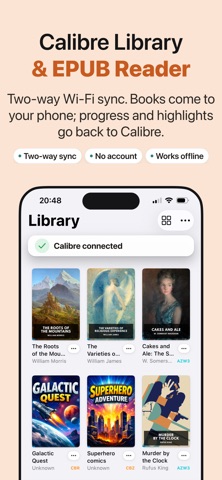
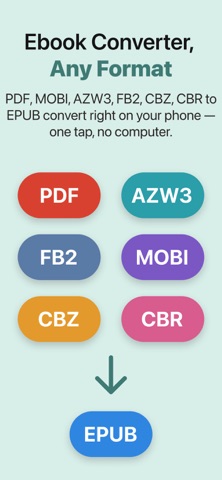
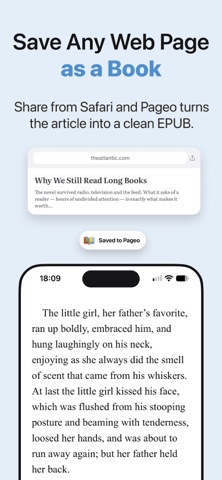
Pageo is a Calibre companion app for iPhone and iPad: a Calibre ebook reader that syncs your library over Wi-Fi in both directions, converts any ebook to EPUB and reads your books aloud in 31 languages. It connects directly to the Content Server built into Calibre — no cables, no account, no hassle. Your whole library on your iPhone or iPad in seconds — and your reading goes back to Calibre. ▶ TWO-WAY CALIBRE SYNC Turn on the Content Server in Calibre (Mac, Windows or Linux) and Pageo finds it on your local network, or connect by address. Books come to your iPhone or iPad — and your reading position, finished books, ratings and highlights go back to your computer, into Calibre's own annotations. Download one book or the whole library in a tap. ▶ ALL YOUR CALIBRE LIBRARIES — EVEN WITH YOUR COMPUTER OFF Multiple Calibre libraries: browse one at a time or all at once, with separate progress for every book. Or open a Calibre library folder straight from iCloud, Dropbox or this device — no server needed. ▶ BUILT FOR CALIBRE POWER USERS Table view puts the columns you built in Calibre into a desktop-style layout — sort by any column, pin titles, jump with the A–Z rail. Search your whole library with Calibre's own search syntax, or search inside every book, even ones you haven't downloaded yet. Series, tags and the author sort you set in Calibre carry over. ▶ CONVERT ANY EBOOK PDF, MOBI, AZW, AZW3, FB2 and CBZ/CBR comics become clean EPUBs right on your device — no desktop, no extra apps. Anything Pageo can't convert itself, it hands to your Calibre server. Share a web page from Safari and it becomes a clean EPUB on your shelf. ▶ READ YOUR WAY Any iOS typeface or reading aids like OpenDyslexic, Atkinson Hyperlegible and Lexend. Focus Text, word spacing and hyphenation in your book's own language. Text up to 400%, six line-spacing and six margin settings. Light, dark and sepia themes, page or scroll mode, page curl or instant turns, right-to-left languages. Highlights, notes and bookmarks — export your annotations to a single file. Pageo remembers your place in every book. ▶ LISTEN TO YOUR BOOKS Turn any ebook into an audiobook with built-in read-aloud: ten lifelike voices, 31 languages, fully offline after a single download. The page follows the voice, and every language gets a natural pace. Start listening from the library, right where you left off. ▶ FIND ANYTHING FAST Search inside the book you're reading or across your whole library. Your books, chapters, highlights and bookmarks show up in Spotlight, and Siri Shortcuts let you say "Continue reading in Pageo" or "Listen to my book in Pageo". Home Screen widgets keep your current book and reading streak in view. ▶ YOUR LIBRARY, YOUR CONTROL Import from Files, Dropbox, OneDrive or iCloud Drive. Organize by author, series, tags or collection. Nothing to read yet? The Discover tab offers free public-domain classics from Project Gutenberg in many languages. Your books stay on your device — no account, no lock-in. ▶ FREE WITH OPTIONAL PRO UPGRADE Pageo is free to use with ads. Pageo Pro unlocks read-aloud and the converters, and removes ads. Try Pro free for 3 days. ▶ COMMON QUESTIONS Does Pageo work with Calibre? Yes — with the Content Server built into Calibre on Mac, Windows and Linux. No plugin or connector to install. Can I view my Calibre library without downloading everything? Yes — browse covers and metadata for every book, download only what you want to read. Does my computer need to be on? For server sync, yes. For a library folder in iCloud or Dropbox, no. Does reading progress sync back to Calibre? Yes — position, finished status, ratings and highlights. Do I need an account? No. Terms of Use (EULA): https://visioncraft.es/pageo-terms Privacy Policy: https://visioncraft.es/pageo-privacy-policy ——— Pageo is made for readers who use Calibre. If you've been waiting for a Calibre reader for iPhone and iPad that truly talks to your Calibre server — this is it.
What's new · 1.20
▶ Two pages, side by side — turn iPad to landscape, and a book lies open on two facing pages, the way it does in print. Prefer a single page? Choose One Page under Pages in the reader’s Text Settings. Happy reading with Pageo!
Details