

Readest - eBook Reader
Bilingify LLC · Books
Independent analytics for this App Store listing. AppTracker is not affiliated with Bilingify LLC.
Chart standing · US
What changed · US
Listing changes AppTracker has observed for this app in this storefront — new versions, price moves, rating shifts, and store copy.
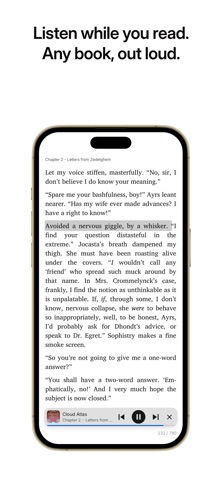
– Text-to-Speech: You can now listen sentence by sentence and loop a passage with A-B repeat, control playback from your desktop's Now Playing controls – Reading: Added dialogue highlighting for quoted speech, a Column Gap setting for two-page spreads – Sync: Added a Readest plugin for CrossPoint e-readers for reading progress sync – Sync: You can now sync reading progress to Pagebound, sign in to Hardcover more easily, and note edits are no longer overwritten by older synced copies – PDF: PDFs now blend smoothly with your reading theme with smart image inversion, show page thumbnails in the table of contents – PDF: Highlighting and text selection on scanned PDFs is smoother and more accurate, and very large scanned pages no longer crash the reader on iOS – Translation: You can now add your own translation providers with a reusable prompt library, look up words with an AI context dictionary – Annotations: A global note now appears on every occurrence of its text, exports can include the sentence around each highlight
Price & rating history · US
Reconstructed from the listing changes AppTracker has observed in this storefront. A field is charted once it has changed more than once, and each line starts at the value it moved from.
Average rating · ★ 4.52 now · 10 changes on record
Ratings breakdown · US
The star breakdown behind this app's rating in this storefront.
In-app purchases · US
What this app sells inside itself, grouped by kind and priced for this storefront.
Screenshots

Similar apps
Competitors and close alternatives, as estimated by AppTracker.
 EPUB Reader, Ebook - justRead
PETR JAHODA
EPUB Reader, Ebook - justRead
PETR JAHODA
 Babel Reader
Martin Bocker Dr
Babel Reader
Martin Bocker Dr
 ReadEra – book reader pdf epub
READERA EOOD
ReadEra – book reader pdf epub
READERA EOOD
 ContinuousReader: Book Reader
Oleksii Koshkin
ContinuousReader: Book Reader
Oleksii Koshkin
 Pageo: Calibre Epub Reader
VISIONCRAFT, SOCIEDAD LIMITADA
Pageo: Calibre Epub Reader
VISIONCRAFT, SOCIEDAD LIMITADA
 AuraRead - 本地小说听书阅读器
少川 李
AuraRead - 本地小说听书阅读器
少川 李
 BookFusion
 Inc.
BookFusion
BookFusion Inc.
 StillRead: Private Reader
Shaanxi Yunxin Industry Co., Ltd.
StillRead: Private Reader
Shaanxi Yunxin Industry Co., Ltd.
About
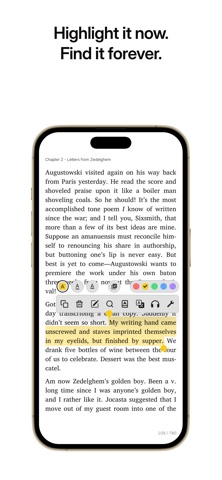
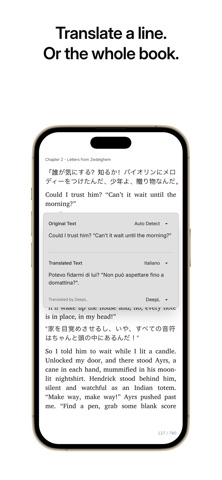
Readest is an ebook reader for people who read a lot, and who want their books, notes and reading position on whatever device is nearest. Open EPUB, PDF, MOBI, AZW3, FB2, CBZ, TXT and Markdown in one library. Pull books from OPDS catalogs or from your own Calibre server. Read, annotate, listen, translate. Made for iPhone and iPad • CarPlay, so you can keep listening on the road with playback controls on the dashboard • Download read-aloud voices per book and listen with no connection at all • Add books from Files, Mail or any share sheet, and read them in place instead of copying them into a second library • Open up to four books at once on iPad and arrange them how you like Reading • Paginated or scrolling, with custom fonts, themes, spacing and margins • Vertical text for CJK books • Contrast and refresh tuned for e-ink screens • Full-text search inside a book Your library • Browse, search and download from OPDS catalogs and public libraries • Connect to Calibre or Calibre-Web, covers and metadata included • Organize with bookshelf groups you can rename Notes • Highlights, bookmarks and structured notes • Copy a highlight together with a deep link back to the passage • Export your annotations Listening and languages • Text-to-speech with downloadable offline voices • Translate a sentence, a page, or an entire book • Wikipedia and dictionary lookup without leaving the page Sync • Readest Cloud, or bring your own: iCloud, Google Drive, OneDrive, WebDAV, S3 • KOReader sync keeps your progress in step with your e-reader • iPhone, iPad, Mac, all other platforms and the web Readest is open source. Support: support@readest.com Privacy Policy: https://readest.com/privacy-policy Terms of Service: https://www.apple.com/legal/internet-services/itunes/dev/stdeula/
What's new · 0.12.16
– Text-to-Speech: You can now listen sentence by sentence and loop a passage with A-B repeat, control playback from your desktop's Now Playing controls – Reading: Added dialogue highlighting for quoted speech, a Column Gap setting for two-page spreads – Sync: Added a Readest plugin for CrossPoint e-readers for reading progress sync – Sync: You can now sync reading progress to Pagebound, sign in to Hardcover more easily, and note edits are no longer overwritten by older synced copies – PDF: PDFs now blend smoothly with your reading theme with smart image inversion, show page thumbnails in the table of contents – PDF: Highlighting and text selection on scanned PDFs is smoother and more accurate, and very large scanned pages no longer crash the reader on iOS – Translation: You can now add your own translation providers with a reusable prompt library, look up words with an AI context dictionary – Annotations: A global note now appears on every occurrence of its text, exports can include the sentence around each highlight
Details