

VoidLink - Extreme
伟敏 张 · Games
Independent analytics for this App Store listing. AppTracker is not affiliated with 伟敏 张.
Chart standing · US
What changed · US
Listing changes AppTracker has observed for this app in this storefront — new versions, price moves, rating shifts, and store copy.
- Fixed settings menu crash for macOS.
Price & rating history · US
Reconstructed from the listing changes AppTracker has observed in this storefront. A field is charted once it has changed more than once, and each line starts at the value it moved from.
Average rating · ★ 4.66 now · 14 changes on record
Ratings breakdown · US
The star breakdown behind this app's rating in this storefront.
In-app purchases · US
What this app sells inside itself, grouped by kind and priced for this storefront.
Screenshots


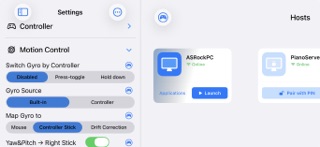


Keywords this app targets
Search terms AppTracker associates with this app — estimates, not search volume. ❝ = in the app's title; a highlighted number is its current position for that term.
Similar apps
Competitors and close alternatives, as estimated by AppTracker.




About
VoidLink is a project developed & maintained by Sunshine - Moonlight game streaming community players. After long term development and iterations, it has been refined into a powerful and feature rich game streaming tool. More details about VoidLink including our community support is available on the app support web page. Key Features of VoidLink 1. Better performance - VoidLink's standard video rendering pipeline delivers unparalleled streaming performance and reference-grade HDR accuracy. Check our app support web page for details. - Supports YUV 4:4:4 streaming (requires device hardware decoding). - Picture‑in‑picture mode supported (iOS15+) —stream in the background without interruption. 2. High-performance frame-interpolated streaming with HDR support: - Supports stable 60 → 120 FPS frame-interpolated streaming on at least A15 and newer devices 3. Drawing Toolkit: Toolkit built for drawing: better stroke transmission, pro-level pressure curve mapping, double-tap and squeeze shortcuts, exclusive on-screen buttons. (Basic stylus support remains available without purchasing the Drawing Toolkit) 4. External controller support - Radial menu and global controller navigation, covering 95% of app settings and operations for gamepad streamers. Enjoy a handheld-like experience without touching the screen! - Super fun! VoidLink brings the first-ever [Gamepad Visual Feedback Overlay] to the game streaming community. - Specify controller mapping as Xbox360 or DualShock 4. - User-defined controller mouse mode. - User-defined gyro toggle & hold button. - Controllers can be connected anytime during streaming. - DS4 Gyroscope mapping. 5. Advanced touch support - Smooth, reliable multi‑touch passthrough. - The app introduces a multi‑Touch game fine‑tuning feature for games with native mobile UI on PC. - Simulated mouse click, double click, right‑click, drag, etc., with adjustable pointer sensitivity. 6. Powerful on-screen widgets - Button widget includes: controller, keyboard, mouse, gyro control, functional (settings menu, soft keyboard, etc.) - Supports grouping, layering, collapsing, and expanding on-screen widgets. - Widget group is able to import complete layouts for quick reuse. - Supports combo buttons, button macros, button+touchpad hybrid widgets - Touchpad widget that enables mobile style gaming. - Auto tap timer for each button widgets - Visual and haptic feedback supported (requires device with vibration motor). - Customize on-screen widget & layout—adjust size, shape, border, transparency, sensitivity, labels, and more. - Import/export on-screen widget layouts for sharing configurations across devices. 7. Powerful motion control - Directly maps built-in gyro or external gamepad gyro to mouse or controller stick, no need for third party PC software for motion control mapping - Works with on-screen gyro control button “GYRO” & “GYROPAUSE” or user-defined physical controller buttons. 8. Haptic engine selection (iOS 13+) - Auto: rumbles iPhone when controller does not support rumbling. Able to rumble iPhone when using on-screen widget control while no physical controller is connected. - swap rumbling left & right handle motor on controller Note: external controller rumbling supported on iOS 14+. 9. Microphone redirection - Support for microphone redirection with Sunshine-Foundation. 10. Changing bitrate upper limit without disconnecting - Bitrate upper limit can be adjusted without disconnecting when working with Sunshine-Foundation. Note: check out our technical support page for more details about Sunshine-Foundation 11. Full portrait‑mode support - Streaming content and on‑screen widgets adapt to portrait orientation: automatic resolution and widget layout adjustment 12. External display support: duplicate or external display only
What's new · 3.5.8
- Fixed settings menu crash for macOS.
Details