

Lazy Lighting
AUDITY APPS LLC · Graphics & Design
Independent analytics for this App Store listing. AppTracker is not affiliated with AUDITY APPS LLC.
Chart standing · US
What changed · US
Listing changes AppTracker has observed for this app in this storefront — new versions, price moves, rating shifts, and store copy.
NEW: DEPTH MODE Take a photo of a pumpkin, a statue or a doorway and Lazy Lighting calculates its depth right on your device, turning it into a shape whose visuals follow every curve. Choose from 38 depth visuals, including the new Pulse Rift Loop. 45 HALLOWEEN VISUALS Jack-o'-lantern faces in 30 styles, ghosts, bat swarms, a flying witch, dancing skeletons and more, ready to project onto pumpkins, windows and garage doors. ALSO IN THIS UPDATE • Connect to Lazy Lighting Link by IP address, with clearer help for Local Network access and a more accurate connection status • Easier photo cropping in Depth Mode • Bug fixes and performance improvements
Price & rating history · US
Reconstructed from the listing changes AppTracker has observed in this storefront. A field is charted once it has changed more than once, and each line starts at the value it moved from.
Average rating · ★ 4.56 now · 11 changes on record
Ratings breakdown · US
The star breakdown behind this app's rating in this storefront.
In-app purchases · US
What this app sells inside itself, grouped by kind and priced for this storefront.
Screenshots


Keywords this app targets
Search terms AppTracker associates with this app — estimates, not search volume. ❝ = in the app's title; a highlighted number is its current position for that term.
Similar apps
Competitors and close alternatives, as estimated by AppTracker.
 LayerMapper MApp
Denis Grzechnik
2 shared topics
LayerMapper MApp
Denis Grzechnik
2 shared topics
 Pro Mapper Projection Mapping
omur olgunay
2 shared topics
Pro Mapper Projection Mapping
omur olgunay
2 shared topics
 ProjectX - Projection Mapping
Pacific Apps LLC
1 shared topic
ProjectX - Projection Mapping
Pacific Apps LLC
1 shared topic
 AirPly Camera
ALI OZAN CIL
AirPly Camera
ALI OZAN CIL
 Holographium 2026
Franz Bruckhoff
Holographium 2026
Franz Bruckhoff
 100VJ
Narumi Inada
100VJ
Narumi Inada
 Ghost Arcade
Justin Wood
Ghost Arcade
Justin Wood
 Light DJ Pro for Smart Lights
NRTHRNLIGHTS, LLC
Light DJ Pro for Smart Lights
NRTHRNLIGHTS, LLC
About
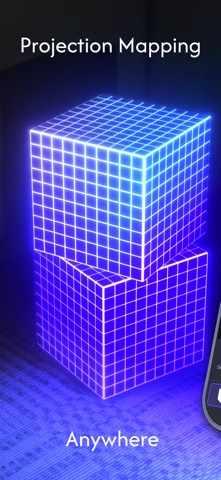
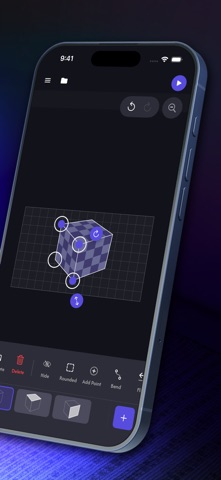
Turn your iPhone or iPad into a touch-first projection mapping and video mapping studio. Lazy Lighting lets you warp videos, photos, live camera feeds, animated drawings, and generative VJ visuals onto walls, stages, sculptures, windows, objects, and multi-surface installations—without a laptop. MAP ANY SURFACE Create squares, circles, custom text, cubes, boxes, image silhouettes, and hand-drawn outlines. Drag corners directly on screen to align each projection, bend edges around curved forms, then use masks and cutouts to control exactly where every visual appears. Map several surfaces at once. Assign different content to individual shapes, layer visuals with independent opacity and ordering, and save projects to continue later. CREATE LIVE VISUALS • Explore built-in visualizers, VJ loops, generative shaders, gradients, tunnels, neon effects, and shape-aware animations • Import videos and photos from your device • Use a live camera feed as projection content • Draw and animate original visuals by hand • Crop, fit, mask, layer, and apply real-time effects including kaleidoscope, tile, slide, rotate, zoom, blur, monochrome, invert, and color cycle • Make visuals react to audio or control parameters with MIDI • Animate controls with BPM-synced LFO and envelope modulation • Use hand and face tracking for expressive control BUILD A COMPLETE SHOW Create scenes and switch between them live, or arrange them on a timeline. Add an audio track, trim and duplicate clips, automate visual parameters, and move between looks with fade or dissolve transitions. Export the finished projection-mapped show in 720p, 1080p, or 4K with audio. Save it to Photos or send it to a compatible receiver running Lazy Lighting Link. EXPORT ONCE. PLAY WITHOUT YOUR PHONE. Once the transfer is complete, Lazy Lighting Link saves and loops the show on the receiver. Close the app and free your iPhone or iPad—the projection keeps playing without your device remaining connected. CONNECT YOUR WAY Connect by HDMI with a compatible USB-C or Lightning adapter, use AirPlay, or connect through Lazy Lighting Link. External display output keeps the controls on your device while the visual output fills the projector. Lazy Lighting is made for projection artists, VJs, DJs, musicians, performers, stage and event designers, galleries, installations, window displays, parties, home ambience, and Halloween, Christmas, or holiday projections. Create the map. Build the visuals. Perform live—or export once and let Lazy Lighting Link keep it playing. A compatible projector or display and a wired or wireless connection are required for external output. Lazy Lighting Link export requires a compatible receiver on the same network. Some features require a subscription. Terms of Use: https://lazylighting.com/ios-terms Privacy Policy: https://lazylighting.com/ios-privacy
What's new · 4.1.1
NEW: DEPTH MODE Take a photo of a pumpkin, a statue or a doorway and Lazy Lighting calculates its depth right on your device, turning it into a shape whose visuals follow every curve. Choose from 38 depth visuals, including the new Pulse Rift Loop. 45 HALLOWEEN VISUALS Jack-o'-lantern faces in 30 styles, ghosts, bat swarms, a flying witch, dancing skeletons and more, ready to project onto pumpkins, windows and garage doors. ALSO IN THIS UPDATE • Connect to Lazy Lighting Link by IP address, with clearer help for Local Network access and a more accurate connection status • Easier photo cropping in Depth Mode • Bug fixes and performance improvements
Details