

Mathematics with PocketCAS Pro
Timing Software GmbH · Education
Independent analytics for this App Store listing. AppTracker is not affiliated with Timing Software GmbH.
Chart standing · US
What changed · US
Listing changes AppTracker has observed for this app in this storefront — new versions, price moves, rating shifts, and store copy.
This is the biggest PocketCAS update in years, with a new design and new ways to understand your results. - Suggestions under your results: the derivative, zeros, extrema and more, with the answers already shown. Tap one to add it to your document. Settings > Suggestions turns them off or shows them only under the newest result. - A small plot appears next to a function's result. Tap it to add the plot. - Calculation steps show how PocketCAS works out derivatives, integrals and a few other calculations. - Results look like a math textbook, and long results wrap to the width of the screen. - Clearer 2D plots with a finer grid, and 3D surfaces with soft light, shading and a floor grid. Plots in a document pan, turn and zoom right where they are. - Vector field plots: enter [f(x,y), g(x,y)] in a plot. - A new keyboard look, with your recent functions right above it. - On iOS 26 and later, PocketCAS uses Apple's new design, Liquid Glass, and has a new icon. - Brackets close by themselves, and printed documents break long lines at the page's width. - Plots now use seven curve colors, so a 7th or later curve in an older document may get a new color. If something works differently from what you are used to, or you find a problem, please write to us.
Ratings breakdown · US
The star breakdown behind this app's rating in this storefront.
In-app purchases · US
No in-app purchases.
Screenshots


Keywords this app targets
Search terms AppTracker associates with this app — estimates, not search volume. ❝ = in the app's title; a highlighted number is its current position for that term.
Similar apps
Competitors and close alternatives, as estimated by AppTracker.
 Calculator ∞
Incpt.Mobis
3 shared topics
Calculator ∞
Incpt.Mobis
3 shared topics
 Graphing Calculator Plus AI
Incpt.Mobis
2 shared topics
Graphing Calculator Plus AI
Incpt.Mobis
2 shared topics
 Graphing Calculator Pro⁸⁴
Di Venisco UG (haftungsbeschrankt)
Graphing Calculator Pro⁸⁴
Di Venisco UG (haftungsbeschrankt)
 Calculator Plus - PRO
DigitAlchemy LLC
1 shared topic · 1 shared title word
Calculator Plus - PRO
DigitAlchemy LLC
1 shared topic · 1 shared title word
 GraphNCalc83
Ernest Brock
1 shared topic
GraphNCalc83
Ernest Brock
1 shared topic
 i41CX+
Antonio Lagana
2 shared topics
i41CX+
Antonio Lagana
2 shared topics
 Ans: Scientific Calculator
MATTHEW BERNARD LEACH
2 shared topics
Ans: Scientific Calculator
MATTHEW BERNARD LEACH
2 shared topics
 Calc Pro - The Top Calculator
Panoramic Software Inc.
1 shared topic · 1 shared title word
Calc Pro - The Top Calculator
Panoramic Software Inc.
1 shared topic · 1 shared title word
About
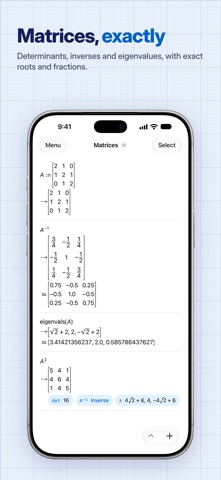
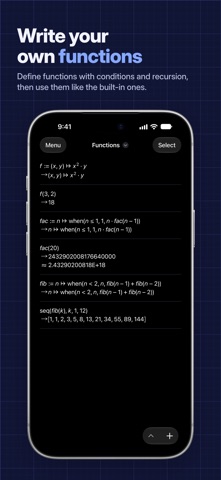
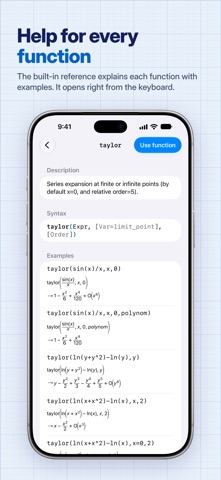
PocketCAS is a graphing calculator and computer algebra system for iPhone and iPad. It graphs your functions, gives exact answers and shows the steps behind derivatives and integrals. Everything runs on your device, so it works without internet or an account, and you buy it once instead of paying for a subscription. Graphs - 2D plots of functions, implicit equations, polar and parametric curves, run charts and vector fields. PocketCAS marks zeros, extrema and intersections. In full screen, tap a mark to read its coordinates. - 3D surfaces and space curves with soft light and shading. Drag to turn them, pinch to zoom, add a floor grid or pick another color map. - Animated plots: use the variable anim in any plot. Suggestions and steps - Under each function, suggestions show what to look at next: its derivative, zeros, extrema, integral or a plot. The answer is already in the suggestion. Tap it to add it to your document. - Functions get a small plot right beside the result. - Calculation steps show the rules behind a derivative, an integral, a differential equation or an extremum, one row per rule. Exact answers - Algebra: solve equations and systems, simplify, expand and factor expressions, divide polynomials. - Calculus: limits, derivatives, integrals, Taylor series and sums. - Linear algebra: matrices, determinants, inverses, eigenvalues and eigenvectors. - Differential equations: ordinary differential equations, solved exactly. - Units and constants: enter physical formulas with units and convert the results. - Scripts: define your own functions with conditions, loops and recursion. Reads like your textbook - Results look the way they do in a textbook: fractions, roots, sums, integrals and matrices. Long results wrap to the width of your screen. - A math keyboard with every function in reach. Your recent functions sit above it, and a hint shows what goes between the brackets. Made for daily work - Documents keep your calculations and plots together, so you can pick up where you left off. - iCloud syncs your documents between iPhone, iPad and Mac. The Mac app is a separate purchase. - Export: print or share plots, entries or whole documents as PDF. - Import: reuse functions from other documents, or load data from CSV files. - Help built in: the reference explains every function with examples, and tutorials get you started. A free version, PocketCAS Lite, lets you try the interface and many features first. What users say "This program has an incredible amount of power for such a compact program. I teach high school math, and this program can work with all sorts of expressions, graphs, and help check my work. Definitely worth it!" "One of three Apps I use when teaching A Level maths. Have recommended to numerous students. Excellent." "This app is amazing and could help me with about 98% of the math that I had to do during my mechanical engineering degree all the way from my bachelor to my master." Questions or ideas? Write to us at https://pocketcas.com/support.
What's new · 2026.1
This is the biggest PocketCAS update in years, with a new design and new ways to understand your results. - Suggestions under your results: the derivative, zeros, extrema and more, with the answers already shown. Tap one to add it to your document. Settings > Suggestions turns them off or shows them only under the newest result. - A small plot appears next to a function's result. Tap it to add the plot. - Calculation steps show how PocketCAS works out derivatives, integrals and a few other calculations. - Results look like a math textbook, and long results wrap to the width of the screen. - Clearer 2D plots with a finer grid, and 3D surfaces with soft light, shading and a floor grid. Plots in a document pan, turn and zoom right where they are. - Vector field plots: enter [f(x,y), g(x,y)] in a plot. - A new keyboard look, with your recent functions right above it. - On iOS 26 and later, PocketCAS uses Apple's new design, Liquid Glass, and has a new icon. - Brackets close by themselves, and printed documents break long lines at the page's width. - Plots now use seven curve colors, so a 7th or later curve in an older document may get a new color. If something works differently from what you are used to, or you find a problem, please write to us.
Details