

Ans: Scientific Calculator
MATTHEW BERNARD LEACH · Utilities
Independent analytics for this App Store listing. AppTracker is not affiliated with MATTHEW BERNARD LEACH.
Chart standing · US
What changed · US
Listing changes AppTracker has observed for this app in this storefront — new versions, price moves, rating shifts, and store copy.
Send a value across from Ans Graph. • Ans now accepts values sent from Ans Graph. The value arrives on the input line and stays there until you press =, so nothing is worked out for you and no answer, memory or stored variable changes on its own. • Touch and hold the display for Paste, which brings a whole expression in from another app — the same thing ⌘V has always done on the Mac. • Powers of ten survive being pasted, and a result you copy from Ans can be pasted straight back in.
In-app purchases · US
No in-app purchases.
Screenshots




Keywords this app targets
Search terms AppTracker associates with this app — estimates, not search volume. ❝ = in the app's title; a highlighted number is its current position for that term.
Similar apps
Competitors and close alternatives, as estimated by AppTracker.
 Calculator HD Pro
Cider Software LLC
2 shared topics · 1 shared title word
Calculator HD Pro
Cider Software LLC
2 shared topics · 1 shared title word
 Calculator ∞
Incpt.Mobis
2 shared topics · 1 shared title word
Calculator ∞
Incpt.Mobis
2 shared topics · 1 shared title word
 Calculator!
7th Gear
2 shared topics · 1 shared title word
Calculator!
7th Gear
2 shared topics · 1 shared title word
 Graphing Calculator Plus AI
Incpt.Mobis
2 shared topics · 1 shared title word
Graphing Calculator Plus AI
Incpt.Mobis
2 shared topics · 1 shared title word
 TechniCalc Calculator
Jacob Parker
1 shared topic · 1 shared title word
TechniCalc Calculator
Jacob Parker
1 shared topic · 1 shared title word
 Calculator₊
Impala Studios
1 shared topic · 1 shared title word
Calculator₊
Impala Studios
1 shared topic · 1 shared title word
 Calculator Plus - PRO
DigitAlchemy LLC
1 shared topic · 1 shared title word
Calculator Plus - PRO
DigitAlchemy LLC
1 shared topic · 1 shared title word
 Mathematics with PocketCAS Pro
Timing Software GmbH
2 shared topics
Mathematics with PocketCAS Pro
Timing Software GmbH
2 shared topics
About
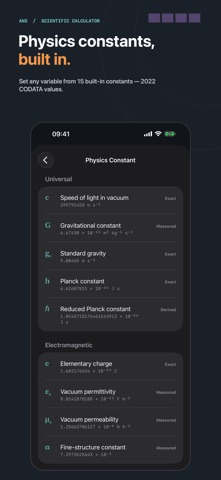
Ans is a proper scientific calculator: a dedicated instrument that opens instantly, works entirely offline and treats your mathematics with respect. It brings back the feel of the calculator you trusted at school — real keys, a clear two-line display, an answer you can carry forward — thoughtfully modernised for iPhone, iPad and Mac. EXACT WHEN IT MATTERS Fractions stay fractions: with A = 3/4 and B = 2/3, (A+B)×(A−B) is exactly 17/144, not a decimal pretending. π is kept exact, so sin(π) is 0 — not almost 0. Every answer can switch between its exact and decimal forms with one key, and you can copy either. BUILT AROUND YOUR ANSWER The app is named after its most useful key. Press an operator after any result and Ans carries it into the next expression — exactly, with nothing rounded away. Step back through earlier calculations with the replay keys, edit any expression in place, and evaluate again. A COMPLETE SCIENTIFIC TOOL Trigonometry in degrees, radians and gradians. Logarithms and exponentials. Powers, roots of any degree, factorials, fractions, percentages, scientific notation with proper superscripts, a random-number key, independent memory and parentheses that behave the way a dedicated calculator's do. SEE IT IN ACTION A one-minute Quick Tour demonstrates SHIFT, variables, the VAR hold that opens the Variable Explorer, built-in physics constants and exact fractions on the calculator itself, with the keys pressing as you watch. Take it on first launch or replay it at any time from Settings. With haptics enabled, VAR responds lightly on touch and more firmly when the explorer opens. The tour is on iPhone and iPad; on Mac, the built-in guide in Help covers the same ground. SIX VARIABLES, REMEMBERED EXACTLY Store values in A to D, X and Y through the classic STO flow, give them names like "gravity", and inspect them without leaving your calculation. Or choose from 15 built-in physics constants — including the speed of light, Planck constant, gravitational constant and particle masses — using current 2022 CODATA values. A stored 1/3 stays 1/3, across launches. YOUR ANSWERS, ALWAYS CLOSE Home Screen widgets in three sizes page through your recent calculations with calculator-style keys, and can open the exact one you select. A Lock Screen widget keeps the latest answer in view, and a Control Centre control opens Ans in one tap. MADE FOR IPHONE AND IPAD The complete face, always ready, on iPhone. A centred instrument with room to think on iPad — every orientation, Split View beside your notes, and hardware keyboards mapped the way you would hope: digits, operators, Return for equals. MADE FOR MAC A real desk calculator beside your work: a compact window that can keep itself in front while you write in the document behind it. Type calculations straight from the keyboard — Return for equals, ⇧ while clicking for shifted functions, ⌥ for variables — and open all six variables in their own window with ⇧⌘V. Native menus, native Help, the same exact engine. PART OF THE ANS FAMILY Ans Graph is the sister app: a graphing calculator with numerical integration you can drag. Send a result from the graph and it arrives here on the input line, ready for the next calculation. Each is a separate purchase and each stands entirely on its own. A CALCULATOR YOU CAN OWN Buy Ans once and the whole calculator is yours. No subscriptions. No ads. No accounts. No tracking. No locked functions. Ans itself makes no network connections — your work stays on your device, and the privacy policy is one page long. Built by one person who wanted a calculator worth keeping. Questions and ideas: support@anscalc.com
What's new · 1.4
Send a value across from Ans Graph. • Ans now accepts values sent from Ans Graph. The value arrives on the input line and stays there until you press =, so nothing is worked out for you and no answer, memory or stored variable changes on its own. • Touch and hold the display for Paste, which brings a whole expression in from another app — the same thing ⌘V has always done on the Mac. • Powers of ten survive being pasted, and a result you copy from Ans can be pasted straight back in.
Details