

Graphing Calculator Pro⁸⁴
Di Venisco UG (haftungsbeschrankt) · Education
Independent analytics for this App Store listing. AppTracker is not affiliated with Di Venisco UG (haftungsbeschrankt).
Chart standing · US
What changed · US
Listing changes AppTracker has observed for this app in this storefront — new versions, price moves, rating shifts, and store copy.
NEW KEYBOARD • The 2nd and alpha labels sit inside every key, with a round arrow pad • Pick the colors of the 2nd and alpha labels under MODE ▸ LABEL COLORS • Light and dark follow DISPLAY in MODE • On iPad in landscape the keypad sits beside the display, so your graph gets the full height PROGRAMS • Press 2nd clear to write and run programs • Built-in editor with a toolbar for →, Lbl, Goto, If, For, Disp, Input and more • Import .8xp files from the Files app and run them with Input, Prompt, Menu, Pause and Output • Programs share variables, lists and Ans with the home screen GRAPHING • Zeros, maxima, minima and intersections snap under your cursor. Turn it on under FORMAT ▸ DETECT • Scroll the graph with one finger, drag a curve to trace it, press GRAPH to jump back to your window • The complete DRAW menu: text, pen, points, circles and shading, ten stored pictures, or a photo behind your graph • The full ZOOM menu: Zoom Box, Zoom Default, Zoom [-10,10], Zoom Fit and more, plus quick zoom with + and − • Sequence variables u, v and w on 2nd 7, 8 and 9 MATH • Math templates palette on alpha + X,T,θ,n: fraction, absolute value, piecewise, integral, derivative, sum, nCr, nPr and matrix • Matrices fill in right on the home screen • Piecewise functions, three new regression models, distribution shading and gradian mode • Tap any result to flip between fraction and decimal, alpha + enter shows the decimal right away MENU AND HELP • New side menu on ≡: Graph, Table, Programs, Draw, Geometry, Periodic table and Unit converter are one tap away • The ? key opens help with links to the manual apps and the printed guidebook • Share an equation as a link, and GraphNCalc84 opens it directly
Price & rating history · US
Reconstructed from the listing changes AppTracker has observed in this storefront. A field is charted once it has changed more than once, and each line starts at the value it moved from.
Average rating · ★ 4.86 now · 7 changes on record
Ratings breakdown · US
The star breakdown behind this app's rating in this storefront.
In-app purchases · US
No in-app purchases.
Screenshots




Similar apps
Competitors and close alternatives, as estimated by AppTracker.




About
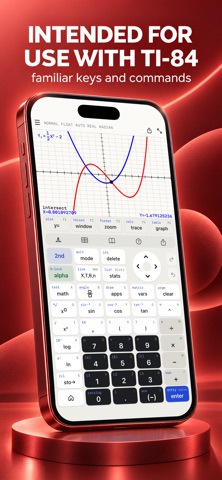
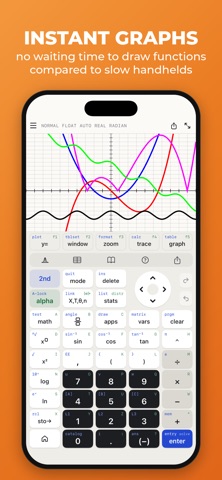
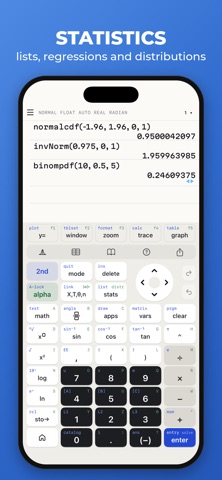
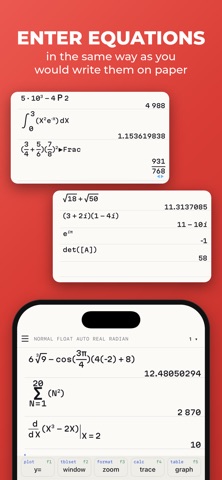
A full-featured graphing calculator: Graph and investigate functions, solve equations, work with statistics, distributions, matrices and much more. FIVE REASONS WHY YOU NEED THIS APP 1. Keyboard and command syntax similar to physical graphing calculators -> No need to learn a new calculator. 2. Powerful emulator like Wabbitemu Calculator -> No more waiting to graph functions compared to slow physical handhelds. 3. Enter fractions, equations or functions in the same way as you would write them on paper. 4. Never forget your calculator at home! It's always ready on your iPhone & iPad, and it weighs nothing. 5. High-resolution graphs FULL GRAPHING CALCULATOR • Graph more than ten functions at once, each with a different color • Add Lines, Horizontals, Verticals, and Tangents to the graph • Use your finger or the arrow keys to trace the coordinates of your functions • Calculate the Zero, Minimum, Maximum, Intersection, and Derivative • Find integrals and color the area under the function • Set the X and Y coordinates of the graphing window; zoom in and out with your fingers ADVANCED SCIENTIFIC CALCULATOR • Enter calculations in natural textbook format • Includes all basic arithmetic (+, -, x, ÷, ^, ², √, π, …) • Use advanced functions like sin, cos, tan, e, ln, Σ, ... • Scroll your calculation history and modify existing calculations with one tab • Store and recall variables • Quadratic Equation Solver MATRIX CALCULATOR • Work with matrices the easy way -> store them or enter them directly on the calculator interface • Do basic matrix arithmetic operations like addition, subtraction, multiplication or power of a Matrix • Put the matrix into Reduced Row-Echelon Form and solve linear equation systems • Calculate the determinant, inversion or transpose the matrix STATISTICS AND LISTS • Use lists for all basic and trigonometric operations • Enter lists using the Statistics List Editor or use curly brackets on the main screen • Perform 1- and 2- Variable Stats • Investigate your lists: min, max, mean, median, sum, product, standard deviation, and variance. • Do regressions with best-fit lines: LinReg, QuadReg, CubicReg, QuartReg, ExpReg • Work with distributions: Normal, Poisson and Binomial TUTORIAL AND CATALOG • Easy to understand tutorial to get started • Full Catalog of all commands with syntax, example, and possible error messages • Tab on highlighted math terms to read on point definitions PERFECT FOR HIGH SCHOOL & COLLEGE STUDENTS • Recommended by teachers to use in math classes • Pre-Algebra, Algebra 1 & 2 • Pre-Calculus, Calculus • Statistics • Permitted on SAT/ ACT/ AP (your phone might not be permitted, but you can use the app for homework and borrow an actual calculator from your school for the test)
What's new · 2.0.0
NEW KEYBOARD • The 2nd and alpha labels sit inside every key, with a round arrow pad • Pick the colors of the 2nd and alpha labels under MODE ▸ LABEL COLORS • Light and dark follow DISPLAY in MODE • On iPad in landscape the keypad sits beside the display, so your graph gets the full height PROGRAMS • Press 2nd clear to write and run programs • Built-in editor with a toolbar for →, Lbl, Goto, If, For, Disp, Input and more • Import .8xp files from the Files app and run them with Input, Prompt, Menu, Pause and Output • Programs share variables, lists and Ans with the home screen GRAPHING • Zeros, maxima, minima and intersections snap under your cursor. Turn it on under FORMAT ▸ DETECT • Scroll the graph with one finger, drag a curve to trace it, press GRAPH to jump back to your window • The complete DRAW menu: text, pen, points, circles and shading, ten stored pictures, or a photo behind your graph • The full ZOOM menu: Zoom Box, Zoom Default, Zoom [-10,10], Zoom Fit and more, plus quick zoom with + and − • Sequence variables u, v and w on 2nd 7, 8 and 9 MATH • Math templates palette on alpha + X,T,θ,n: fraction, absolute value, piecewise, integral, derivative, sum, nCr, nPr and matrix • Matrices fill in right on the home screen • Piecewise functions, three new regression models, distribution shading and gradian mode • Tap any result to flip between fraction and decimal, alpha + enter shows the decimal right away MENU AND HELP • New side menu on ≡: Graph, Table, Programs, Draw, Geometry, Periodic table and Unit converter are one tap away • The ? key opens help with links to the manual apps and the printed guidebook • Share an equation as a link, and GraphNCalc84 opens it directly
Details