

LoveToBike
Thomas Pfenninger · Health & Fitness
Independent analytics for this App Store listing. AppTracker is not affiliated with Thomas Pfenninger.
Chart standing · US
What changed · US
Listing changes AppTracker has observed for this app in this storefront — new versions, price moves, rating shifts, and store copy.
Know every climb. Beat your best. LoveToBike now recognises climbs you have ridden before and compares your effort to your personal record — live on your wrist. Records are stored and compared separately for each workout type, so a ride on the road bike never mixes with one on the e-bike or another sport. See whether you are faster or slower as you climb, and keep the result on each finished climb in the list. See your climbs in the climb view: swipe right during a workout and the climb view appears. In the normal training view you can also tell when you are chasing a new climb record — the color of the arrow in the climb field shows you. Your climb records stay on the Apple Watch. Want a clean slate? Delete all stored climb records anytime in the LoveToBike settings on your iPhone.
In-app purchases · US
No in-app purchases.
Screenshots




Keywords this app targets
Search terms AppTracker associates with this app — estimates, not search volume. ❝ = in the app's title; a highlighted number is its current position for that term.
Similar apps
Competitors and close alternatives, as estimated by AppTracker.




About
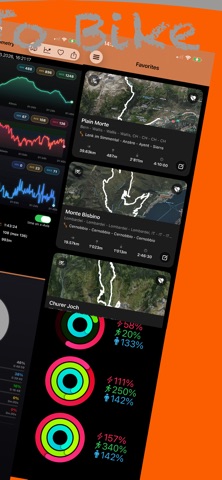
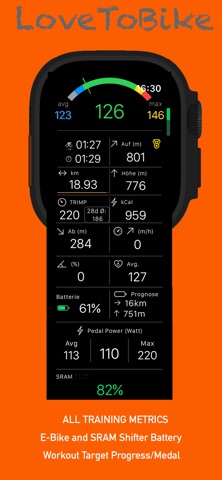
LoveToBike turns your Apple Watch into a cycling and fitness companion. Record workouts, see live metrics, and sync everything to your iPhone. Workouts & Sports Outdoor: Bicycling, Mountain Bike, E-Bike, Running, Hiking, Cross-Country Skiing, Skiing, Rowing Indoor: Indoor Cycling, Indoor Running, Strength Training Live Metrics During Workouts Time & Distance: Elapsed time, distance, speed, max- avg. speed Elevation: Altitude, climb, descent, climb angle, vertical speed Heart Rate: Live heart rate, average heart rate, heart rate zones, time in each heart rate zone Calories: Burn rate and calories per hour TRIMP: Training load (TRIMP) Progress toward your workout goals Automatic climb detection Live climb card: gain, length, time and grade at a glance Heart Rate Zones Time in each heart rate zone (gray, blue, green, yellow, red) Calories per hour Climb Segments Map & GPS Track map: View your route on the map POI: Points of interest along the route My own location on the map Location tracking: GPS for outdoor workouts Bluetooth (BLE) E-bike battery: Battery level and remaining range Pedal power: Power from compatible power meters Combined: E-bike battery and pedal power in one view SRAM shifter: Battery level for SRAM AXS shifters Auto-reconnect: Reconnects devices during workouts when they’re temporarily out of range One-tap connect: Connect to registered devices Interval Coach Interval training with preset intervals Coach mode during workouts Visual interval progress Sync to iPhone Sync workouts to the LoveToBike iPhone app Automatic sync when the iPhone is nearby Manual sync for unsynced workouts Vital Data Age, weight, height, gender Max HR, resting HR VO₂max (Apple & LoveToBike) BMR and calories method Synced from Health and the iPhone app Safety & Reliability Locked controls during workouts to avoid accidental taps Low battery warning Automatic save when the watch battery is low Apple Fitness Integration Workouts saved to Apple Fitness Uses HealthKit for heart rate and activity data iPhone: LoveToBike is the companion app for cyclists and athletes. It receives workouts from your Apple Watch, imports activities from other devices, and helps you analyze and manage your training. ACWR (Acute:Chronic Workload Ratio), a powerful new way to understand your training load. Home & Dashboard Cockpit Overview of your recent activities Quick access to key stats Fitness Apple Activity Rings for the last 7 days Move, Exercise, and Stand progress Uses Apple Health data Activities Voice search (“Speak with Me”) Search by date, sport, country, region Filter by workout type Bookmark your best adventures Activity Details Map: GPS route with terrain Charts: Heart rate, altitude, speed over time Telemetry: Distance, climb, descent, speed, heart rate zones HR Drop: Heart rate recovery after workout TRIMP: Training load (TRIMP) Photos: Link photo albums to activities Climbs incl. map Statistics & Reports Reports Duration, distance, climb, TRIMP by period (week, month, year, custom) Best activities by duration, distance, climb Import & Sync Apple Watch Sync workouts from LoveToBike Watch app Automatic sync when iPhone is nearby Manual sync for unsynced workouts Settings Watch Configuration Customize watch screen fields Separate outdoor and indoor layouts Drag-and-drop field arrangement Workout Targets Workout Values Announcements Intervals Interval training configuration Coach mode for the watch Vital Data Age, weight, height, gender Max HR, resting HR VO₂max (Apple & LoveToBike) BMR and calories method Max heart rate (stored for each year) Activity Merge Merge split workouts (e.g. from GPS pauses) Combine activities from the same ride Photos Link photo albums to activities View photos you made during a ride on the map view Organize ride memories Share GPS tracks export any ride as a GPX file via AirDrop, Messages, Mail, or Files Create a .FIT file from your track and use as overlay for videos of DJI camera English, German
What's new · 19.3.14
Know every climb. Beat your best. LoveToBike now recognises climbs you have ridden before and compares your effort to your personal record — live on your wrist. Records are stored and compared separately for each workout type, so a ride on the road bike never mixes with one on the e-bike or another sport. See whether you are faster or slower as you climb, and keep the result on each finished climb in the list. See your climbs in the climb view: swipe right during a workout and the climb view appears. In the normal training view you can also tell when you are chasing a new climb record — the color of the arrow in the climb field shows you. Your climb records stay on the Apple Watch. Want a clean slate? Delete all stored climb records anytime in the LoveToBike settings on your iPhone.
Details