

Workout Live - Heart Rate Zone
Anh Nguyen · Health & Fitness
Independent analytics for this App Store listing. AppTracker is not affiliated with Anh Nguyen.
Chart standing · US
What changed · US
Listing changes AppTracker has observed for this app in this storefront — new versions, price moves, rating shifts, and store copy.
START AND END FROM YOUR IPHONE Tap Start on Apple Watch, choose a workout, and Workout Live starts it on your watch. When you're done, tap End Workout on your iPhone to end and save it on your watch. ONE-TAP WORKOUTS ON YOUR WATCH FACE Put any workout on your watch face and start it with one tap. Running, cycling, hand cycling, walking and rowing come as Outdoor and Indoor versions. Requires watchOS 10.2 or later. ROUTE MAPS Outdoor runs, walks, rides, hand cycling and rowing now save their GPS route with the workout, so Apple Fitness can show the map. ZONE CHANGE ALERTS Feel a tap on your wrist when your heart rate moves into a different zone. Turn it on in Settings > Heart Rate Zones. ZONES FROM YOUR RESTING HEART RATE Base your zones on your resting heart rate from Apple Health: Settings > Heart Rate Zones > Use Resting Heart Rate. ALSO IN THIS RELEASE - Double tap to pause and resume, on Apple Watch models that support the gesture with watchOS 11 or later. Turn it on in Settings > User Interface > Double Tap to Pause. - Your watch shows the heart rate zone as text, not only as a color. - The workout list on your watch has an icon for every workout. - Arabic numbers now use one digit system throughout. - Fixes for the connection status and for live mirroring after the watch app restarts.
Price & rating history · US
Reconstructed from the listing changes AppTracker has observed in this storefront. A field is charted once it has changed more than once, and each line starts at the value it moved from.
Average rating · ★ 4.05 now · 6 changes on record
Ratings breakdown · US
The star breakdown behind this app's rating in this storefront.
In-app purchases · US
What this app sells inside itself, grouped by kind and priced for this storefront.
Screenshots




Keywords this app targets
Search terms AppTracker associates with this app — estimates, not search volume. ❝ = in the app's title; a highlighted number is its current position for that term.
Similar apps
Competitors and close alternatives, as estimated by AppTracker.
 Pulse Link: Heart Rate BLE
HUMBLE MARS LTD
2 shared topics · 3 shared title words
Pulse Link: Heart Rate BLE
HUMBLE MARS LTD
2 shared topics · 3 shared title words
 HeartWatch: Heart Rate Monitor
Tantsissa
1 shared topic · 3 shared title words
HeartWatch: Heart Rate Monitor
Tantsissa
1 shared topic · 3 shared title words
 Combi Fit Track
Martynas Prascevicius
2 shared topics
Combi Fit Track
Martynas Prascevicius
2 shared topics
 RunnersHeart
oozoofrog
RunnersHeart
oozoofrog
 AccuRate Heart Rate Monitor
Oxford Fitness Ltd
1 shared topic · 3 shared title words
AccuRate Heart Rate Monitor
Oxford Fitness Ltd
1 shared topic · 3 shared title words
 Cardiogram - HR Monitor
Nicolae Gherasim
2 shared topics
Cardiogram - HR Monitor
Nicolae Gherasim
2 shared topics
 Athlytic: AI Fitness Coach
MyndArc, LLC
2 shared topics
Athlytic: AI Fitness Coach
MyndArc, LLC
2 shared topics
 Simple Heart Rate Monitor
Martin Bezecny
Simple Heart Rate Monitor
Martin Bezecny
About
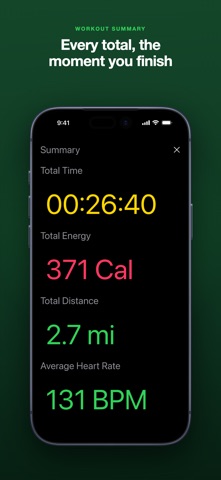
Prop your iPhone on the treadmill, bike or rower and read your Apple Watch heart rate from across the room. Huge numbers, color-coded zones, and a screen that never sleeps. WHAT YOU SEE - Live heart rate, calories, distance and elapsed time, streamed from your Apple Watch to your iPhone. - Color-coded heart rate zones: five colors from four thresholds you set yourself, so you know where you are without reading the number. - Time in each zone, building as you train, with the full breakdown waiting on your summary. - Your screen, your order: show, hide and reorder every section of the live view. - Start any workout with one tap from your watch face, or from your iPhone. - The iPhone screen stays awake for the whole workout. - 27 workout types, from HIIT, running and cycling to yoga, boxing, tennis and rowing. - Your units, your way: miles or kilometers; Calories, kilocalories or kilojoules; total or active energy. - Workouts are saved to Apple Health and appear in your Apple Fitness history. HOW IT WORKS - PLEASE READ BEFORE YOU BUY Workout Live records the workout itself. Start the workout in Workout Live on your Apple Watch, or from Workout Live on your iPhone, and keep Workout Live open on your iPhone to watch it live. Workout Live cannot display heart rate from other workout apps. If you start your workout in Apple's Workout app, Nike Run Club, Strava or anything else, Workout Live has no way to read it, because only one app at a time can own a workout session on Apple Watch. An Apple Watch paired to your iPhone is required. PRIVACY - No personal information is collected. - No ads, no tracking, no profiles. - No account and no sign-up. - Your data stays on your device and in Apple Health.
What's new · 1.28
START AND END FROM YOUR IPHONE Tap Start on Apple Watch, choose a workout, and Workout Live starts it on your watch. When you're done, tap End Workout on your iPhone to end and save it on your watch. ONE-TAP WORKOUTS ON YOUR WATCH FACE Put any workout on your watch face and start it with one tap. Running, cycling, hand cycling, walking and rowing come as Outdoor and Indoor versions. Requires watchOS 10.2 or later. ROUTE MAPS Outdoor runs, walks, rides, hand cycling and rowing now save their GPS route with the workout, so Apple Fitness can show the map. ZONE CHANGE ALERTS Feel a tap on your wrist when your heart rate moves into a different zone. Turn it on in Settings > Heart Rate Zones. ZONES FROM YOUR RESTING HEART RATE Base your zones on your resting heart rate from Apple Health: Settings > Heart Rate Zones > Use Resting Heart Rate. ALSO IN THIS RELEASE - Double tap to pause and resume, on Apple Watch models that support the gesture with watchOS 11 or later. Turn it on in Settings > User Interface > Double Tap to Pause. - Your watch shows the heart rate zone as text, not only as a color. - The workout list on your watch has an icon for every workout. - Arabic numbers now use one digit system throughout. - Fixes for the connection status and for live mirroring after the watch app restarts.
Details