

Heart Rate to Health App
Dawson Toth · Health & Fitness
Independent analytics for this App Store listing. AppTracker is not affiliated with Dawson Toth.
Chart standing · US
What changed · US
Listing changes AppTracker has observed for this app in this storefront — new versions, price moves, rating shifts, and store copy.
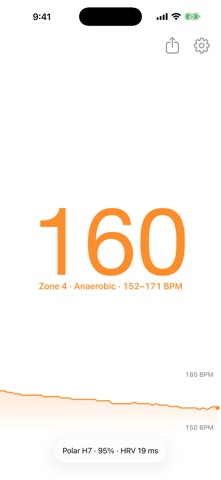
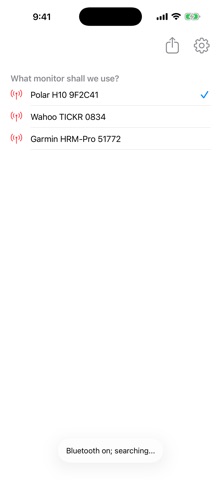
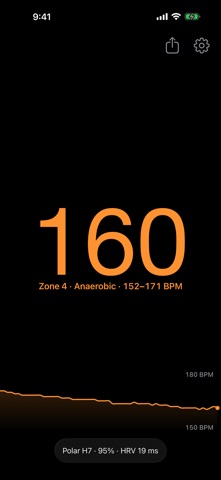
Training zones. Your heart rate now shows the zone you are in, from Zone 1 to Zone 5, and the whole display takes that zone's colour. Set your maximum heart rate and adjust where each zone starts in Settings. Heart rate variability. Chest straps report the interval between beats, and Heart Rate now reads it. Your HRV appears next to the battery level once enough beats have been seen, and is saved with every session. Sessions are kept. Each measurement is saved automatically and listed under the share button with its duration, average, maximum and HRV. Export any of them as a CSV with real timestamps. A clearer screen. The graph has been redrawn, settings have moved behind a gear in the corner, and the app now walks you through pairing a monitor the first time you use it. The screen stays awake while you are measuring, and the layout now fits iPad properly.
Ratings breakdown · US
The star breakdown behind this app's rating in this storefront.
In-app purchases · US
No in-app purchases.
Screenshots


Keywords this app targets
Search terms AppTracker associates with this app — estimates, not search volume. ❝ = in the app's title; a highlighted number is its current position for that term.
Similar apps
Competitors and close alternatives, as estimated by AppTracker.
 Bluetooth Heart Rate Monitor
Bostock Software Development and Consultancy Ltd
2 shared topics · 3 shared title words
Bluetooth Heart Rate Monitor
Bostock Software Development and Consultancy Ltd
2 shared topics · 3 shared title words
 Heart Rate Pro-Health Monitor
Zane
1 shared topic · 4 shared title words
Heart Rate Pro-Health Monitor
Zane
1 shared topic · 4 shared title words
 Heart Rate Monitor · Pulse App
AKRURA PTE. LTD
1 shared topic · 4 shared title words
Heart Rate Monitor · Pulse App
AKRURA PTE. LTD
1 shared topic · 4 shared title words
 HeartWatch: Heart Rate Monitor
Tantsissa
1 shared topic · 3 shared title words
HeartWatch: Heart Rate Monitor
Tantsissa
1 shared topic · 3 shared title words
 Heart Rate Health: Pulse Mate
Sergey Mosin
1 shared topic · 4 shared title words
Heart Rate Health: Pulse Mate
Sergey Mosin
1 shared topic · 4 shared title words
 Instant Heart Rate: HR Monitor
Bodymatter, Inc.
1 shared topic · 3 shared title words
Instant Heart Rate: HR Monitor
Bodymatter, Inc.
1 shared topic · 3 shared title words
 AccuRate Heart Rate Monitor
Oxford Fitness Ltd
1 shared topic · 3 shared title words
AccuRate Heart Rate Monitor
Oxford Fitness Ltd
1 shared topic · 3 shared title words
 Cardiio: Heart Rate Monitor
Cardiio, Inc.
1 shared topic · 3 shared title words
Cardiio: Heart Rate Monitor
Cardiio, Inc.
1 shared topic · 3 shared title words
About
Send your Heart Rate to the Health app from your Bluetooth LE Heart Rate Monitor. In addition to seeing your heart rate in-app, the app will continue to run in the background, adding your heart rate to the Health app once a minute. You can also easily export a CSV of your heart rate over time. Note that Fitbit devices won't work with this app, due to them locking down their Bluetooth communications. This app has no ads, and doesn't sell (or even track) your usage to anyone, ever.
What's new · 1.6.0
Training zones. Your heart rate now shows the zone you are in, from Zone 1 to Zone 5, and the whole display takes that zone's colour. Set your maximum heart rate and adjust where each zone starts in Settings. Heart rate variability. Chest straps report the interval between beats, and Heart Rate now reads it. Your HRV appears next to the battery level once enough beats have been seen, and is saved with every session. Sessions are kept. Each measurement is saved automatically and listed under the share button with its duration, average, maximum and HRV. Export any of them as a CSV with real timestamps. A clearer screen. The graph has been redrawn, settings have moved behind a gear in the corner, and the app now walks you through pairing a monitor the first time you use it. The screen stays awake while you are measuring, and the layout now fits iPad properly.
Details