

Data Widget - 3g/4g/5g data
大胜 纪 · Utilities
Independent analytics for this App Store listing. AppTracker is not affiliated with 大胜 纪.
Chart standing · US
What changed · US
Listing changes AppTracker has observed for this app in this storefront — new versions, price moves, rating shifts, and store copy.
Small improvements.
Price & rating history · US
Reconstructed from the listing changes AppTracker has observed in this storefront. A field is charted once it has changed more than once, and each line starts at the value it moved from.
Price · 1.99 USD now · 2 changes on record
Average rating · ★ 4.33 now · 32 changes on record
Ratings breakdown · US
The star breakdown behind this app's rating in this storefront.
In-app purchases · US
No in-app purchases.
Screenshots




Keywords this app targets
Search terms AppTracker associates with this app — estimates, not search volume. ❝ = in the app's title; a highlighted number is its current position for that term.
Similar apps
Competitors and close alternatives, as estimated by AppTracker.
 DataMan - Data Usage Widget
Johnny Ixe
2 shared topics · 2 shared title words
DataMan - Data Usage Widget
Johnny Ixe
2 shared topics · 2 shared title words
 Data Usage
oBytes, LLC
3 shared topics · 1 shared title word
Data Usage
oBytes, LLC
3 shared topics · 1 shared title word
 Widget Data Cellular
Emanuele Floris
2 shared topics · 2 shared title words
Widget Data Cellular
Emanuele Floris
2 shared topics · 2 shared title words
 CellMonitor
VOJTECH VOLPRECHT
2 shared topics
CellMonitor
VOJTECH VOLPRECHT
2 shared topics
 Databit: Data usage manager
Jorge Cozain
2 shared topics · 1 shared title word
Databit: Data usage manager
Jorge Cozain
2 shared topics · 1 shared title word
 DataTracker - Data Usage
Gerard Grundy
1 shared topic · 1 shared title word
DataTracker - Data Usage
Gerard Grundy
1 shared topic · 1 shared title word
 Health Data Widgets
Daniel Buehner
2 shared topics · 1 shared title word
Health Data Widgets
Daniel Buehner
2 shared topics · 1 shared title word
 Download Meter - track Data Usage and avoid Data Plan Overage
HedonicSoft
1 shared topic · 1 shared title word
Download Meter - track Data Usage and avoid Data Plan Overage
HedonicSoft
1 shared topic · 1 shared title word
About
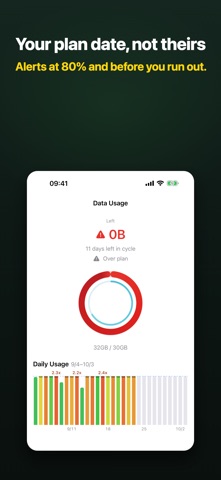
See how much data you have left this cycle — and whether you’re heading for overage. Track against your own plan date: remaining on the Home Screen, Lock Screen, and Apple Watch, with optional alerts at 80% or when you run out. No carrier login, and no extra data used just to check. It is a one-time purchase: no subscription, no ads, widgets included. ONE-TIME PURCHASE. NO SUBSCRIPTION. Buy once and everything below is included: • No subscription, no trial that expires, no “Pro” tier added later • Home Screen, Lock Screen, StandBy and Apple Watch widgets are part of the app, not an upgrade • Nothing you already paid for gets moved behind a new plan later YOUR PLAN DATE, NOT THEIRS Usage in Settings doesn’t follow your billing date, and carrier apps want an account. Data Widget totals cellular bytes on-device against the cap you set: • Monthly, weekly, or a custom cycle • Calibrate to the number on your bill (confirms before saving) • If your plan rolls unused data, carry it into this cycle • Dual SIM / eSIM: both lines together, primary only, or split — useful with a travel eSIM • 5G and LTE cellular interfaces REMAINING VS. PACE The headline number is remaining. Time and usage share one bar; the arrow is calendar pace — green if you’re under, red if you’re burning faster. Home says “12% ahead of pace” or “about N days left at this rate,” with a daily chart for spikes. History is one row per cycle, grouped by year. GLANCE WITHOUT OPENING THE APP Widgets on the Home Screen, Lock Screen, or StandBy show remaining in large type, plus when it last updated. Apple Watch complications show remaining on the face. In the app, tap to switch % and used | remaining. BEFORE YOU OVERAGE Optional alerts at 80%, 90%, or when you run out — once per tier each cycle. You can also alert when usage runs ahead of time. PRIVATE AND HONEST No ads. No location. No SMS scraping, no carrier-bill login. On-device totals can differ from Settings > Cellular because of VPN, Personal Hotspot, or carrier rounding. That’s explained in Settings; calibration lines the ledger up with your plan. Requires iOS 17 or later. Apple Watch requires watchOS 10 or later. Designed for iPhone. On iPad it only counts on cellular models.
What's new · 4.4.2
Small improvements.
Details