

Trip Receipts
Wayne Hartman · Travel
Independent analytics for this App Store listing. AppTracker is not affiliated with Wayne Hartman.
Chart standing · US
What changed · US
Listing changes AppTracker has observed for this app in this storefront — new versions, price moves, rating shifts, and store copy.
This update gives you more control over trip totals and expense entry. You can now switch an amount between positive and negative with a button beside the currency selector. Negative amounts are included correctly in trip totals. You can also choose a reporting currency for the grand total shown at the top of a trip, using the same combined-currency approach available in charts. Receipt photos edited in Photos now keep their crop and rotation when imported. We also fixed crashes that could occur while opening or updating your receipt library and added safeguards for existing data. This release includes additional reliability improvements and regression fixes throughout the app.
Price & rating history · US
Reconstructed from the listing changes AppTracker has observed in this storefront. A field is charted once it has changed more than once, and each line starts at the value it moved from.
Average rating · ★ 4.84 now · 5 changes on record
Ratings breakdown · US
The star breakdown behind this app's rating in this storefront.
In-app purchases · US
No in-app purchases.
Screenshots



Keywords this app targets
Search terms AppTracker associates with this app — estimates, not search volume. ❝ = in the app's title; a highlighted number is its current position for that term.
Similar apps
Competitors and close alternatives, as estimated by AppTracker.
 Receipt Organizer・ReceiptGenie
Botisan AI Pte. Ltd.
2 shared topics
Receipt Organizer・ReceiptGenie
Botisan AI Pte. Ltd.
2 shared topics
 Smart Receipts: Expenses & Tax
REACTIVE APPS CORP.
2 shared topics · 1 shared title word
Smart Receipts: Expenses & Tax
REACTIVE APPS CORP.
2 shared topics · 1 shared title word
 Receipt Tracker - Receiptix
Reciptix LLP
2 shared topics
Receipt Tracker - Receiptix
Reciptix LLP
2 shared topics
 Trexpense - Travel Budget
Stefan Galler
2 shared topics
Trexpense - Travel Budget
Stefan Galler
2 shared topics
 Receipts Pro
Tidal Pool Software
2 shared topics · 1 shared title word
Receipts Pro
Tidal Pool Software
2 shared topics · 1 shared title word
 Travel Expenses - Spentrip
Reciptix LLP
1 shared topic
Travel Expenses - Spentrip
Reciptix LLP
1 shared topic
 Expenses: Spending Tracker
BLUE COMET LABS LLC
2 shared topics
Expenses: Spending Tracker
BLUE COMET LABS LLC
2 shared topics
 Imburse - The Receipt Holder
Apoby AB
2 shared topics
Imburse - The Receipt Holder
Apoby AB
2 shared topics
About
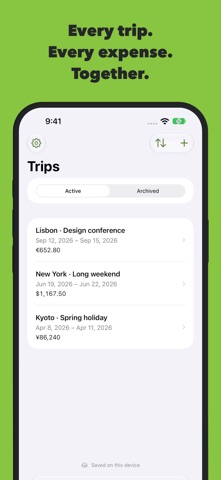
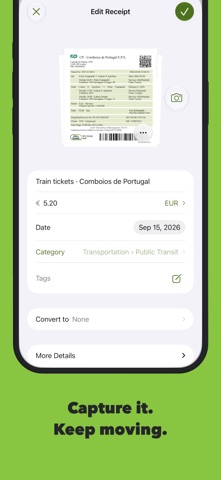
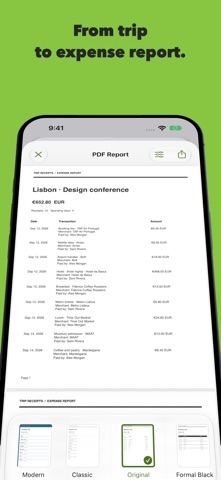
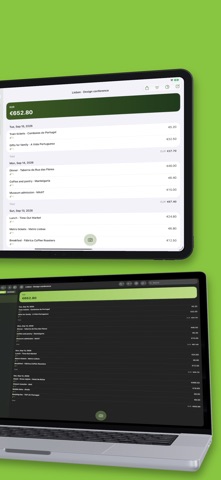
Every trip. Every expense. Together. Keep your travel expenses and receipts in one place, from the first coffee to the final hotel bill. Whether you’re traveling for work, taking a holiday, or organizing a group trip, Trip Receipts helps you capture the details and keep moving. CAPTURE IT. KEEP MOVING. Photograph a receipt, import a photo or PDF, or enter an expense without an attachment. Keep multiple attachments with an expense and review available on-device recognition suggestions before using them. ONE TRIP. EVERYONE’S RECEIPTS. Share a trip through iCloud so participants can add and edit receipts. Record who paid and keep everyone’s expenses together. KNOW WHERE YOUR MONEY GOES. Explore spending by category and day with interactive charts. Organize expenses with categories, subcategories, and tags, and set category budgets for each trip. Keep original currencies and use currency conversion to bring totals together. FIND THE RECEIPT YOU NEED. Search by merchant, description, tag, participant, or receipt text. Use filters to narrow the results and keep photos and PDFs alongside the expense they belong to. FROM TRIP TO EXPENSE REPORT. Create PDF reports with a choice of layouts. Export CSV data for spreadsheets or original attachments in a ZIP file. Back up your library so you can keep a separate copy of your records. YOUR TRIP. ACROSS YOUR DEVICES. Use Trip Receipts on iPhone, iPad, and Mac, with iCloud sync across your devices. Check trip totals and daily spending on Apple Watch through its iPhone companion. Keep working offline with your downloaded library. Your receipts, organized for the journey.
What's new · 2.1
This update gives you more control over trip totals and expense entry. You can now switch an amount between positive and negative with a button beside the currency selector. Negative amounts are included correctly in trip totals. You can also choose a reporting currency for the grand total shown at the top of a trip, using the same combined-currency approach available in charts. Receipt photos edited in Photos now keep their crop and rotation when imported. We also fixed crashes that could occur while opening or updating your receipt library and added safeguards for existing data. This release includes additional reliability improvements and regression fixes throughout the app.
Details