

WattBench
Seth Egger · Utilities
Independent analytics for this App Store listing. AppTracker is not affiliated with Seth Egger.
Chart standing · US
Screenshots





Similar apps
Competitors and close alternatives, as estimated by AppTracker.
 Watt CS: Charging Speed Meter
Aakash Sajjad
Watt CS: Charging Speed Meter
Aakash Sajjad
 Battery Monitor Sync
Rogier Van dam
Battery Monitor Sync
Rogier Van dam
 Watt Charging Speed: Meter
Sindre Sørensen
Watt Charging Speed: Meter
Sindre Sørensen
 Device Monitor: iDevice
Grima Hdez
Device Monitor: iDevice
Grima Hdez
 DeviceLab - Phone Benchmark
Shanghai Aisujiao Network Technology Co., Ltd.
DeviceLab - Phone Benchmark
Shanghai Aisujiao Network Technology Co., Ltd.
 BatteryPro++
Binh Tran
BatteryPro++
Binh Tran
 Amperes 4: Battery Charge Info
CrioSoft LLC
Amperes 4: Battery Charge Info
CrioSoft LLC
 TrueWatt: Power Meter Match
Nils Albertsen
TrueWatt: Power Meter Match
Nils Albertsen
About
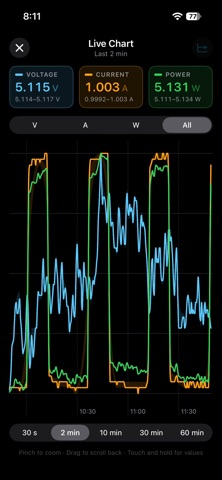
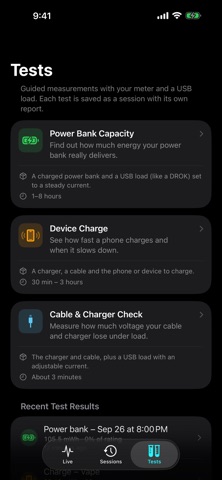
WattBench turns your iPhone into a wireless display, data logger and test bench for the FNIRSI FNB58 USB power meter. Connect over Bluetooth and watch voltage, current and power live. See what your charger is doing on the USB data lines. Record a whole charge cycle with the phone locked. Then run guided tests that answer real questions: how much a power bank actually holds, how fast a phone really charges, and whether a cable is wasting power. LIVE • Big, glanceable voltage, current and power with peak hold • USB data lines: D+ and D− voltages and the meter's temperature • Charger detection: Quick Charge, USB PD, Apple, Samsung and BC 1.2 patterns named automatically • Full-screen chart with V, A, W or all three, up to the last 60 minutes, in portrait or landscape, with pinch to zoom • Trip counter for energy (Wh) and capacity (mAh) without starting a recording TESTS • Power Bank Capacity: compares what a bank really delivers with the mAh on its label • Device Charge: shows the fast, tapering and trickle phases of a charge, with a battery estimate • Cable & Charger Check: guides you through load steps with a USB electronic load and grades the resistance of the cable and charger RECORDINGS AND REPORTS • Recordings keep running with the screen locked and survive a crash or a Bluetooth drop; dropouts are shown honestly as gaps • Lock Screen, Dynamic Island and Apple Watch Smart Stack show live readings while you record • Automatic markers when the charger changes mode or voltage • Session reports with zoomable charts, range statistics, a power histogram, a voltage-versus-current plot, cumulative energy, temperature and D+/D− over time • Compare up to four sessions on one chart • Export PDF reports and CSV files ALERTS • Over- and under-voltage, over-current, over-power, current below, voltage drop, disconnect, over-temperature and "fast charge lost", with presets • Banners in the app, notifications in the background, with Stop & save during a recording PRIVATE BY DESIGN No account, no ads, no analytics, no network access. Your recordings stay on your iPhone. REQUIREMENTS The FNIRSI FNB58 USB power meter with Bluetooth. Turn Bluetooth on in the meter's settings menu, then tap Connect. A USB electronic load is recommended for the power bank and cable tests. No meter yet? Tap Try Demo Data to explore every screen. User guide and test recipes: https://redthoroughbred.github.io/wattbench/guide.html WattBench is an independent project and is not affiliated with or endorsed by FNIRSI.
Details