

Watt Charging Speed: Meter
Sindre Sørensen · Utilities
Independent analytics for this App Store listing. AppTracker is not affiliated with Sindre Sørensen.
Chart standing · US
What changed · US
Listing changes AppTracker has observed for this app in this storefront — new versions, price moves, rating shifts, and store copy.
Accuracy fixes for sessions and benchmarks: • Sessions that charge all the way to 100% are now saved with the correct end level and duration • A benchmark no longer saves a misleading result if the app was in the background when the target level was reached — it now tells you to run the test again • A finished benchmark no longer keeps the screen awake or blocks other tests • The live wattage follows the current rate when charging slows down, and very low power is correctly shown as trickle charging • Fixed text being cut off with "…" when a large accessibility text size is enabled
Price & rating history · US
Reconstructed from the listing changes AppTracker has observed in this storefront. A field is charted once it has changed more than once, and each line starts at the value it moved from.
Average rating · ★ 4.23 now · 5 changes on record
Ratings breakdown · US
The star breakdown behind this app's rating in this storefront.
In-app purchases · US
No in-app purchases.
Screenshots


Keywords this app targets
Search terms AppTracker associates with this app — estimates, not search volume. ❝ = in the app's title; a highlighted number is its current position for that term.
Similar apps
Competitors and close alternatives, as estimated by AppTracker.
 Watt CS: Charging Speed Meter
Aakash Sajjad
2 shared topics · 5 shared title words
Watt CS: Charging Speed Meter
Aakash Sajjad
2 shared topics · 5 shared title words
 USB Connection Information
Daniel Gauthier
USB Connection Information
Daniel Gauthier
 Amperes 4: Battery Charge Info
CrioSoft LLC
Amperes 4: Battery Charge Info
CrioSoft LLC
 Mister Battery
He Zhou
1 shared topic
Mister Battery
He Zhou
1 shared topic
 WattBench
Seth Egger
WattBench
Seth Egger
 Kilowatt – Electric Car Timer
Automatique VOF
1 shared topic
Kilowatt – Electric Car Timer
Automatique VOF
1 shared topic
 ChargeFinder: Public Charging
ChargeFinder Inc.
1 shared title word
ChargeFinder: Public Charging
ChargeFinder Inc.
1 shared title word
 Volra: Battery & Charger Test
Ahmet Burak Ozyurt
Volra: Battery & Charger Test
Ahmet Burak Ozyurt
About
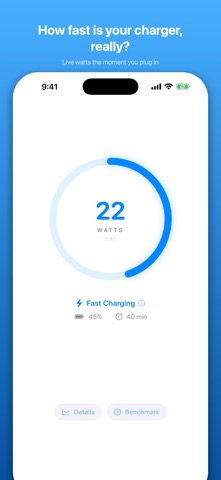
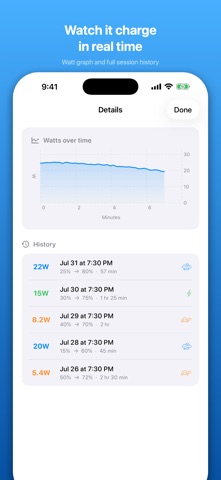
How fast is your charger, really? Plug in your iPhone or iPad and Watt Charging Speed shows you a live estimate of your charging power in watts — so you can tell a fast charger from a slow one, and find out whether your cable actually supports fast charging. HOW IT WORKS — HONESTLY iPhone and iPad don't give apps access to a hardware power meter. Instead, Watt Charging Speed estimates wattage by tracking how quickly your battery level rises, combined with your device's exact battery capacity. That means: • Readings are careful estimates, not direct measurements • Your first reading appears after a few minutes of charging • The longer the app stays open while charging, the more accurate it gets LIVE CHARGING SPEED • Live wattage estimate while charging • Color-coded speed indicator: Fast, Normal, Slow, or Trickle • Animated charging ring and live session graph • Estimated time until fully charged BENCHMARK YOUR CHARGERS • Create battery range tests (e.g. 30% → 80%) and time them precisely • Compare chargers and cables under identical conditions • See which charger actually performs best CHARGING HISTORY • Automatic session tracking with average watts, duration, and battery range • Compare sessions over time to spot slow cables or aging chargers PRIVATE BY DESIGN • No ads, no tracking, no accounts • All data stays on your device • Works completely offline GOOD TO KNOW iOS pauses background apps, so keep Watt Charging Speed open while it measures — it keeps your screen awake during a session so nothing is interrupted. Perfect for testing a new charger, diagnosing slow charging, or finally settling which of your cables belongs in the drawer.
What's new · 1.4
Accuracy fixes for sessions and benchmarks: • Sessions that charge all the way to 100% are now saved with the correct end level and duration • A benchmark no longer saves a misleading result if the app was in the background when the target level was reached — it now tells you to run the test again • A finished benchmark no longer keeps the screen awake or blocks other tests • The live wattage follows the current rate when charging slows down, and very low power is correctly shown as trickle charging • Fixed text being cut off with "…" when a large accessibility text size is enabled
Details