

FieldGrade
Timmy Faneuf · Business
Independent analytics for this App Store listing. AppTracker is not affiliated with Timmy Faneuf.
Chart standing · US
What changed · US
Listing changes AppTracker has observed for this app in this storefront — new versions, price moves, rating shifts, and store copy.
• On a crew? The unlock screen now leads with Enter Company Code, so joining your company's plan is one tap.
Price & rating history · US
Reconstructed from the listing changes AppTracker has observed in this storefront. A field is charted once it has changed more than once, and each line starts at the value it moved from.
Price · Free now · 3 changes on record
Ratings breakdown · US
The star breakdown behind this app's rating in this storefront.
In-app purchases · US
No in-app purchases.
Screenshots


Similar apps
Competitors and close alternatives, as estimated by AppTracker.
 Tractor GPS
Yaroslav Babenko
Tractor GPS
Yaroslav Babenko
 Site Auditor: Field Proj Mgmt
Royal Allen
Site Auditor: Field Proj Mgmt
Royal Allen
 Slope Calculator
John Lein
Slope Calculator
John Lein
 FieldCalc - GPS Area Measure
Pravin Gondaliya
FieldCalc - GPS Area Measure
Pravin Gondaliya
 Field Maps Measure - Landmetr
Alexey Sakharov
Field Maps Measure - Landmetr
Alexey Sakharov
 GPS Fields Area Measure Map
Rento UAB
GPS Fields Area Measure Map
Rento UAB
 FieldNav: MGRS & UTM GPS
PAWEŁ KANDYBOWICZ
FieldNav: MGRS & UTM GPS
PAWEŁ KANDYBOWICZ
 Farm Sprayer GPS
Joshua Johnson
Farm Sprayer GPS
Joshua Johnson
About
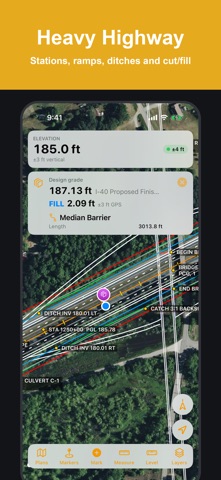
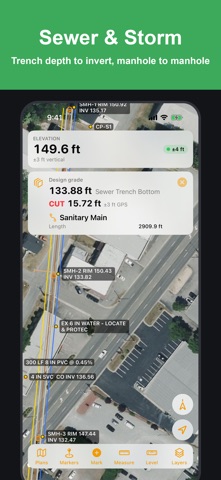
FieldGrade puts your grade plan in your pocket. Open a site plan or a Topcon or Trimble job on your iPhone or iPad and see exactly where you're standing on it, live, with design grade and a built-in level. Built for foremen, grade checkers, and ground crew who aren't in a machine-controlled dozer but still need to know where they are on the plan. TWO WAYS TO GET IT • For yourself: free download with a 7-day free trial of everything. Then a one-time $19.99 unlock, yours to keep. No subscription, nothing billed automatically. • For your crew: a company plan puts FieldGrade on every phone and iPad in your crew, adds crew sharing and an office dashboard, and is invoiced to your company. From $12 per device per month. Details: fieldgrade.netlify.app/companies • Already have a company code? Download FieldGrade, tap "Have a company code?", and enter it. OPEN PLANS THE WAY THEY ARRIVE • Topcon machine-control jobs: a single .tp3 file, or .ln3 linework and .tn3 design surfaces • Trimble Business Center, Civil 3D and Carlson LandXML: surfaces, alignments, points and pipe networks • GeoJSON, KML, and DXF in latitude/longitude or NC State Plane • Open from Mail, Files, or AirDrop, or link a shared Google Drive, OneDrive, Dropbox or iCloud folder so the office's plans stay up to date • Only have paper? Photograph the plan sheet, match a few spots to the map, and it lays over the satellite view KNOW WHERE YOU ARE • Live position arrow that points the way you're facing, with your elevation always on screen • North-up or heading-up map that turns with you like the machine's screen • Tap anywhere to see the design grade, and cut or fill where you stand • Tap a drain, culvert, inlet or any plan line to see its length, inverts, slope, size and material • Accuracy badge, so you know when to trust the dot FIELD TOOLS • Level: lay the phone flat, stand it up, or mount it in the cab for side-to-side and front-to-back slope in percent and degrees. Zero it on level ground, and float a level box over the map • Mark points with notes like "soft spot" or "busted pipe", and navigate back to them • Outline areas and note grade changes, cut, fill, or keep-out zones • Measure distances in feet • Satellite base map, or your own drone imagery (GeoTIFF or MBTiles), all working offline COMPANY PLANS • Crew sharing: markers and area notes dropped by anyone on the crew show up on everyone's phone, with who dropped them • Office plans: plans uploaded on the company dashboard land on every crew phone automatically • Company dashboard: see and remove devices, manage office plans, and review shared markers from any web browser • Add or remove devices any time PRIVACY No account and no tracking. For individual users, your location, plans, and markers never leave your device. On a company plan, only the markers and area notes you create are shared with your crew; your live location is never sent. Accuracy note: FieldGrade uses your device's built-in GPS, typically accurate to 10–16 feet in open sky. It's for viewing and marking up plans, not for machine guidance or grade staking. Wi-Fi-only iPads have no GPS chip, so use an iPhone or a cellular iPad on site.
What's new · 1.7
• On a crew? The unlock screen now leads with Enter Company Code, so joining your company's plan is one tap.
Details