

Vent Sim - Ventilator Training
Code Blue Co.,Ltd. · Education
Independent analytics for this App Store listing. AppTracker is not affiliated with Code Blue Co.,Ltd.
Chart standing · US
What changed · US
Listing changes AppTracker has observed for this app in this storefront — new versions, price moves, rating shifts, and store copy.
- Now on iPhone (portrait). The Full Version you bought on iPad also works on iPhone with the same Apple ID - Training rebuilt. The alarm is already ringing: read the chart, use checks and treatments to find the cause and fix it, then name the cause and review what happened (about 2 minutes each). 5 scenes: 2 free, 3 in the Full Version (mainstem intubation, unplanned extubation, tension pneumothorax) - Case setup now lets you choose spontaneous breathing: none, weak or strong - A Home button takes you back to the title screen from the monitor and from each training screen - The alarm sound now stops while the simulation is paused - Waveform display fixes
Screenshots


Similar apps
Competitors and close alternatives, as estimated by AppTracker.


About
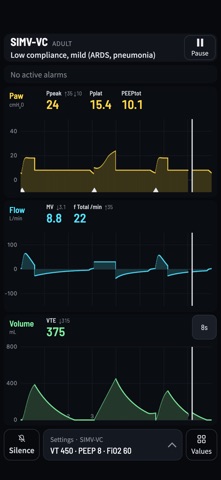
When the ventilator alarms — what to look at, what to do. Vent Sim puts you at the bedside. The ventilator alarm is ringing: read the chart, use checks and treatments to find the cause and fix it, then name the cause and review what happened. Each scene takes about 2 minutes, and you can run them again on your own. Works on iPad and iPhone. It's also a full ventilator simulator underneath: - Modes: A/C-VC, A/C-PC, SIMV-VC, SIMV-PC, and PSV (with apnea backup ventilation) - Real-time airway pressure, flow, and volume waveforms that respond immediately to every setting you change - Alarms for airway pressure, tidal volume, minute ventilation, respiratory rate, and apnea - Work of breathing (WOB), so you can compare a patient's effort before and after a mode change - Built-in cases across normal lungs, ARDS (mild/moderate/severe), COPD, and severe asthma - A Sources screen showing where the app's numbers come from (textbooks, guidelines, papers), and marking which values are design decisions Free: A/C (volume and pressure control) and PSV modes, the core settings, 3 cases (normal lungs, moderate ARDS, COPD), and 2 training scenes (airway blocked by secretions, circuit disconnection). One-time purchase unlocks: SIMV (volume and pressure control), advanced settings (inspiratory pause, rise time), the remaining cases (mild and severe ARDS, severe asthma), 3 more training scenes (mainstem intubation, unplanned extubation, tension pneumothorax), and review export (image and data). One-time purchase — no subscription. Buy it once, use it for as long as you want. No accounts, no sign-in, and no data collection of any kind — see the Privacy Policy below. Please note: - This app is for education only and is not intended for clinical decision-making. - It is based on a single-compartment lung model and a simplified gas exchange model, so its behavior may differ from that of real patients. - It does not reproduce the behavior of any specific manufacturer's ventilator. When operating actual equipment, follow the manufacturer's instructions for use.
What's new · 1.3.0
- Now on iPhone (portrait). The Full Version you bought on iPad also works on iPhone with the same Apple ID - Training rebuilt. The alarm is already ringing: read the chart, use checks and treatments to find the cause and fix it, then name the cause and review what happened (about 2 minutes each). 5 scenes: 2 free, 3 in the Full Version (mainstem intubation, unplanned extubation, tension pneumothorax) - Case setup now lets you choose spontaneous breathing: none, weak or strong - A Home button takes you back to the title screen from the monitor and from each training screen - The alarm sound now stops while the simulation is paused - Waveform display fixes
Details