

Fotoarchiv – Photo Vault
Frank Deubert · Photo & Video
Independent analytics for this App Store listing. AppTracker is not affiliated with Frank Deubert.
Chart standing · US
What changed · US
Listing changes AppTracker has observed for this app in this storefront — new versions, price moves, rating shifts, and store copy.
Digitise your old photos — included in the purchase, no subscription. SCAN ALBUM PAGES AND SINGLE PRINTS • Photograph a whole album page: the app finds the individual prints, cuts them out, straightens each one and files it as a photo of its own. A single print works the same way. • Shots are taken at your camera's full resolution — as JPG or as RAW, in ProRAW on the Pro models. Several pages one after another work too. • Before you commit, you check what was found: every frame can be dragged by its four corners, moved or left out — and whatever the detection missed, you add yourself. Each frame shows how many megapixels it will come out at. • Afterwards you can give the whole batch a date. Leave it out and the field stays empty — better than a wrong date, since sorting and searching go by it. • The page shot itself is not kept; only the cut-out prints land in the album. TAKE A PHOTO Alongside memory cards and the Photos library there is now the direct route: “Take a photo” shoots into the open album, as JPG, as RAW or both at once. The import then runs as usual, with duplicate checking and RAW previews. ROTATE AND CROP Turn in 90° steps, straighten a crooked horizon by up to 15 degrees, crop freely or to 1:1, 4:3, 3:2 and 16:9, and set exposure, shadows and highlights by hand — each slider both ways. None of it changes the file: the values sit with the photo, and “Reset” brings the original back. A photo shared as a JPG carries the edit in it; the RAW original still leaves the archive untouched. SLIDESHOW MUSIC Load up to 10 of your own tracks into the app and tick what should play before each slideshow. The music fades in, carries on across every photo and fades out at the end — over AirPlay or a connected display too, and even while the device is muted. Your own files as MP3, M4A, WAV or AIFF; tracks from a music subscription are copy-protected and cannot be used.
In-app purchases · US
No in-app purchases.
Screenshots




Similar apps
Competitors and close alternatives, as estimated by AppTracker.


About
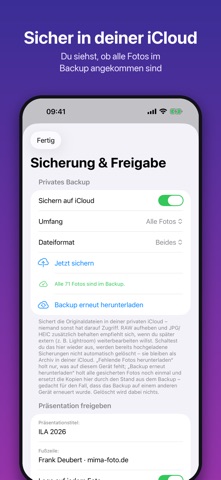
Fotoarchiv is the private photo vault for photographers: protected albums like the well-known vault apps, but built around the workflow behind the camera. For iPhone, iPad and Mac — one purchase covers all three. SCAN OLD PHOTOS, NO SUBSCRIPTION Put an album page down and photograph it: the app cuts out the single prints, straightens each one and files it as a photo of its own. Single prints work the same way. Before you commit you see what was found — every frame can be dragged by its corners, left out or added by hand. Afterwards you can give the whole batch a date; leave it off and it stays empty rather than wrong. Shots are taken at your camera's full resolution. PROTECTED ALBUMS Protect every album individually with a password, Face ID or Touch ID; optionally the whole app locks too. Your photos live on your device and in your own iCloud only — never on third-party servers, no account, no tracking. TIDY UP YOUR IPHONE AND IPAD Thousands of photos in your library and nothing to be found? Bring them into albums of your own — by job, shoot or year, with batch renaming and a trash. RAW, MEMORY CARDS AND CAMERA Import from a memory card or from the Photos library — as RAW, as JPG/HEIC/TIFF, or both at once; “Take a photo” shoots straight into the open album. The common RAW formats are supported: CR3/CR2 (Canon), NEF (Nikon), ARW (Sony), RAF (Fujifilm), ORF (Olympus, OM System), RW2 (Panasonic), PEF (Pentax), DNG and Apple ProRAW. RAW and JPG of the same shot are kept together as one photo, and your originals are only ever copied, never altered. ROTATE, CROP, LIGHT Turn a photo in 90° steps, straighten a crooked horizon, crop freely or to a fixed ratio and set exposure, shadows and highlights by hand — or leave it to one tap on the automatic correction. None of it changes the file: “Reset” brings the original back, years later as well. KEYWORDS, SEARCH AND SMART ALBUMS Every photo gets keywords, a title, a rating and a colour label. The search finds photos across every album — by keyword, camera, lens or year. A smart album holds no photos of its own but rules like “at least 4 stars” or “not backed up yet”, and always shows whatever matches right now. When you share, the keywords travel in the file, and beside a RAW in an .xmp file. EDIT ELSEWHERE, BACK AUTOMATICALLY Develop your photos in the editing app of your choice: “Edit in another app” hands them over, and “Find edited photos” brings the saved version back. SELECT, PRESENT, WITH MUSIC Work through your shots in the filmstrip and star the best ones. That selection is exactly what you show in presentation mode: offline on the device itself, via AirPlay on a TV, or on a connected external display — with your own title, your contact details in the footer and up to 10 tracks of your own. SHARE WITH CLIENTS Share your selection as a presentation: a single file with a slideshow, filmstrip and photo names on your own iCloud Drive, with your logo if you like. The app creates the link and sends it with a ready-made mail text; your client opens it in the browser, without the app and without signing in. The link is valid for 30 days. CONTACT SHEET AS A PDF Turn any album into a contact sheet on A4: with a title, photo names, footer, logo and boxes to tick. Four layouts, from 24 photos per page to a client selection with 6 large ones. BACK UP AND RESTORE Back up each album individually to your private iCloud — all photos or only the starred ones. Delete an album and the backup can stay; one tap brings it back, including its password protection. ONE PURCHASE No subscription, no ads, no account. One purchase covers iPhone, iPad and Mac. Note: Importing from a memory card needs a compatible card reader. Backup and sharing use your own iCloud storage.
What's new · 1.3
Digitise your old photos — included in the purchase, no subscription. SCAN ALBUM PAGES AND SINGLE PRINTS • Photograph a whole album page: the app finds the individual prints, cuts them out, straightens each one and files it as a photo of its own. A single print works the same way. • Shots are taken at your camera's full resolution — as JPG or as RAW, in ProRAW on the Pro models. Several pages one after another work too. • Before you commit, you check what was found: every frame can be dragged by its four corners, moved or left out — and whatever the detection missed, you add yourself. Each frame shows how many megapixels it will come out at. • Afterwards you can give the whole batch a date. Leave it out and the field stays empty — better than a wrong date, since sorting and searching go by it. • The page shot itself is not kept; only the cut-out prints land in the album. TAKE A PHOTO Alongside memory cards and the Photos library there is now the direct route: “Take a photo” shoots into the open album, as JPG, as RAW or both at once. The import then runs as usual, with duplicate checking and RAW previews. ROTATE AND CROP Turn in 90° steps, straighten a crooked horizon by up to 15 degrees, crop freely or to 1:1, 4:3, 3:2 and 16:9, and set exposure, shadows and highlights by hand — each slider both ways. None of it changes the file: the values sit with the photo, and “Reset” brings the original back. A photo shared as a JPG carries the edit in it; the RAW original still leaves the archive untouched. SLIDESHOW MUSIC Load up to 10 of your own tracks into the app and tick what should play before each slideshow. The music fades in, carries on across every photo and fades out at the end — over AirPlay or a connected display too, and even while the device is muted. Your own files as MP3, M4A, WAV or AIFF; tracks from a music subscription are copy-protected and cannot be used.
Details