

AstroLab
SOURC3 · Education
Independent analytics for this App Store listing. AppTracker is not affiliated with SOURC3.
Chart standing · US
In-app purchases · US
No in-app purchases.
Screenshots


Similar apps
Competitors and close alternatives, as estimated by AppTracker.
 StarLens: Star & Planet Finder
Masakazu Yamada
StarLens: Star & Planet Finder
Masakazu Yamada
 Star Map: Sky & Star Finder
MUHAMMET USLU
Star Map: Sky & Star Finder
MUHAMMET USLU
 Star Rover - Stargazing Guide
寒飞 易
Star Rover - Stargazing Guide
寒飞 易
 Star Gazer - Astronomy Sky Map
LeoStudio Global
Star Gazer - Astronomy Sky Map
LeoStudio Global
 Starlight® - Explore the Stars
ION6, LLC
Starlight® - Explore the Stars
ION6, LLC
 Cosmo Lens: Star Finder
Baptiste LAZ
Cosmo Lens: Star Finder
Baptiste LAZ
 GoSkyWatch Planetarium
GoSoftWorks
GoSkyWatch Planetarium
GoSoftWorks
 SPACE AR: Stargazing Star Map
Gen Takagaki
SPACE AR: Stargazing Star Map
Gen Takagaki
About
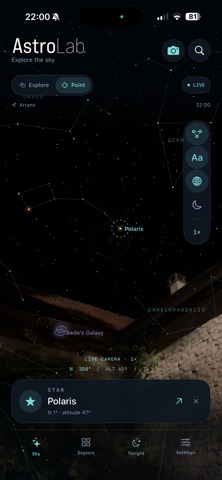
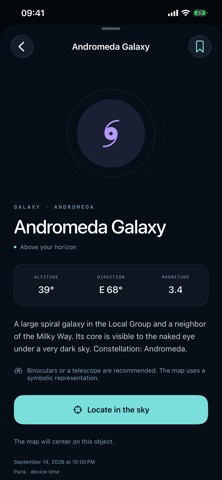
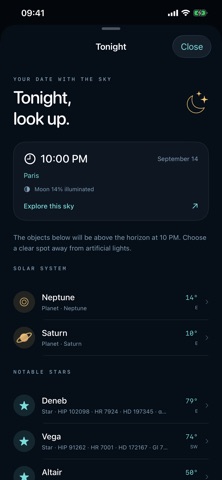
Put a name to the lights above you. AstroLab brings the night sky to your iPhone. Point your phone toward the sky to explore the stars and planets in that direction, or browse the map by touch from wherever you are. FIND YOUR WAY Choose an object and tap Locate. In Point mode, a direction arrow guides you toward your target while the sky continues to follow your phone. Explore constellations, tap an object for its story, and save your favorites for another night. A SKY FULL OF DISCOVERIES • 8,920 stars and all 88 constellations. • The Sun, Moon, Mercury, Venus, Mars, Jupiter, Saturn, Uranus, and Neptune, with positions calculated on your device. • 110 deep-sky objects, including the Orion Nebula, Andromeda Galaxy, Pleiades, and Magellanic Clouds. • Search by English or French name, common alias, or catalog reference such as M31, NGC7000, or HIP11767. YOUR VIEW OF THE SKY Use the virtual map on its own or enable the optional live rear-camera background. Adjust constellation lines, object names, deep-sky objects, and the horizontal grid. Switch to a red night-view palette, change the limiting magnitude, and zoom in to explore. PLAN YOUR NEXT LOOK UP Tonight suggests objects above the horizon at 10 PM for your chosen location and shows the Moon’s illuminated fraction. Travel through dates from 1900 to 2100, move by an hour or a day, and return to the live sky with Now. Dates and times use your device’s time zone. EXPLORE ON YOUR TERMS Use your location or enter coordinates manually. The star catalogs and sky calculations work offline, with no account required. English and French are included, and favorites are saved on your device. You can also enable the current ISS position when an internet connection and fresh data from the third-party service Where the ISS at are available. This optional feature shows the station’s current direction; it does not predict passes. Pointing uses your iPhone’s compass and gyroscope. The optional camera view adds a live background to the calculated map; it does not identify objects in photographs. Deep-sky shapes are symbolic, and what you can see outdoors depends on the sky and observing conditions.
Details