

Star Map: Sky & Star Finder
MUHAMMET USLU · Weather
Independent analytics for this App Store listing. AppTracker is not affiliated with MUHAMMET USLU.
Chart standing · US
What changed · US
Listing changes AppTracker has observed for this app in this storefront — new versions, price moves, rating shifts, and store copy.
A much bigger sky. • 86 real photographs: zoom in on a bright nebula or galaxy and its actual image appears. ESO's panorama of the whole Milky Way is a new layer behind the map. • Zoom in and the stars keep coming — 74,000 more, down to magnitude 9. • Zoom further and a planet stops being a dot: Venus in phase, Jupiter with its four moons where they really are, Saturn's rings at tonight's real tilt. • Satellites are drawn at the brightness they will really have as they pass. • An encyclopedia built in — 300+ written entries on the planets, all 88 constellations and their myths, every Messier object and the brightest stars. • Guided tours that walk you across the sky, a stop at a time. • The calendar now finds real events: eclipses for your own location, conjunctions, oppositions, elongations, equinoxes and supermoons. • Deep sky grew from 3 objects to 1,800. Comets, planet moons and 150+ satellites arrived with it. • New map layers — constellation figures, boundaries, asterisms, the Milky Way, grids, the ecliptic and a real horizon. • The Moon is drawn in its true phase, and every planet in its own colour. • Time Machine — scrub to any date and watch the whole sky move with it. • Widgets, an Apple Watch app, and a proper iPad layout. • Sky news, sharable object cards, and optional event reminders. • Two map modes — Light stays smooth on any phone, Detail turns everything on. • A new opening: the solar system exactly where it stands today.
In-app purchases · US
What this app sells inside itself, grouped by kind and priced for this storefront.
Screenshots


Keywords this app targets
Search terms AppTracker associates with this app — estimates, not search volume. ❝ = in the app's title; a highlighted number is its current position for that term.
Similar apps
Competitors and close alternatives, as estimated by AppTracker.
 Star Guide: Night Sky Map
Star register
3 shared topics · 3 shared title words
Star Guide: Night Sky Map
Star register
3 shared topics · 3 shared title words
 Sky Map - Star Tracker
Nguyen Anh
2 shared topics · 3 shared title words
Sky Map - Star Tracker
Nguyen Anh
2 shared topics · 3 shared title words
 Star Gazer - Astronomy Sky Map
LeoStudio Global
2 shared topics · 3 shared title words
Star Gazer - Astronomy Sky Map
LeoStudio Global
2 shared topics · 3 shared title words
 Stellarium Mobile - Star Map
Noctua Software Ltd
3 shared topics · 3 shared title words
Stellarium Mobile - Star Map
Noctua Software Ltd
3 shared topics · 3 shared title words
 Star Tracker Lite-Live Sky Map
身吉 潘
3 shared topics · 3 shared title words
Star Tracker Lite-Live Sky Map
身吉 潘
3 shared topics · 3 shared title words
 Starry Map
NYANKO SOFTWARE
2 shared topics · 1 shared title word
Starry Map
NYANKO SOFTWARE
2 shared topics · 1 shared title word
 Cosmo Lens: Star Finder
Baptiste LAZ
1 shared topic · 3 shared title words
Cosmo Lens: Star Finder
Baptiste LAZ
1 shared topic · 3 shared title words
 Starlight® - Explore the Stars
ION6, LLC
2 shared topics
Starlight® - Explore the Stars
ION6, LLC
2 shared topics
About
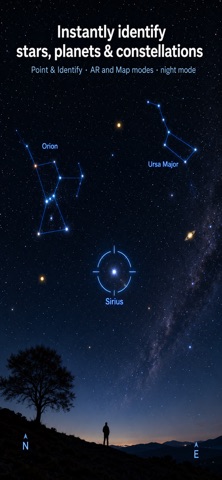
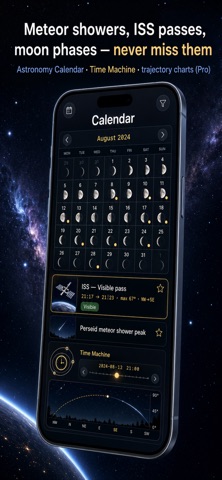
Point your phone at the night sky and instantly identify any star, planet or constellation. Your iPhone becomes a pocket planetarium and a personal stargazing guide. • Point & identify in AR or Map mode — a live sky map labels every star, planet and constellation • Tonight — a Stargazing Index (clouds, Moon, darkness) tells you if it is worth heading out, what is visible and the best time to look • Astronomy calendar — moon phases, meteor showers, ISS passes, sunrise, sunset and twilight • Time Machine — scrub to any date and explore the past or future sky • Object paths — altitude curves and the best viewing time • Night mode — a red filter that protects your night vision • 9,000+ stars, the planets, the Moon and deep-sky objects, all computed offline • Privacy-first — your location never leaves your device. No account, no ads Free to use, with an optional Pro upgrade for satellites, the full calendar, Time Machine and more. Star data: HYG Database (CC BY-SA). Constellations: Stellarium. Terms of Use: https://www.apple.com/legal/internet-services/itunes/dev/stdeula/ Support: https://app.notion.com/p/Support-Astra-38c0cc7ee736805f8479e0494e45fe88?source=copy_link
What's new · 1.2
A much bigger sky. • 86 real photographs: zoom in on a bright nebula or galaxy and its actual image appears. ESO's panorama of the whole Milky Way is a new layer behind the map. • Zoom in and the stars keep coming — 74,000 more, down to magnitude 9. • Zoom further and a planet stops being a dot: Venus in phase, Jupiter with its four moons where they really are, Saturn's rings at tonight's real tilt. • Satellites are drawn at the brightness they will really have as they pass. • An encyclopedia built in — 300+ written entries on the planets, all 88 constellations and their myths, every Messier object and the brightest stars. • Guided tours that walk you across the sky, a stop at a time. • The calendar now finds real events: eclipses for your own location, conjunctions, oppositions, elongations, equinoxes and supermoons. • Deep sky grew from 3 objects to 1,800. Comets, planet moons and 150+ satellites arrived with it. • New map layers — constellation figures, boundaries, asterisms, the Milky Way, grids, the ecliptic and a real horizon. • The Moon is drawn in its true phase, and every planet in its own colour. • Time Machine — scrub to any date and watch the whole sky move with it. • Widgets, an Apple Watch app, and a proper iPad layout. • Sky news, sharable object cards, and optional event reminders. • Two map modes — Light stays smooth on any phone, Detail turns everything on. • A new opening: the solar system exactly where it stands today.
Details