

settled. - money owed, sorted.
DAVID JONATHAN PASUMBAL · Finance
Independent analytics for this App Store listing. AppTracker is not affiliated with DAVID JONATHAN PASUMBAL.
Chart standing · US
What changed · US
Listing changes AppTracker has observed for this app in this storefront — new versions, price moves, rating shifts, and store copy.
Credit cards (beta) - Add your credit cards with their limit, interest rate, statement closing day and payment due date. - Interest is calculated the way your bank does it: monthly on your average daily balance (the default for ₱ cards), or yearly/daily-compounding for US-style cards. - Monthly statements close automatically, with the statement balance, minimum due and due date. - A breakdown of each statement: previous balance, payments, new charges, average daily balance and interest. Charges, installments and payments - Log purchases and refunds, with merchant, note, date and a receipt photo. - Installment plans (0% or with an add-on rate) that bill one part per statement, with early payoff. - Pay the statement balance, the minimum, the current balance or a custom amount, with a clear note on what each choice means. Charge loans, receipts and subscriptions to a card An optional "also charge to card" picker adds the same amount as a charge on the card you choose: - Loans: when you add a new "i lent" single transaction. - Receipts: when you add a new receipt that you paid for. - Subscriptions: when you record a recurring payment, like paying Netflix with your BPI card. Other improvements - Due soon now scrolls up to 28 days ahead, with a "today" button to jump back. - On iPhone, People is now at the top right of Home. - Four new widgets: • Next Due: the next loan, recurring payment or card statement that's due. • Card Utilization: how much of a card's credit limit is in use. • Card Balances: your total card balance and available credit. • Due Soon: loans, recurring payments and card statements due this week. Tap a day to see what's due. Fixes - Widgets are now readable on Clear and Tinted Home Screens.
Ratings breakdown · US
The star breakdown behind this app's rating in this storefront.
In-app purchases · US
No in-app purchases.
Screenshots




Similar apps
Competitors and close alternatives, as estimated by AppTracker.
 BalanceTrackr
Ole Morten Tengesdal
BalanceTrackr
Ole Morten Tengesdal
 DebtMe: IOU & Debt Tracker
Huong Le Dieu
DebtMe: IOU & Debt Tracker
Huong Le Dieu
 DebtTracker: IOU & Loan Log
Osman Dogan
DebtTracker: IOU & Loan Log
Osman Dogan
 Debts.app
Oleksandr Kabanov
Debts.app
Oleksandr Kabanov
 Dibs – Simple Debt Tracker
Pablo Gamero
Dibs – Simple Debt Tracker
Pablo Gamero
 Debt Tracker: Personal Debts
David Serrano Canales
Debt Tracker: Personal Debts
David Serrano Canales
 Money Tracker: Budget App
Serhii Surzhykov
Money Tracker: Budget App
Serhii Surzhykov
 Loan Tracker: You Owe Me
IEVGENII IABLONSKYI
Loan Tracker: You Owe Me
IEVGENII IABLONSKYI
About
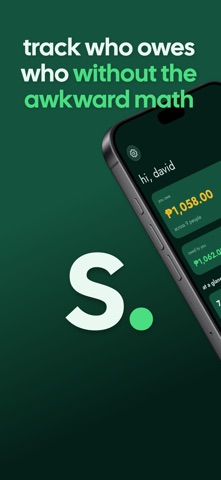
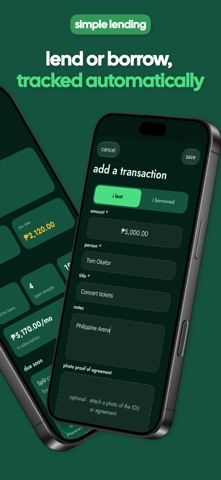
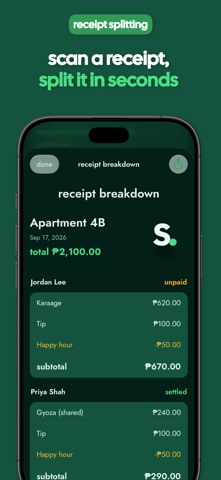
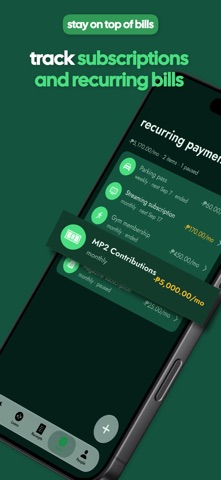
NEVER LOSE TRACK OF IOUs Log what you lent or borrowed in seconds. Single payments or installment plans, with optional interest calculated automatically. See exactly what's outstanding, who's behind, and what's already settled, all in one ledger. CREDIT CARDS UNDER CONTROL (BETA) Add your cards and statements close on their own, with the minimum due and interest calculated the way your bank does it. Log purchases, refunds, and installment plans, then pay the statement, the minimum, or a custom amount. Card debt stays separate from what you owe people. It's in beta, so feedback is welcome. PAID WITH A CARD? TRACK BOTH Lent money, covered a receipt, or paid a subscription with your card? Charge it to the card in the same step and both stay accurate. SPLIT BILLS WITHOUT THE SPREADSHEET Snap a photo of any receipt and Settled reads the items for you. Assign items to whoever ordered them, split shared plates evenly, and let tax, tip, and discounts divide themselves proportionally. Everyone's exact share, done before your food gets cold. YOUR RECEIPTS NEVER LEAVE YOUR PHONE Receipt scanning runs entirely on-device with Apple Intelligence. Nothing is uploaded to a server to be read. Your spending stays private by design, not by policy. LOCKED TO YOU Protect your ledger with a PIN, Face ID, or Touch ID. Who owes you what is nobody else's business, even if someone picks up your device. ONE SCREEN, EVERYTHING THAT MATTERS Open the app and immediately see your net balance, your card balances, what's due soon for the next four weeks, your most recent activity, and how many open loans or receipts you're juggling. No digging through tabs to find out where you stand. YOUR BALANCE, RIGHT ON YOUR HOME SCREEN Add widgets to see your net balance, card balances, how much of a card's limit you've used, and what's due next or this week, without opening the app. Tap a Quick Actions widget to jump straight to logging a loan, a receipt, a recurring payment, or a card charge. BILLS THAT COME BACK Track subscriptions and recurring bills alongside your loans. Weekly, monthly, or yearly, nothing recurring catches you off guard. SETTLE UP, THE EASY WAY Record a payment the moment it happens. Remind someone via text with one tap. When it's time to collect, export a clean, itemized breakdown image you can send to anyone, even if they don't have the app. GROUPS, PEOPLE, AND YOUR BALANCE WITH EACH Organize who you split with into groups: roommates, trip crews, the office lunch chat. See your running balance with every person at a glance. IPHONE, IPAD, AND MAC Settled runs on iPhone, iPad, and Mac (Designed for iPad), with layouts built for each screen. Split the bill on your phone at dinner and review your balances on your Mac the next morning. Everything syncs privately through iCloud. No account to create, no password to remember. --- Feature list: - Log loans & IOUs: either direction, single payment or installments, with optional interest - Credit cards (beta): statements, minimum due, interest, installments, and available credit - Charge a loan, receipt, or subscription payment to a card in the same step - AI-powered receipt scanning, entirely on-device: no cloud upload (Requires devices that support Apple Intelligence) - Itemized bill splitting with proportional tax/tip/discount allocation - App lock with PIN, Face ID, or Touch ID - Home dashboard: net balance, card balances, due soon, recent activity, at-a-glance stats - Home Screen widgets: balances, cards, next due, due soon, stats, and quick actions - Recurring payment & subscription tracking (weekly/biweekly/monthly/yearly) - Payment history & one-tap "remind via text" - Shareable, exportable itemized receipt breakdown images - Group and contact management with per-person balances - In-app notifications when a loan, recurring payment, or card statement is due - Available on iPhone, iPad, and Mac (Designed for iPad) - Private iCloud sync across your devices - Currency selection support
What's new · 4.0
Credit cards (beta) - Add your credit cards with their limit, interest rate, statement closing day and payment due date. - Interest is calculated the way your bank does it: monthly on your average daily balance (the default for ₱ cards), or yearly/daily-compounding for US-style cards. - Monthly statements close automatically, with the statement balance, minimum due and due date. - A breakdown of each statement: previous balance, payments, new charges, average daily balance and interest. Charges, installments and payments - Log purchases and refunds, with merchant, note, date and a receipt photo. - Installment plans (0% or with an add-on rate) that bill one part per statement, with early payoff. - Pay the statement balance, the minimum, the current balance or a custom amount, with a clear note on what each choice means. Charge loans, receipts and subscriptions to a card An optional "also charge to card" picker adds the same amount as a charge on the card you choose: - Loans: when you add a new "i lent" single transaction. - Receipts: when you add a new receipt that you paid for. - Subscriptions: when you record a recurring payment, like paying Netflix with your BPI card. Other improvements - Due soon now scrolls up to 28 days ahead, with a "today" button to jump back. - On iPhone, People is now at the top right of Home. - Four new widgets: • Next Due: the next loan, recurring payment or card statement that's due. • Card Utilization: how much of a card's credit limit is in use. • Card Balances: your total card balance and available credit. • Due Soon: loans, recurring payments and card statements due this week. Tap a day to see what's due. Fixes - Widgets are now readable on Clear and Tinted Home Screens.
Details