

Bingester: TV Show Tracker
Gunnar Wolski · Entertainment
Independent analytics for this App Store listing. AppTracker is not affiliated with Gunnar Wolski.
Chart standing · US
What changed · US
Listing changes AppTracker has observed for this app in this storefront — new versions, price moves, rating shifts, and store copy.
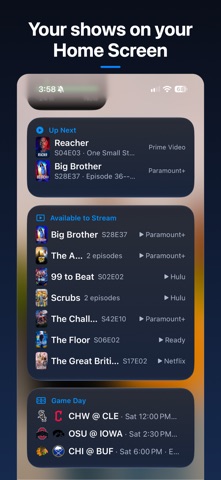
SIRI Ask Bingester out loud. Say "Bingester" in the phrase: "What's on in Bingester tonight?" "What's next in Ghosts in Bingester?" "Any new episodes in Bingester?" "When does Ghosts come back in Bingester?" "When do the Chiefs play next in Bingester?" Siri can also mark the next episode watched, add a show or remove one, and it always asks before it changes anything. Every phrase works in the Shortcuts app too, and on the Action button. TICK OFF FROM THE WIDGET Up Next now has a checkmark button on every row. Tap it to mark that episode watched without opening the app, and the widget moves on to the next one. FASTER Bingester is much quicker with a big library. It opens and comes back from the background without freezing, ticking off an episode no longer stalls, and My Shows scrolls smoothly. FIXES Every team's logo now shows in the Game Day widget, and team badges are colourful so they stand out.
Ratings breakdown · US
The star breakdown behind this app's rating in this storefront.
In-app purchases · US
No in-app purchases.
Screenshots




Similar apps
Competitors and close alternatives, as estimated by AppTracker.
 Bingers: TV & Movie Tracker
Onbox Labs, Inc.
Bingers: TV & Movie Tracker
Onbox Labs, Inc.
 TV Club: Movies & Show Tracker
TV Show Tracker, LLC
TV Club: Movies & Show Tracker
TV Show Tracker, LLC
 ShowFlow: TV Tracker
Perry Klos
ShowFlow: TV Tracker
Perry Klos
 TV Show Tracker - TV Club
RanduSoft SRL
TV Show Tracker - TV Club
RanduSoft SRL
 Suite TV
Nicolas Bordeaux
Suite TV
Nicolas Bordeaux
 Serializd
Serializd
Serializd
 BingeReady: Episode Countdown
Tim Galvin
BingeReady: Episode Countdown
Tim Galvin
 Sofa Time: TV Show Tracker
Javier Aznar de los Rios
Sofa Time: TV Show Tracker
Javier Aznar de los Rios
About
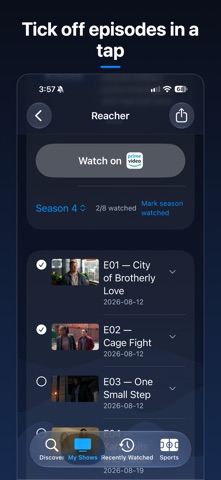
Never lose track of what you're watching. Bingester keeps track of the shows you're watching, remembers exactly where you left off, and tells you what's airing today and what's ready to watch. Add a show once and every season and episode is there. Mark episodes watched as you go, see your progress at a glance, and always know what's next. KNOW WHAT'S ON • See the shows you follow that air today • See episodes that are ready to watch • If nothing is airing, see what's coming next • Get notified when new episodes are available ALWAYS KNOW WHERE YOU LEFT OFF • Track every season and episode • See your progress at a glance • Mark individual episodes or entire seasons watched • Pick up exactly where you stopped KNOW WHERE TO WATCH Optionally connect your streaming services to see where your shows are available and open them directly in the service's app. WIDGETS Put Up Next, Airing Today, Game Day, and your new-episode count on your Home or Lock Screen. YOUR LIBRARY, YOUR DEVICES iCloud keeps your shows and watched episodes in sync between iPhone and iPad. FOLLOW YOUR TEAMS Track NFL, NBA, MLB, NHL, WNBA, college football, and men's and women's college basketball. See upcoming games, where they're airing, and live scores. PRIVATE BY DESIGN No account. No ads. No tracking. No analytics. Your library stays on your devices and in your own iCloud. Bingester was built for people who watch a lot of TV and just want to know: What's on? What have I watched? What's next?
What's new · 1.0.14
SIRI Ask Bingester out loud. Say "Bingester" in the phrase: "What's on in Bingester tonight?" "What's next in Ghosts in Bingester?" "Any new episodes in Bingester?" "When does Ghosts come back in Bingester?" "When do the Chiefs play next in Bingester?" Siri can also mark the next episode watched, add a show or remove one, and it always asks before it changes anything. Every phrase works in the Shortcuts app too, and on the Action button. TICK OFF FROM THE WIDGET Up Next now has a checkmark button on every row. Tap it to mark that episode watched without opening the app, and the widget moves on to the next one. FASTER Bingester is much quicker with a big library. It opens and comes back from the background without freezing, ticking off an episode no longer stalls, and My Shows scrolls smoothly. FIXES Every team's logo now shows in the Game Day widget, and team badges are colourful so they stand out.
Details