

ShowFlow: TV Tracker
Perry Klos · Entertainment
Independent analytics for this App Store listing. AppTracker is not affiliated with Perry Klos.
Chart standing · US
What changed · US
Listing changes AppTracker has observed for this app in this storefront — new versions, price moves, rating shifts, and store copy.
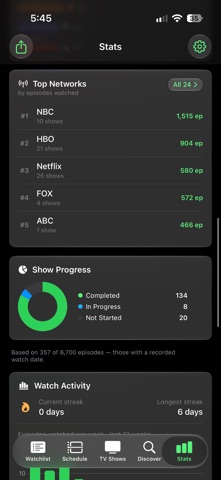
A new look, and a Stats screen worth opening. ShowFlow has been rebuilt around iOS's glass design. Filter bars, pills, toolbars and cards across Watchlist, Schedule, Show Detail and Stats now float over your shows instead of boxing them in — and there's a brand-new app icon to match, with proper dark and tinted versions for your Home Screen. STATS, REDESIGNED - Library Spread — how your whole library breaks down by genre, not just the part you've finished. - Longest Binge — your biggest single sitting, with a rating to go with it. - Tap a Fun Fact — the rows open up and show you what's behind the number. - Pick a week on the Watch Activity chart and see exactly what you watched. - Genre colours stay put. Drama used to be a different colour every time you opened the app. Now it isn't — and every genre carries its own emoji. - Stats are honest about their sample. If some of your history was marked without a date, the screen tells you how many episodes it's actually drawing from. CAST Show Detail now has a Cast section — who's in it, with photos. SEE IT BEFORE YOU ADD IT Tap any search result you aren't already tracking and get a preview first: poster, summary, network, status, when it airs. Add it from there, or don't. FIXES - Repaired watched counts. A show could read "0 of 331 watched" after an ordinary launch if its episodes hadn't finished syncing. That's fixed — and there's a Recalculate Watched Counts button in Settings if any of your shows drifted. - Search results with no poster art used to spin forever. They show a placeholder now.
Ratings breakdown · US
The star breakdown behind this app's rating in this storefront.
In-app purchases · US
No in-app purchases.
Screenshots




Keywords this app targets
Search terms AppTracker associates with this app — estimates, not search volume. ❝ = in the app's title; a highlighted number is its current position for that term.
Similar apps
Competitors and close alternatives, as estimated by AppTracker.
 TV Show Tracker - TV Club
RanduSoft SRL
1 shared topic · 2 shared title words
TV Show Tracker - TV Club
RanduSoft SRL
1 shared topic · 2 shared title words
 Suite TV
Nicolas Bordeaux
1 shared topic · 1 shared title word
Suite TV
Nicolas Bordeaux
1 shared topic · 1 shared title word
 TV Club: Movies & Show Tracker
TV Show Tracker, LLC
1 shared topic · 2 shared title words
TV Club: Movies & Show Tracker
TV Show Tracker, LLC
1 shared topic · 2 shared title words
 Sofa Time: TV Show Tracker
Javier Aznar de los Rios
1 shared topic · 2 shared title words
Sofa Time: TV Show Tracker
Javier Aznar de los Rios
1 shared topic · 2 shared title words
 Bingester: TV Show Tracker
Gunnar Wolski
Bingester: TV Show Tracker
Gunnar Wolski
 Seekee - Watch Movie,drama TV
Ailsa Maceirap
1 shared topic · 1 shared title word
Seekee - Watch Movie,drama TV
Ailsa Maceirap
1 shared topic · 1 shared title word
 Movie App - Movies Now! + TV
Flickdirect Inc
1 shared topic · 1 shared title word
Movie App - Movies Now! + TV
Flickdirect Inc
1 shared topic · 1 shared title word
 TV Launcher - Live US Channels
Adam Foot
1 shared topic · 1 shared title word
TV Launcher - Live US Channels
Adam Foot
1 shared topic · 1 shared title word
About
Every show you watch, finally in order. ShowFlow is a fast, private, native iPhone app that tracks your TV in episode-perfect detail — so you always know what to watch next, when new episodes air, and exactly where to stream them. Most trackers were built for collectors. ShowFlow was built for people who actually want to watch the next episode tonight. A SMARTER WATCHLIST Not a wall of posters — a short, ranked list of what's actually ready for you. Five practical filters (Ready to Watch, New Tonight, Caught Up, Behind, All), with the next unwatched episode pre-expanded. Stop scrolling, start watching. CAN'T DECIDE? ROLL THE DICE Tap the die and let fate pick tonight's show — always your next unwatched episode, never a spoiler, never something that hasn't aired. Disagree with destiny? Roll again. SYNCED ACROSS YOUR DEVICES Your library, progress, and tags stay in step on every device — through your own private iCloud. No ShowFlow account, no ShowFlow servers. Your data syncs through infrastructure only your Apple ID can read. ONE-TAP STREAMING Every show knows where it lives. Tap the colored pill and the streaming app opens — Netflix, Hulu, Max, Apple TV+, and more. No app installed? ShowFlow opens the service's search page with the title pre-filled. No third-party redirects, no trackers. EPISODE NOTIFICATIONS A reminder with the show's poster at 9 AM on each episode's air day. Per-show toggles and custom times, with zero servers — every alert is scheduled and delivered by your phone. Never accidentally read a spoiler again. EVERY EPISODE, IN DETAIL Tap any episode for its description, air date, and runtime — and mark it watched right from the card. Placeholder "TBD" titles fix themselves the moment networks announce. Open any show to see its full cast with photos. ORGANIZE WITH TAGS A show can be a comedy and a comfort rewatch and something you watch with your partner. Unlimited custom tags — each with its own symbol or emoji — let you organize the way you actually think, then filter your library to any combination. YOUR STATS See how much TV you've really watched — Viewer Rank, real per-episode watch time, completion rate, top genres and networks, and your longest binge. Library Spread shows how your whole collection breaks down by genre, not just the part you've finished. Every Fun Fact opens up to show what's behind the number, genres carry their own colour and emoji, and you can pick any week on the activity chart to see exactly what you watched. Share a clean stats card with a friend. ADD ANYTHING IN SECONDS Search any series and tap it for a preview — poster, summary, network, when it airs — then add it with one tap. Results appear as you type, typos still find the right show, and every season, episode, and air date populates automatically. No account, no sign-in, no waiting. ASK SIRI "What's next in ShowFlow?" Your next episodes, by voice, without opening the app. PRIVATE BY DESIGN No accounts. No servers. No analytics. No third-party trackers. Your watchlist lives on your device and syncs through your own private iCloud — readable only by your Apple ID. Your backup is a single file in your iCloud Drive you can read, copy, or delete. We never see what you watch — because there's no "we" that could. PAY ONCE, OWN IT FOREVER One quiet, focused TV tracker. No subscriptions, no in-app purchases, no ads. Buy it once and it's yours. TV data provided by TVMaze.
What's new · 1.2.0
A new look, and a Stats screen worth opening. ShowFlow has been rebuilt around iOS's glass design. Filter bars, pills, toolbars and cards across Watchlist, Schedule, Show Detail and Stats now float over your shows instead of boxing them in — and there's a brand-new app icon to match, with proper dark and tinted versions for your Home Screen. STATS, REDESIGNED - Library Spread — how your whole library breaks down by genre, not just the part you've finished. - Longest Binge — your biggest single sitting, with a rating to go with it. - Tap a Fun Fact — the rows open up and show you what's behind the number. - Pick a week on the Watch Activity chart and see exactly what you watched. - Genre colours stay put. Drama used to be a different colour every time you opened the app. Now it isn't — and every genre carries its own emoji. - Stats are honest about their sample. If some of your history was marked without a date, the screen tells you how many episodes it's actually drawing from. CAST Show Detail now has a Cast section — who's in it, with photos. SEE IT BEFORE YOU ADD IT Tap any search result you aren't already tracking and get a preview first: poster, summary, network, status, when it airs. Add it from there, or don't. FIXES - Repaired watched counts. A show could read "0 of 331 watched" after an ordinary launch if its episodes hadn't finished syncing. That's fixed — and there's a Recalculate Watched Counts button in Settings if any of your shows drifted. - Search results with no poster art used to spin forever. They show a placeholder now.
Details