

SDC – Sub Delay Checker
frank Barsch · Music
Independent analytics for this App Store listing. AppTracker is not affiliated with frank Barsch.
Chart standing · US
What changed · US
Listing changes AppTracker has observed for this app in this storefront — new versions, price moves, rating shifts, and store copy.
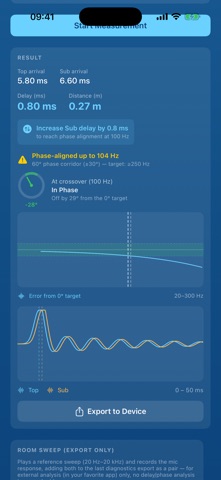
New in 1.1.0 • Crossover preview: see your crossover frequency, filter and delay as a live curve — low-pass, high-pass and, most importantly, their summed response. Drag inside the chart to set the crossover frequency. • Measured curves on top: after each measurement step, the measured response of Top and Sub is drawn over the preview, so the setting sits right next to what the system actually does. • Recheck: after dialling in the recommended delay, only the adjusted side is measured again — the other side stays as reference. Rooms usually need two or three rounds. • Guided flow: muting tips before each measurement, a level check that only continues once the input is in the green, and a clear "Measurement OK?" step that saves the result and offers the room sweep right after. • Room-mode warning when the level at the crossover frequency is too low for a trustworthy phase reading.
In-app purchases · US
No in-app purchases.
Screenshots

Similar apps
Competitors and close alternatives, as estimated by AppTracker.
 RT60 Acoustic Panel Test
Standard Software Incorporated
RT60 Acoustic Panel Test
Standard Software Incorporated
 SoundScope: Audio Analyzer
Waldemar Schneider
SoundScope: Audio Analyzer
Waldemar Schneider
 ARCQ SPL - SPL Meter
jiyeol bae
ARCQ SPL - SPL Meter
jiyeol bae
 Spektral Mobile
Matrix Productions Ltd
Spektral Mobile
Matrix Productions Ltd
 LipSync Test Tool
Norwin Palme
LipSync Test Tool
Norwin Palme
 safemixer
Mixfix Audio Productions
safemixer
Mixfix Audio Productions
 Open Sound Meter
Ehrenaudio GmbH
Open Sound Meter
Ehrenaudio GmbH
 Analyzer
DSP Mobile UG (haftungsbeschraenkt)
Analyzer
DSP Mobile UG (haftungsbeschraenkt)
About
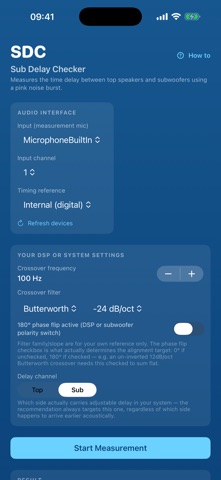
stop guessing - start measuring. you are a touring dj or a sound engineer on a tight schedule and a tighter budget. sdc gets your subs and tops aligned with the gear you already carry. WHAT YOU NEED - iPhone, iPad or Mac - an audio interface, or the usb card already in your mixer - a measurement microphone run the output and the microphone through the same interface. that shared sample clock is what makes the timing trustworthy, and sdc warns you when the two don't match. a built-in phone mic is fine for a rough look - a measurement mic on one shared clock is what you want when it counts. HOW IT GOES 1. hook it up and pick your input and output channels 2. hit start - a level check runs first so you can set your gain 3. the app walks you through it: mute the sub and it measures the top, mute the top and it measures the sub 4. read the answer WHAT YOU GET not a chart to interpret. a sentence to act on: "increase sub delay by 0.8 ms to reach phase alignment at 100 Hz" and the numbers behind it: arrival times for top and sub, the difference in milliseconds and in metres, how far the phase is off at your crossover, and how high up the two stay inside the 60 degree corridor. tell sdc if your dsp or sub runs a 180 degree polarity flip and it aims at the right target angle. set the value on your mixer or dsp. done. THE ROOM, IF YOU WANT IT after a measurement you can add a room sweep to the same export. sdc plays a reference sweep, records the response, and hands you both files as a stimulus/response pair for whatever analyser you already use. no analysis happens in the app - that part stays in your tool. for sweeps, use an interface. a phone's built-in speaker and mic don't share a tight enough clock, and the recording gets rejected on import. BUILT FOR THE FIELD - a guide inside the app: signal chain, mic position and height, the full workflow - an ear protection warning before anything loud plays - works with what you have: usb interfaces, mixer usb cards, wired measurement mics YOUR DATA STAYS YOURS no account, no network, no tracking, no ads. every export lands on your device and goes nowhere unless you send it yourself.
What's new · 1.1.1
New in 1.1.0 • Crossover preview: see your crossover frequency, filter and delay as a live curve — low-pass, high-pass and, most importantly, their summed response. Drag inside the chart to set the crossover frequency. • Measured curves on top: after each measurement step, the measured response of Top and Sub is drawn over the preview, so the setting sits right next to what the system actually does. • Recheck: after dialling in the recommended delay, only the adjusted side is measured again — the other side stays as reference. Rooms usually need two or three rounds. • Guided flow: muting tips before each measurement, a level check that only continues once the input is in the green, and a clear "Measurement OK?" step that saves the result and offers the room sweep right after. • Room-mode warning when the level at the crossover frequency is too low for a trustworthy phase reading.
Details