

WanderWay Navigation
Derek Boyer · Navigation
Independent analytics for this App Store listing. AppTracker is not affiliated with Derek Boyer.
Chart standing · US
What changed · US
Listing changes AppTracker has observed for this app in this storefront — new versions, price moves, rating shifts, and store copy.
WanderWay 2.0 brings more to discover on every drive: stories about the places you pass, scenic detours, a journal of your drives, and a fresh new look. STORY MODE • Hear a short story about places as you approach them. Turn it on in Settings › Points of Interest › Narration Length › Story. • With Apple Intelligence, stories are written on your iPhone from the place's description. Other iPhone models read a shortened description. • On a place page, tap "Listen to the story" to hear it right away. NARRATE WITHOUT A ROUTE • No destination? Turn on Settings › Points of Interest › Narrate Without a Route, open WanderWay, and drive. Nearby places, and their stories, are spoken as you pass. It keeps going with your iPhone locked and stops when you park. SCENIC DETOURS • Planning a route or a Sunday Drive? Tap "Make this drive more scenic" and choose +10, +20, or +30 minutes. • WanderWay picks up to three sights along your way, favoring covered bridges, viewpoints, historic sites, and US scenic byways. You see the extra time and new route on a map before adding them. • Generated drives and detours skip churches unless you prioritize Historic Worship. ROAD TRIP JOURNAL • Each drive you navigate is saved with the roads you drove, its distance and time, the places you passed, and the states or provinces it crossed. • Show the photos you took along the way on the drive's page. They stay in your photo library. • Share Drive turns any drive into a picture card with its route map, stats, and places. PASSPORT • Collect stamps for covered bridges, museums, viewpoints, and 12 more kinds of places. • Track milestones for drives, miles, places passed, and states and provinces. • A new Passport widget shows your progress and next milestone on the Home Screen. A FRESH NEW LOOK • New colors, map pins, and place pages, in light and dark. • Busy maps stay readable: pins spread out, and a "+N" count marks spots with more places. Tap it to zoom in. • Route previews no longer hide under the route bar. • Curated Routes, the Library, Settings, and the Nearby panel are redesigned. • The category button is back at the top of the map: show or hide kinds of places in one tap. ON THE ROAD • The Lock Screen and the expanded Dynamic Island now show the next place ahead and how far away it is. • Spoken directions keep playing while Music or another app is on the CarPlay screen, or your iPhone is locked. • During a phone call you hear only short turn prompts, and nothing while Siri is listening. CARPLAY • A WanderWay map card on CarPlay Dashboard, with Nearby Sights and Where to? shortcuts. • A map and turn details in the instrument cluster, in cars that support it. • In the Route list, tap Show Route Overview to see the whole route, or what's ahead while driving. • If the car's built-in navigation takes over, tap Resume (or Resume Trip on CarPlay Dashboard) to carry on. • Tap a nearby place and choose Hear the Story. • On long tours, More Stops keeps every stop and your destination in reach. • Drives started in CarPlay announce nearby places and count toward your Journal and Passport, even without opening the iPhone app. PLACES • A new report reason: "Pin is in the wrong spot." Reports now work for National Register and Recreation.gov places too. FIXES • Starting a drive on your iPhone while a CarPlay list is open no longer closes WanderWay on the car screen. • Guidance no longer stalls after a pause in location updates, or goes quiet for the rest of a drive after an audio interruption. • The CarPlay arrival time now updates while you're stopped in traffic. • Places without a photo of their own no longer show a photo of a nearby building. • Mute in CarPlay now stays muted when you open WanderWay on your iPhone. • CarPlay turn distances are rounded, like "300 ft". Stories while you drive, narration without a route, and Scenic Detours are part of the unlock and included in the 14-day free trial. Already unlocked or bought WanderWay? They're yours.
In-app purchases · US
What this app sells inside itself, grouped by kind and priced for this storefront.
Screenshots


Similar apps
Competitors and close alternatives, as estimated by AppTracker.
 ExploreHere - Roadtrip Guide
Wesley Vance
ExploreHere - Roadtrip Guide
Wesley Vance
 Action Tour Guide: Experiences
Action Tour Guide
Action Tour Guide: Experiences
Action Tour Guide
 DriveTracker - Driving Log
Ryunosuke Shibuya
DriveTracker - Driving Log
Ryunosuke Shibuya
 Navigate Back
Christian Drapatz
Navigate Back
Christian Drapatz
 JourneyPulse
Hans Ulrich Heine
JourneyPulse
Hans Ulrich Heine
 TrackHound: Navigation Remixed
Michel Storms
TrackHound: Navigation Remixed
Michel Storms
 Drivelines
Joshua Parkin
Drivelines
Joshua Parkin
 GuideAlong | GPS Audio Tours
GyPSy Guide LLC
GuideAlong | GPS Audio Tours
GyPSy Guide LLC
About
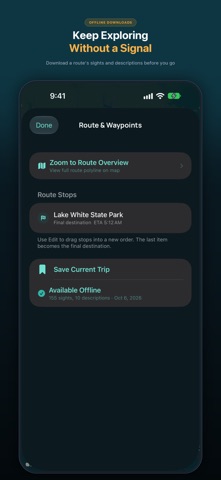
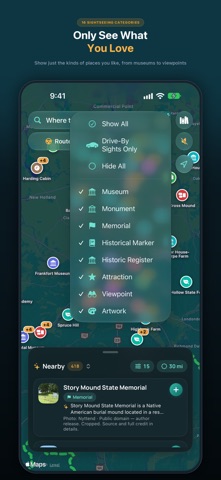
WanderWay finds covered bridges, scenic overlooks, and historic sites along your drive, then guides you there on iPhone and CarPlay. Hear stories about the places you pass, add a scenic detour, and keep a journal of your drives. No subscription, no ads, and no tracking. Built by Derek Boyer, a solo developer in Southern Ohio. WanderWay was inspired by my wife Jordan's wish for an app that reveals the history and beauty along everyday routes. Choose a destination, build a multi-stop route, or generate a Sunday Drive loop, then follow spoken turn-by-turn directions. FREE TO TRY, ONE PURCHASE TO KEEP • Free to download, with every feature open for a 14-day free trial. The trial doesn't renew and never charges you. • One-time unlock: keep navigation on iPhone and CarPlay, Story Mode while you drive, narration without a route, Scenic Detours, curated drives, offline downloads, and searches up to 40 miles. No subscription. • Always free: nearby places within 5 miles, place details and photos, destination search, and route previews. • No ads and no account. WanderWay keeps no location history or routes on a server, never sells personal data, and saves your Road Trip Journal on your iPhone. STORY MODE & SCENIC DETOURS • Story Mode: as you approach a place, hear a short story about it, or tap "Listen to the story" on its page. With Apple Intelligence, stories are written on your iPhone from the place's description. Other iPhone models read a shortened description. • Narrate Without a Route: hear nearby places and their stories on any drive, even without directions. • Scenic Detours: spend 10, 20, or 30 extra minutes on up to three sights along your way, favoring US scenic byways. See the extra driving time on a map before you add them. SUNDAY DRIVES & SCENIC ROUTES • Generate a scenic loop or a curated drive to a destination, from 30 minutes to 5 hours • Stay Within: set how far the drive can wander from where you start • Weather-aware: the forecast and National Weather Service alerts, favoring indoor stops when rain or snow is expected • Favor US scenic byways (dashed green on the map) and prefer backroads • Prioritize any of 16 categories, from covered bridges to castles, or show only sights you can enjoy from the road • Search up to 40 miles (60 km) around you, or drop a pin anywhere KNOW BEFORE YOU GO • Descriptions and photos from Wikipedia and Wikimedia Commons, plus Apple Look Around or Mapillary street views • National Park Service hours, fees, and alerts, Recreation.gov trailheads and tours, and National Register listings • Opening hours, with a warning if a stop will be closed when you arrive • EV charger status and cost from Open Charge Map ROAD TRIP JOURNAL & PASSPORT • Each drive you navigate is saved with the roads you drove, the places you passed, and the states or provinces you crossed • Show the photos you took on each drive, from your own library • Share a picture card of any drive, with its route map, stats, and places • Passport: stamps for 15 kinds of places, milestones, and a Home Screen widget ON THE ROAD • Offline downloads for places without cell service • Your next turn and the next place ahead on the Lock Screen and in the Dynamic Island • Widgets and a Control Center button to start a Sunday Drive EXPLORE WITH CARPLAY • Start a drive from search, a saved trip, a favorite, or by voice • Nearby sights with detour times, and a place's story • A WanderWay map card on CarPlay Dashboard, with Nearby Sights and Where to? shortcuts • Show Route Overview to see the rest of your drive • A map and turn details in the instrument cluster, in cars that support it • If the car's built-in navigation takes over, resume your drive with one tap AVAILABLE IN FOUR LANGUAGES English, German, French, and Spanish. BUILT BY AN INDIE DEVELOPER Feedback or route ideas? Email me at wanderwaysupport@gmail.com. Derek Drive attentively and follow traffic laws. Set your route before you start.
What's new · 2.0
WanderWay 2.0 brings more to discover on every drive: stories about the places you pass, scenic detours, a journal of your drives, and a fresh new look. STORY MODE • Hear a short story about places as you approach them. Turn it on in Settings › Points of Interest › Narration Length › Story. • With Apple Intelligence, stories are written on your iPhone from the place's description. Other iPhone models read a shortened description. • On a place page, tap "Listen to the story" to hear it right away. NARRATE WITHOUT A ROUTE • No destination? Turn on Settings › Points of Interest › Narrate Without a Route, open WanderWay, and drive. Nearby places, and their stories, are spoken as you pass. It keeps going with your iPhone locked and stops when you park. SCENIC DETOURS • Planning a route or a Sunday Drive? Tap "Make this drive more scenic" and choose +10, +20, or +30 minutes. • WanderWay picks up to three sights along your way, favoring covered bridges, viewpoints, historic sites, and US scenic byways. You see the extra time and new route on a map before adding them. • Generated drives and detours skip churches unless you prioritize Historic Worship. ROAD TRIP JOURNAL • Each drive you navigate is saved with the roads you drove, its distance and time, the places you passed, and the states or provinces it crossed. • Show the photos you took along the way on the drive's page. They stay in your photo library. • Share Drive turns any drive into a picture card with its route map, stats, and places. PASSPORT • Collect stamps for covered bridges, museums, viewpoints, and 12 more kinds of places. • Track milestones for drives, miles, places passed, and states and provinces. • A new Passport widget shows your progress and next milestone on the Home Screen. A FRESH NEW LOOK • New colors, map pins, and place pages, in light and dark. • Busy maps stay readable: pins spread out, and a "+N" count marks spots with more places. Tap it to zoom in. • Route previews no longer hide under the route bar. • Curated Routes, the Library, Settings, and the Nearby panel are redesigned. • The category button is back at the top of the map: show or hide kinds of places in one tap. ON THE ROAD • The Lock Screen and the expanded Dynamic Island now show the next place ahead and how far away it is. • Spoken directions keep playing while Music or another app is on the CarPlay screen, or your iPhone is locked. • During a phone call you hear only short turn prompts, and nothing while Siri is listening. CARPLAY • A WanderWay map card on CarPlay Dashboard, with Nearby Sights and Where to? shortcuts. • A map and turn details in the instrument cluster, in cars that support it. • In the Route list, tap Show Route Overview to see the whole route, or what's ahead while driving. • If the car's built-in navigation takes over, tap Resume (or Resume Trip on CarPlay Dashboard) to carry on. • Tap a nearby place and choose Hear the Story. • On long tours, More Stops keeps every stop and your destination in reach. • Drives started in CarPlay announce nearby places and count toward your Journal and Passport, even without opening the iPhone app. PLACES • A new report reason: "Pin is in the wrong spot." Reports now work for National Register and Recreation.gov places too. FIXES • Starting a drive on your iPhone while a CarPlay list is open no longer closes WanderWay on the car screen. • Guidance no longer stalls after a pause in location updates, or goes quiet for the rest of a drive after an audio interruption. • The CarPlay arrival time now updates while you're stopped in traffic. • Places without a photo of their own no longer show a photo of a nearby building. • Mute in CarPlay now stays muted when you open WanderWay on your iPhone. • CarPlay turn distances are rounded, like "300 ft". Stories while you drive, narration without a route, and Scenic Detours are part of the unlock and included in the 14-day free trial. Already unlocked or bought WanderWay? They're yours.
Details