

JourneyPulse
Hans Ulrich Heine · Navigation
Independent analytics for this App Store listing. AppTracker is not affiliated with Hans Ulrich Heine.
Chart standing · US
What changed · US
Listing changes AppTracker has observed for this app in this storefront — new versions, price moves, rating shifts, and store copy.
Calmer warnings, improved lane guidance and lower battery use while navigating. • Warnings only while driving: roadworks, speed camera and hazard warnings no longer appear when you are standing still, waiting at a light or walking. • Roadworks: long roadworks now trigger a single announcement. Closed exits that are not on your route are no longer reported. • The delay indicator no longer lingers after a roadwork. • CarPlay: reworked lane guidance before exits and junctions. • The "Energy Saving Mode recommended" prompt no longer appears at every app launch. • Lower battery use while navigating: hazard data is now fetched more efficiently. • Spoken announcements no longer block the interface.
In-app purchases · US
No in-app purchases.
Screenshots


Similar apps
Competitors and close alternatives, as estimated by AppTracker.
 DrivePulse: Car Companion
Davide Guida
DrivePulse: Car Companion
Davide Guida
 Speedometer: Driving Tracker
Taohidul Islam
Speedometer: Driving Tracker
Taohidul Islam
 Track My Journey - Travel Log
Chathura Lakmal
Track My Journey - Travel Log
Chathura Lakmal
 DriveTracker - Driving Log
Ryunosuke Shibuya
DriveTracker - Driving Log
Ryunosuke Shibuya
 TorqueTrailPulse
Yogesh Jadhav
TorqueTrailPulse
Yogesh Jadhav
 TravelLogger - GPS Travel Log
haruaki ohara
TravelLogger - GPS Travel Log
haruaki ohara
 PersonalMap Journal
Spyridon Tsiolakis
PersonalMap Journal
Spyridon Tsiolakis
 GPS Trace - Track & Record
Sylvain MICHEL
GPS Trace - Track & Record
Sylvain MICHEL
About
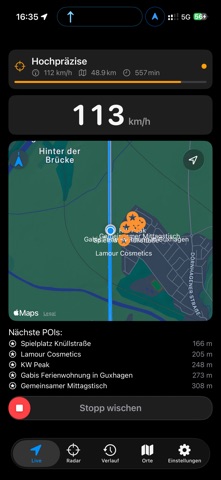
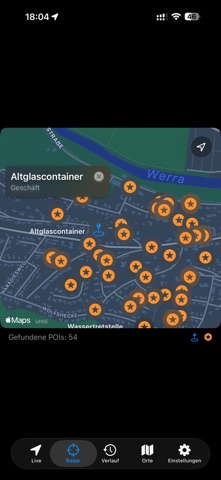
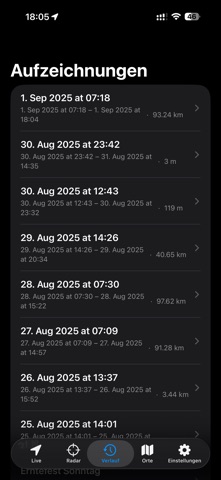
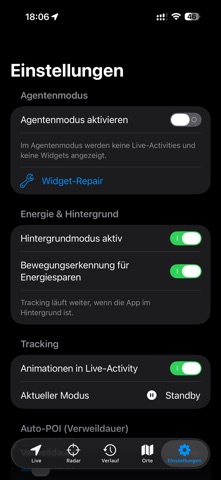
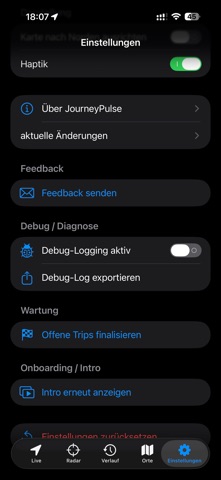
JourneyPulse is navigation and trip log in one app – for everyone who wants to understand their journeys. ALWAYS ON: TRACKING, PLACES & AUTO-POI JourneyPulse records your journeys automatically and continuously in the background – without you having to start anything. • Permanent location tracking: trips start and end by themselves, even with the screen locked • Auto-POI: the app recognizes places where you stay for a while and saves them as places (minimum duration adjustable) • Stays and place clusters: see where you were and for how long – plus weekly and monthly trends • Three profiles to choose from: foreground only, background with trip recording, or important places only (extra battery-friendly) • Automatic accuracy: economical when stationary, automatically more precise when driving and navigating • Motion detection (optional) throttles location updates when you stand still • You stay in control: "Always" location access is optional, analysis happens on your iPhone, no account and no cloud NAVIGATION • Routes with spoken turn-by-turn instructions, also in the background and via CarPlay • Offline routing: optionally download a map dataset for Germany and navigate without an internet connection • Speed limit display and warning tone when you are too fast • Lane guidance and signposts at junctions and motorway interchanges • Position arrow snaps cleanly to the route, tunnels are bridged • Warnings about roadworks, closures and traffic jams – only what is on your route • Weather warnings from the German Weather Service for your estimated arrival time • Fuel stop suggestion when your range does not reach the destination • Waypoints and destinations by voice TRIPS & LOGBOOK • Trips are recorded automatically – in the background and battery-friendly • Route, duration, speed and history for each trip, export as GPX, CSV or PDF • Logbook with purpose (business, private, commute) – pre-filled automatically if you like • Reports as CSV or PDF, e.g. as an overview for your tax return • Personal travel time: the app learns from your own trips and estimates arrival times more accurately • Departure time tips for your routine routes CAR & OBD • Optional: connection to an OBD2 adapter via Bluetooth (BLE) • Live values, consumption and range • Read fault codes, show them in plain language and log them • Diagnostic changes to the control unit are only written after Face ID CARPLAY, SIRI & WIDGETS • CarPlay with map, lane guidance and hazard alerts • Live Activity and Dynamic Island while driving • Siri and Shortcuts: start and end a trip, report a hazard, check range, navigate home or to work • Control Center switch PRIVACY • No account, no registration • Your trips are stored in a local database on your iPhone • Your tracking stays on your iPhone: you decide on profile, permissions and export • Map data © OpenStreetMap contributors (ODbL) Note: Background recording uses GPS and can increase battery usage. Traffic and hazard information comes from public sources and may be incomplete. Traffic rules and the traffic situation on site always take precedence.
What's new · 4.91
Calmer warnings, improved lane guidance and lower battery use while navigating. • Warnings only while driving: roadworks, speed camera and hazard warnings no longer appear when you are standing still, waiting at a light or walking. • Roadworks: long roadworks now trigger a single announcement. Closed exits that are not on your route are no longer reported. • The delay indicator no longer lingers after a roadwork. • CarPlay: reworked lane guidance before exits and junctions. • The "Energy Saving Mode recommended" prompt no longer appears at every app launch. • Lower battery use while navigating: hazard data is now fetched more efficiently. • Spoken announcements no longer block the interface.
Details