

Rep Jam Gig
Jasmine Williamson · Productivity
Independent analytics for this App Store listing. AppTracker is not affiliated with Jasmine Williamson.
Chart standing · US
What changed · US
Listing changes AppTracker has observed for this app in this storefront — new versions, price moves, rating shifts, and store copy.
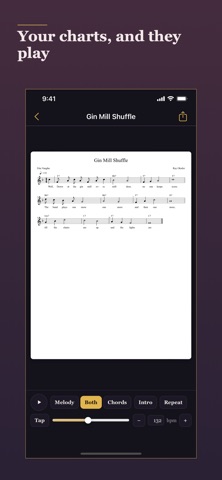
YOUR CHARTS, WITH YOUR SONGS Keep the lead sheet with the tune it belongs to. Attach a PDF, a photo of the page or a MusicXML file to any song and open it full screen: each page fits the screen, swipe between pages, pinch to zoom. Add it on the song's page with Add Chart — Files, Photos, or Scan with Camera, which turns the pages into one PDF. Or share one in from Files, AirDrop or a scanner app and pick the song it goes with. An icon under a song's key on Repertoire opens its chart, and with iCloud on, charts follow your songs to your other devices. The camera is asked for only the first time you choose Scan with Camera, never when the app opens. If you'd rather not allow it, take the photo in the Camera app and add it from Photos, which asks for nothing. AND IF IT'S MUSICXML, IT PLAYS A lead sheet exported from any notation software opens as notation rather than a picture of it, laid out like a lead sheet: the writers at the top, four bars to a line. Tap Play to hear the melody, the chords or both on a piano, with a line following the music. It plays in your key, not the one the file was written in. The tempo starts from the chart's own marking; tap, type, nudge or slide your own. Send it round as many times as you like, and start with an intro of the last four or eight bars. Each tune remembers how you last played it, on all your devices. The piano is recorded and lives inside the app: nothing is fetched, and a chart plays with no signal. SHARE IT, BACK IT UP Share, at the top of a chart, sends it on, named after the song: to a bandmate, to Files, or to a printer for a PDF or photo. And Export All Data now brings your charts along: one zip with your library, your calendar and every chart file, which imports back onto the right songs. ALSO IN THIS UPDATE • An About screen, on the ⓘ on Repertoire: the version, the guide and privacy policy, links to rate the app and send feedback, and whether your library is syncing with iCloud • Clearer about iCloud: on a new phone, Repertoire says when your library is on its way back, so an empty screen means wait, not gone; if iOS removes the synced library from a device, About says it's still in iCloud; and the app asks before an import that would leave two of everything • Sort each list your way: Performance Ready A–Z or by plays, In Progress and Want to Learn A–Z or newest — the order songs joined the list. Want to Learn now opens on newest • A song in a jam can carry its own musicians and its own note, for the guest who sat in on one tune • Set lists finish your titles as you type • Delete from inside any edit screen • Every add form opens with the cursor in its first field, and name fields capitalize themselves • Empty screens explain what each tab is for FIXED • Restoring a backup brings back every performance — a tune called twice in one night, a night logged when the clocks changed at midnight, dates a spreadsheet re-saved as 3/29/26 — and doubles nothing. Backups made from now on by a phone set to the Buddhist, Islamic or Japanese calendar restore without doubling too. A file that lists a performance twice keeps both. Musicians keep their own instruments • A set list title ending in brackets — "Fly Me to the Moon (In Other Words)" — keeps its whole title instead of becoming a second song, and the songbook's longer spelling of a song you have no longer adds a copy • Naming two instruments inside one set of parentheses — "Dana Reyes (piano, flute)" — no longer invents a musician called "flute)" • Warnings now appear on the form you're filling in, so Save no longer looks as though it did nothing • The set list builder finishes musicians' names like the other forms do • Re-importing a calendar no longer doubles it, and the app can fold together copies an older version made. A single night moved to another day now shows on that day • Count tiles no longer touch on iPad and larger iPhones
In-app purchases · US
No in-app purchases.
Screenshots




Keywords this app targets
Search terms AppTracker associates with this app — estimates, not search volume. ❝ = in the app's title; a highlighted number is its current position for that term.
Similar apps
Competitors and close alternatives, as estimated by AppTracker.
 Jam: Concerts & Musique
Matheo Munoz
1 shared title word
Jam: Concerts & Musique
Matheo Munoz
1 shared title word
 Jam Maestro: create guitar tab
David Blake
1 shared title word
Jam Maestro: create guitar tab
David Blake
1 shared title word
 MeloStock
NOBUHIRO MIYARA
MeloStock
NOBUHIRO MIYARA
 SongFolio: Chords,Tabs,Setlist
Jeronimo Ferreira
SongFolio: Chords,Tabs,Setlist
Jeronimo Ferreira
 AGAIN. Rehearsal Notes
Trevor Lawrence
AGAIN. Rehearsal Notes
Trevor Lawrence
 iReal Pro
Technimo LLC
iReal Pro
Technimo LLC
 Jam Maestro Lite
David Blake
1 shared title word
Jam Maestro Lite
David Blake
1 shared title word
 JamUp Pro
Positive Grid Inc
1 shared topic
JamUp Pro
Positive Grid Inc
1 shared topic
About
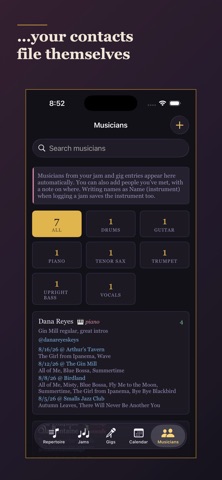
Rep Jam Gig is the working notebook for musicians — singers and instrumentalists. Your repertoire in the keys you do it in, every jam and gig logged, set lists that build themselves, a calendar of what's coming, and a directory of everyone you've played with. It's one app, not five. Log a jam and the songs you called file themselves into your repertoire; the players you name build themselves into a directory. What you do on a Tuesday night makes the app more useful by Friday. WHAT IT TRACKS • Repertoire — every song you know, sorted Performance Ready / In Progress / Want to Learn, with your key, the credits and any notes you need at the stand; searchable and filterable by genre • Jams — log who you played with and what you played, grouped by night • Gigs & Set Lists — build set lists from your ready repertoire, with a tempo-aware builder, and save what you actually played • Calendar — plan the jam sessions you mean to go to, with repeats like "every Wednesday" or "the third Monday of the month". Star the ones you care about, search them, and log one as a jam in a tap. Import any calendar's .ics file • Musicians — a running directory of everyone you've played with, built automatically from your jam and gig entries, with instruments and Instagram handles • Charts — keep the lead sheet with the tune: a PDF, a photo or a scan of the page, or a MusicXML file from your notation software, opened full screen from the song Songs you perform that aren't already in your repertoire file themselves under In Progress — with composer, lyricist and year filled in from the built-in songbook of 2,500+ standards — so nothing falls through the cracks. BULK IMPORT AND EXPORT Already have your setlist in a spreadsheet? Download one CSV template covering your whole library — repertoire, musicians, jams and gigs — fill it in with any spreadsheet app, and import it back in. Songs and musicians already on file are matched by name and merged, never duplicated or overwritten with blanks, so re-importing the same file is always safe. Export All Data writes everything back out, for a backup or for moving to a new device without iCloud. Once you have charts, it's one zip — the CSV, your calendar and every chart file. Import it and the charts land back on their songs; the Calendar tab takes the same zip for your sessions. CHARTS THAT PLAY Attach a lead sheet to any song and open it full screen: each page fits the screen, swipe between pages, pinch in on small print. Add it on the song's own page from Files or Photos, or scan the paper with your camera and the pages become one PDF; the camera is asked for only when you scan. Or send one over from Files, AirDrop or a scanner app and choose the song it belongs to. Share a chart on from the chart itself. A MusicXML lead sheet — the export every notation program writes — opens as notation rather than a picture of one, and plays. Melody, chords, or both, on a recorded piano, with a line travelling along the music. It plays in your key rather than the one the file was written in. Tap out the tempo, type it, nudge it or drag it; send the tune round as many times as you want; start with an intro of the last four or eight bars. Each song remembers how you last played it. The piano is inside the app, so a chart plays with no signal at all. Playing fetches nothing and sends nothing. SYNC ACROSS DEVICES Your repertoire — charts included — follows you from iPhone to iPad through your own iCloud account, and it is yours: nothing goes to us, and we run no server for it to go to. Turn iCloud off for Rep Jam Gig and iOS takes the synced library off that device; it stays in iCloud and returns when you turn it back on. DESIGN A dark, uncluttered interface with serif type throughout, built to be read quickly at a stand or a bar. Rep Jam Gig starts empty: no sample data to delete, nothing to configure. Just start adding what you actually play.
What's new · 2.3
YOUR CHARTS, WITH YOUR SONGS Keep the lead sheet with the tune it belongs to. Attach a PDF, a photo of the page or a MusicXML file to any song and open it full screen: each page fits the screen, swipe between pages, pinch to zoom. Add it on the song's page with Add Chart — Files, Photos, or Scan with Camera, which turns the pages into one PDF. Or share one in from Files, AirDrop or a scanner app and pick the song it goes with. An icon under a song's key on Repertoire opens its chart, and with iCloud on, charts follow your songs to your other devices. The camera is asked for only the first time you choose Scan with Camera, never when the app opens. If you'd rather not allow it, take the photo in the Camera app and add it from Photos, which asks for nothing. AND IF IT'S MUSICXML, IT PLAYS A lead sheet exported from any notation software opens as notation rather than a picture of it, laid out like a lead sheet: the writers at the top, four bars to a line. Tap Play to hear the melody, the chords or both on a piano, with a line following the music. It plays in your key, not the one the file was written in. The tempo starts from the chart's own marking; tap, type, nudge or slide your own. Send it round as many times as you like, and start with an intro of the last four or eight bars. Each tune remembers how you last played it, on all your devices. The piano is recorded and lives inside the app: nothing is fetched, and a chart plays with no signal. SHARE IT, BACK IT UP Share, at the top of a chart, sends it on, named after the song: to a bandmate, to Files, or to a printer for a PDF or photo. And Export All Data now brings your charts along: one zip with your library, your calendar and every chart file, which imports back onto the right songs. ALSO IN THIS UPDATE • An About screen, on the ⓘ on Repertoire: the version, the guide and privacy policy, links to rate the app and send feedback, and whether your library is syncing with iCloud • Clearer about iCloud: on a new phone, Repertoire says when your library is on its way back, so an empty screen means wait, not gone; if iOS removes the synced library from a device, About says it's still in iCloud; and the app asks before an import that would leave two of everything • Sort each list your way: Performance Ready A–Z or by plays, In Progress and Want to Learn A–Z or newest — the order songs joined the list. Want to Learn now opens on newest • A song in a jam can carry its own musicians and its own note, for the guest who sat in on one tune • Set lists finish your titles as you type • Delete from inside any edit screen • Every add form opens with the cursor in its first field, and name fields capitalize themselves • Empty screens explain what each tab is for FIXED • Restoring a backup brings back every performance — a tune called twice in one night, a night logged when the clocks changed at midnight, dates a spreadsheet re-saved as 3/29/26 — and doubles nothing. Backups made from now on by a phone set to the Buddhist, Islamic or Japanese calendar restore without doubling too. A file that lists a performance twice keeps both. Musicians keep their own instruments • A set list title ending in brackets — "Fly Me to the Moon (In Other Words)" — keeps its whole title instead of becoming a second song, and the songbook's longer spelling of a song you have no longer adds a copy • Naming two instruments inside one set of parentheses — "Dana Reyes (piano, flute)" — no longer invents a musician called "flute)" • Warnings now appear on the form you're filling in, so Save no longer looks as though it did nothing • The set list builder finishes musicians' names like the other forms do • Re-importing a calendar no longer doubles it, and the app can fold together copies an older version made. A single night moved to another day now shows on that day • Count tiles no longer touch on iPad and larger iPhones
Details