

Checkbook Register: Balance
Alex Gameli Heyman · Finance
Independent analytics for this App Store listing. AppTracker is not affiliated with Alex Gameli Heyman.
Chart standing · US
Screenshots



Similar apps
Competitors and close alternatives, as estimated by AppTracker.




About
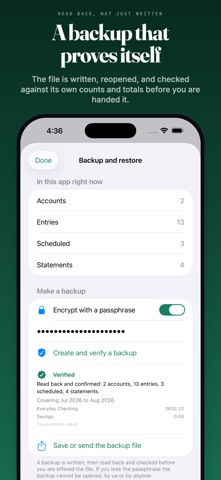
Your bank shows what has cleared. Your register shows what is left after every check you have written and every payment you have scheduled. Those are different numbers, and only one of them keeps you out of an overdraft. Checkbook Register keeps that number honest, then lets you prove it against your statement. THREE BALANCES, NEVER CONFUSED Available: everything, including the checks nobody has cashed yet. This is the number at the top of the screen, and the one you spend against. Cleared: what the bank would show if you looked right now. Reconciled: what you have proven against a closed statement and never need to check again. BALANCE A STATEMENT IN ONE PASS Tick off what the bank shows and watch the difference walk to zero. When it does not get there, the app does not just say you are off by 47.32. It checks your entries against the gap and names what would fix it: the entry whose amount is exactly the difference, the one you ticked that is not on this statement, the pair that adds up, a sign the wrong way round, or two digits that look transposed. Get interrupted and nothing is lost. Every tick is saved as you make it. SEE THE DIP BEFORE IT HAPPENS Set a cushion you want to keep and a limit you never want to cross. The app shows what is safe to spend today, and seven days of where the balance lands once rent and the phone bill clear. WRITTEN FOR REAL MONEY Every amount is exact decimal currency, never a floating point number. Add 75, subtract 75, get zero. Every time, in every currency. A BACKUP THAT IS ACTUALLY CHECKED Most apps write a backup and tell you it worked. This one writes the file, reads it back off disk, re-derives the counts and totals from what it read, and only then reports what it verified: accounts, entries, date range, per account totals. Backups can be encrypted with a passphrase, and restoring shows you what is in the file next to what is in the app before anything is replaced. A damaged or altered file is refused rather than half applied. If the register file itself ever cannot be read, the app does not start empty and save over it. It sets the file aside, keeps it, and tells you. CSV IN, CSV OUT Import from your bank, a spreadsheet, or another register app. Commas, semicolons and tabs, quoted fields, separate money out and money in columns, and dates written either way round. You confirm the column mapping and see the rows decoded before a single entry is added. Export any account back out, running balance column included. EVERYTHING ELSE A REGISTER NEEDS Multiple accounts: checking, savings, cash, credit card Running balance on every line Check numbers, payees, categories and memos Payee suggestions that bring the last amount and category with them Transfers recorded on both sides Recurring entries: weekly, every two weeks, twice a month, monthly, quarterly or yearly, with month ends handled properly, so the 31st becomes the 28th in February and goes back to the 31st in March Nothing is posted automatically. Scheduled entries wait for you. Search across payee, memo, category and check number Face ID, Touch ID or passcode lock Reconcile streak and a seven day activity strip iPhone and iPad NO ACCOUNT, NO BANK LOGIN, NO SUBSCRIPTION There is no sign up, no bank connection, no analytics, no tracking, no advertising and no network code of any kind. Your register is a file on your device, protected by iOS encryption, and it goes nowhere unless you export it yourself. You pay once. Backup, restore, CSV import, CSV export and every other feature are included, now and in every update. This app records what you tell it. It does not fetch your bank balance and is not a substitute for your bank's own statements. Privacy policy: https://app.innovaapps.ai/privacy Terms of use: https://www.apple.com/legal/internet-services/itunes/dev/stdeula
Details