

Fluxe Connect
Starfysh, LLC · Lifestyle
Independent analytics for this App Store listing. AppTracker is not affiliated with Starfysh, LLC.
Chart standing · US
What changed · US
Listing changes AppTracker has observed for this app in this storefront — new versions, price moves, rating shifts, and store copy.
• Finds your Wemo devices faster and more reliably, including devices on less common ports. • Your device list and device screens now follow changes made in Apple Home or at the switch. • Add a device to Apple Home from its detail screen: copy the setup code, then tap Add to Apple Home. • Out of credits? You now see this before setup starts, not partway through. • Setup finishes when your phone returns to a different WiFi network on the same home network. • Setup now confirms a new device in homes that already have other Wemo devices. • Setup tells you when a device stops answering, instead of reporting success. • A factory-reset device now shows as Reset, with a Set up again button. • Setting up a factory-reset device is more reliable. • "Check HomeKit broadcast" now points out old Apple Home records that no longer answer.
In-app purchases · US
What this app sells inside itself, grouped by kind and priced for this storefront.
Screenshots


Similar apps
Competitors and close alternatives, as estimated by AppTracker.
 WSwitch for WeMo
Georgios Trigonakis
WSwitch for WeMo
Georgios Trigonakis
 Flux HA Dashboard
Brandon Halterman
Flux HA Dashboard
Brandon Halterman
 Flux – FTP & WebDAV
Marc Hille
Flux – FTP & WebDAV
Marc Hille
 WiZ Connected
Signify Netherlands B.V.
WiZ Connected
Signify Netherlands B.V.
 MasterSwitch for HomeKit+Hue
Pepper Dog Soft LLC
MasterSwitch for HomeKit+Hue
Pepper Dog Soft LLC
 LSC Smart Connect
Electro Cirkel Retail BV
LSC Smart Connect
Electro Cirkel Retail BV
 Flux Feed for Miniflux
Sayan Goswami
Flux Feed for Miniflux
Sayan Goswami
 WiFi Network Tools & Maps
Alexandre Fenyo
WiFi Network Tools & Maps
Alexandre Fenyo
About
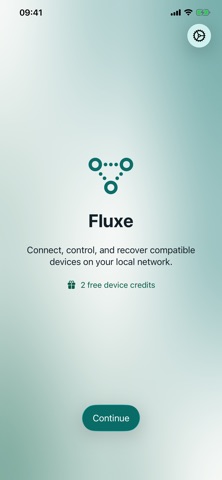
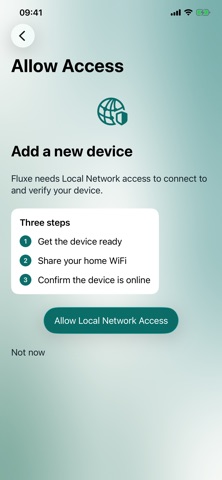
Fluxe reconnects factory-reset Wemo smart plugs and switches to your home WiFi network — no Wemo account, no cloud account, no hub. If you've ever reset a Wemo device (or bought one used) and been stuck trying to get it back online, Fluxe walks you through it: find the device's setup network, enter your WiFi password, and Fluxe handles the rest over your local network. No data leaves your phone except to Apple for purchases. HOW IT WORKS • Fluxe finds your factory-reset Wemo device's setup WiFi network • Enter your home WiFi password once • Fluxe configures the device directly over your local network • Once connected, your Wemo device works with HomeKit, Alexa, or Google Home as usual WHY FLUXE • No account required — Fluxe doesn't use a backend server • Works entirely over your local network • Fast: most devices reconnect in under a minute • 2 free reconnects included, with credit packs available for more Fluxe is not affiliated with Belkin or Wemo. It's an independent tool for owners of Wemo hardware who need a faster way to get a reset device back online.
What's new · 0.9.6
• Finds your Wemo devices faster and more reliably, including devices on less common ports. • Your device list and device screens now follow changes made in Apple Home or at the switch. • Add a device to Apple Home from its detail screen: copy the setup code, then tap Add to Apple Home. • Out of credits? You now see this before setup starts, not partway through. • Setup finishes when your phone returns to a different WiFi network on the same home network. • Setup now confirms a new device in homes that already have other Wemo devices. • Setup tells you when a device stops answering, instead of reporting success. • A factory-reset device now shows as Reset, with a Set up again button. • Setting up a factory-reset device is more reliable. • "Check HomeKit broadcast" now points out old Apple Home records that no longer answer.
Details