

Flux HA Dashboard
Brandon Halterman · Productivity
Independent analytics for this App Store listing. AppTracker is not affiliated with Brandon Halterman.
Chart standing · US
What changed · US
Listing changes AppTracker has observed for this app in this storefront — new versions, price moves, rating shifts, and store copy.
Widgets that look right at every size • Nothing gets cut off anymore. Every widget has a sensible minimum, scales its content to the tile it's given, and never crops — live while you drag. • Stacks are fixed: members size to their cells, wrap smartly on iPhone, show their names, and never spill outside the stack. • Buttons show their names by default. • Inline controls: put a brightness, volume or cover-position slider right on a tile. • Camera walls: several cameras in one widget. • A "didn't go through" banner when Home Assistant rejects a command. Home Assistant automations can drive Flux • flux_set_page switches any screen to a dashboard or page by name. • flux_notify puts a titled banner on every Flux screen. Importing from Home Assistant • Auto-generated dashboards (the default Overview) now import — rebuilt from your areas. • Sections layouts keep their grid, tile features become inline controls, mushroom and container cards keep their shape, pictures with /local paths load, and skipped cards say why. • Refresh from Home Assistant keeps your arrangement and only touches widgets it created. • Rooms: one page per area, laid out for iPhone, iPad and Apple TV. • Export a dashboard as a file to share it; import one as a new dashboard. Reliability • Reconnects the moment Wi‑Fi returns; saved servers keep retrying after a restart. • Cameras: faster snapshots, HLS falls back to MJPEG, memory leak fixed. • Motion alerts no longer fire at launch or miss shared sensors; motion notifications show in the foreground. • An iPad's push no longer overwrites a layout just arranged on the Apple TV; "Apple TV only" dashboards now reach the TV. • Fixed "time is between" automation conditions, demo mode leaving controls simulated, helper previews crashing on "inf", the Helpers screen missing its + button, and duplicate "Home" dashboards on a second device.
Ratings breakdown · US
The star breakdown behind this app's rating in this storefront.
In-app purchases · US
No in-app purchases.
Screenshots




Keywords this app targets
Search terms AppTracker associates with this app — estimates, not search volume. ❝ = in the app's title; a highlighted number is its current position for that term.
Similar apps
Competitors and close alternatives, as estimated by AppTracker.
 HomePane
Leandro Palmieri
3 shared topics
HomePane
Leandro Palmieri
3 shared topics
 Home Assistant Dashboard
Mads Holm Vittrup
3 shared topics · 1 shared title word
Home Assistant Dashboard
Mads Holm Vittrup
3 shared topics · 1 shared title word
 Flux – FTP & WebDAV
Marc Hille
1 shared title word
Flux – FTP & WebDAV
Marc Hille
1 shared title word
 InfluxDB Dashboard
Anton Havekes
1 shared topic · 1 shared title word
InfluxDB Dashboard
Anton Havekes
1 shared topic · 1 shared title word
 Controller for HomeKit
acasa Software GmbH
2 shared topics
Controller for HomeKit
acasa Software GmbH
2 shared topics
 HomeDash
inbrillio UG (haftungsbeschrankt)
2 shared topics
HomeDash
inbrillio UG (haftungsbeschrankt)
2 shared topics
 SmartHome Dashboard - HomeView
Remco Uitdenboogaart
1 shared title word
SmartHome Dashboard - HomeView
Remco Uitdenboogaart
1 shared title word
 IoT Panels
Philipp Arndt
1 shared topic
IoT Panels
Philipp Arndt
1 shared topic
About
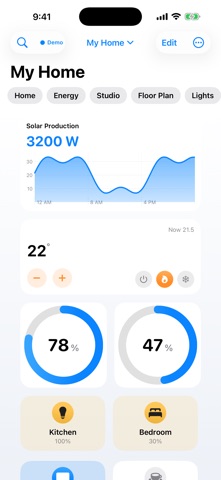
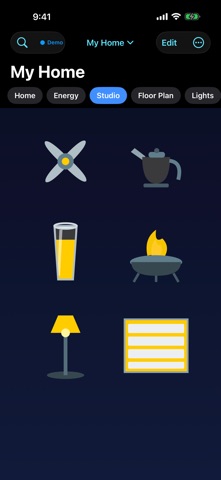
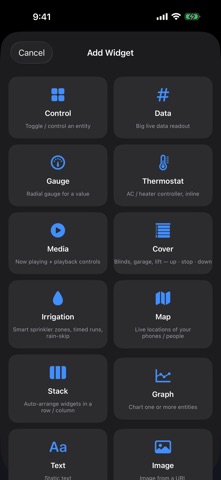
Flux is the most beautiful way to control your smart home with Home Assistant and Apple HomeKit — built natively for iPhone, iPad, and Apple TV, with the polish of a first-party Apple app. DESIGN DASHBOARDS YOU'LL LOVE • Drag-and-drop builder with a free-form canvas — place anything, anywhere • Per-device layouts: a tailored design for iPhone, iPad, and Apple TV • Beautiful tiles: buttons, gauges, thermostats, graphs, cameras, weather, calendar, energy flow, media players, and more • Every widget scales to its tile and never clips — stacks, buttons, gauges, everything, at any size • Bring your home to the big screen — a dedicated Apple TV app that mirrors your dashboards exactly, navigable with the Siri Remote START FROM YOUR HOME ASSISTANT DASHBOARDS • Import any Lovelace dashboard — even the auto-generated Overview — as native Flux widgets, laid out for iPhone, iPad, and Apple TV • Rooms: one page per area, built in a tap • Refresh from Home Assistant keeps your arrangement and only touches what it created • Export a dashboard as a file to share it; import one as a new dashboard DRAW YOUR HOME — FLOOR PLANS • Sketch your actual floor plan with walls, doors, windows and rooms — crisp, to-scale vector drawing • Furnish it from a library of objects — beds, sofas, tubs, vehicles and more — rotate, stretch and place freely • Set it as a live dashboard backdrop and lay your controls right where they live LIVING ARTWORK • A library of premium SVG objects — lamps, fans, appliances, vehicles, tanks and more • Map them to your entities so they come alive: lights glow in their real color, fans and washers spin when running, thermometers fill with temperature, tanks show their level • Import your own SVGs and wire them up in seconds CONTROL EVERYTHING • Full light control: brightness, color and effects for RGB/WRGB bulbs • Smart thermostats with multiple designs and instant, optimistic response • Inline brightness, volume and cover sliders right on a tile • Live camera feeds and camera walls, media players, covers, locks — every Home Assistant domain • A clear banner whenever Home Assistant rejects a command MUSIC, EVERYWHERE • Play Apple Music straight from your device and send it across your speakers with AirPlay 2 • Multi-room grouping with per-speaker volume, shuffle, repeat and up-next queue • Album art, scrubbing and living visualizers that dance to the beat SMARTER HELPERS & WEATHER • Build virtual devices that combine and calculate — group entities, sum, average, threshold and more — in plain language, no YAML • Apple Weather built in: full daily and hourly forecasts with the metrics you choose AUTOMATIONS, MADE SIMPLE — AND POWERFUL • A visual "When → Only if → Do" builder that reads like plain English • Branch with Cases: do different things in different situations • Test any automation, watch it run, and trace exactly where it succeeded or failed • Saved as real Home Assistant automations • Let Home Assistant drive Flux: flux_set_page switches any screen to a dashboard or page, flux_notify posts a banner on every Flux screen PRIVATE BY DESIGN • Connects directly to YOUR Home Assistant — local network or Nabu Casa • No middle-man cloud, no account required — your data stays yours • Full metric/imperial unit conversion for every value Make your smart home look as good as it works. Home Assistant is a trademark of the Open Home Foundation. Flux is an independent app, not affiliated with or endorsed by the Open Home Foundation.
What's new · 2.1.0
Widgets that look right at every size • Nothing gets cut off anymore. Every widget has a sensible minimum, scales its content to the tile it's given, and never crops — live while you drag. • Stacks are fixed: members size to their cells, wrap smartly on iPhone, show their names, and never spill outside the stack. • Buttons show their names by default. • Inline controls: put a brightness, volume or cover-position slider right on a tile. • Camera walls: several cameras in one widget. • A "didn't go through" banner when Home Assistant rejects a command. Home Assistant automations can drive Flux • flux_set_page switches any screen to a dashboard or page by name. • flux_notify puts a titled banner on every Flux screen. Importing from Home Assistant • Auto-generated dashboards (the default Overview) now import — rebuilt from your areas. • Sections layouts keep their grid, tile features become inline controls, mushroom and container cards keep their shape, pictures with /local paths load, and skipped cards say why. • Refresh from Home Assistant keeps your arrangement and only touches widgets it created. • Rooms: one page per area, laid out for iPhone, iPad and Apple TV. • Export a dashboard as a file to share it; import one as a new dashboard. Reliability • Reconnects the moment Wi‑Fi returns; saved servers keep retrying after a restart. • Cameras: faster snapshots, HLS falls back to MJPEG, memory leak fixed. • Motion alerts no longer fire at launch or miss shared sensors; motion notifications show in the foreground. • An iPad's push no longer overwrites a layout just arranged on the Apple TV; "Apple TV only" dashboards now reach the TV. • Fixed "time is between" automation conditions, demo mode leaving controls simulated, helper previews crashing on "inf", the Helpers screen missing its + button, and duplicate "Home" dashboards on a second device.
Details