

PanoFlow
mark david · Photo & Video
Independent analytics for this App Store listing. AppTracker is not affiliated with mark david.
Chart standing · US
What changed · US
Listing changes AppTracker has observed for this app in this storefront — new versions, price moves, rating shifts, and store copy.
Added compare option. Pick two drone 360 images and compare them side by side in portrait or landscape to see what’s changed. Check out how buildings have changed, trees or landscapes, or building works. Added move one or both at the same time.
In-app purchases · US
No in-app purchases.
Screenshots


Similar apps
Competitors and close alternatives, as estimated by AppTracker.






About
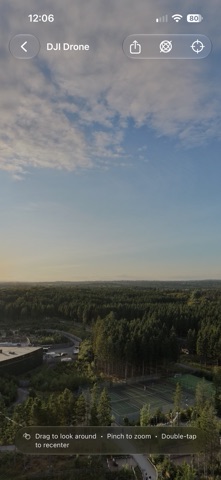
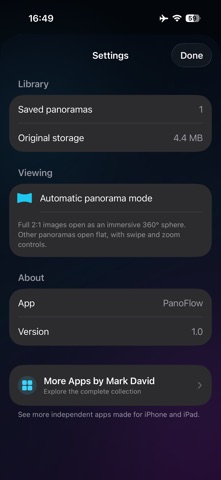
PanoFlow is a simple way to open and explore 360° photos taken with your DJI drone or panoramas taken on your phone or other devices. Export your stitched drone panorama, import it from Photos or Files and look all around the image on your iPhone or iPad. Full 2:1 panoramas open in a 360° viewer. Drag to look around, pinch to zoom, recenter the view or move your phone to explore the image naturally. PanoFlow is built for DJI drone panoramas, but it also works with compatible 360° images from other cameras and apps. Regular wide panoramas open in a flat viewer, so they are not stretched into a sphere. You can: • Import several images at once • Keep your panoramas together in one library • Rename and sort imported images • View the date, dimensions and file size • Detect duplicate imports • Share or export the original image • Delete an in-app copy without deleting the original • NEW Compare option. Pick two drone 360 images and compare them side by side in portrait or landscape to see what’s changed. Check out how buildings have changed, trees or landscapes, or building works. There is no account to create and no subscriptions for any of my apps - ever. Your panorama library stays on your device. Independent App Notice: PanoFlow is an independent app and is not affiliated with, endorsed by or sponsored by DJI. DJI is a trademark of SZ DJI Technology Co., Ltd. No DJI software, account or connection is required to use PanoFlow.
What's new · 2.2
Added compare option. Pick two drone 360 images and compare them side by side in portrait or landscape to see what’s changed. Check out how buildings have changed, trees or landscapes, or building works. Added move one or both at the same time.
Details