

PanoFuser Touch
MARTIN DOLEZEL · Photo & Video
Independent analytics for this App Store listing. AppTracker is not affiliated with MARTIN DOLEZEL.
Chart standing · US
What changed · US
Listing changes AppTracker has observed for this app in this storefront — new versions, price moves, rating shifts, and store copy.
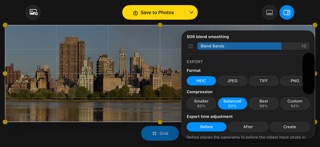
Expanded interface and built-in help translations. Improved panorama stitching performance with a new balanced default. New Seam detail options in the inspector let you choose Fast, Balanced or Detailed stitching while keeping the panorama at full resolution.
In-app purchases · US
No in-app purchases.
Screenshots


Keywords this app targets
Search terms AppTracker associates with this app — estimates, not search volume. ❝ = in the app's title; a highlighted number is its current position for that term.
Similar apps
Competitors and close alternatives, as estimated by AppTracker.





About
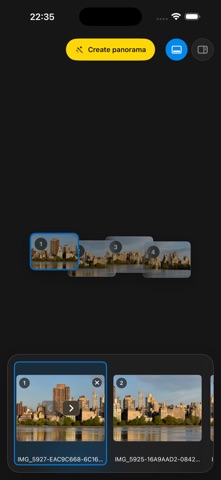
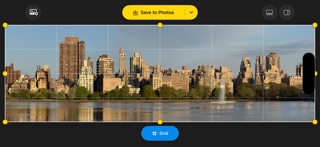
PanoFuser is for photographers, travelers, Apple Photos users, and anyone who wants a clean, powerful panorama workflow with more control than a quick sweep. PanoFuser creates high-quality panoramas from overlapping photos on iPhone and iPad. Start with photos you already have, capture a new source set with Guided Camera, review the sequence, stitch locally, refine the result, and save or export a finished panorama with flexible tools that fit your workflow. Bring in photos from Apple Photos or image files, or use Camera to capture source photos directly in PanoFuser. Guided Camera helps when you are on location and have not captured the panorama yet: it guides how far to rotate between shots, so neighboring photos have enough overlap for stitching without wasting too much frame area on repeated content. During capture, you can choose an available rear lens, capture standard or full-resolution photos when supported, use RAW on devices that report RAW capture support, and lock camera settings when lighting consistency matters. If a capture session is interrupted, PanoFuser keeps the captured originals in private app storage and can offer to recover them on the next launch. After capture or import, PanoFuser brings the photos into the normal source workflow so you can review, sort, reverse, or manually arrange the sequence before stitching. The original photos stay untouched; PanoFuser creates a new result you can save to Photos or export as a file. After stitching, use the touch workspace to inspect the panorama, check horizon and composition with the grid, crop manually, straighten, and use advanced controls only when the source set needs extra care. Projection, Source Tilt, overlap trim, blend quality, metadata, and export options are available in a focused workflow built for panorama creation. For repeat workflows, Turbo Mode can automate selected steps. Let PanoFuser start creating after import, save the finished panorama to Apple Photos, export to files, build an archive folder, or run a complete output sequence when you already know how you want the job handled. If the source photos contain compatible HDR gain-map data, PanoFuser can show an HDR preview and export an HDR HEIC panorama. HDR is easiest to judge on an HDR-capable Apple display. On a standard SDR display, the file can still contain HDR gain-map data, but the extra highlight brightness is not visible in the same way. HDR panoramas are especially useful for scenes with bright highlights, sunsets, reflections, lamps, windows, or strong contrast. If every source photo is SDR, the panorama is SDR. If the source set mixes HDR and non-HDR photos, the HDR result may be unavailable or less predictable. JPEG, PNG, and TIFF exports are written as standard SDR images. Why you'll like it: - Create panoramas from overlapping photos you already have - Capture source photos with Guided Camera - Use overlap guidance while shooting on location - Import from Apple Photos or image files - Review, sort, reverse, or manually arrange source photos - Stitch locally, with no upload service - Keep original photos untouched - Refine crop, straightening, and composition by touch - Use Source Tilt and overlap trim for difficult source sets - Automate repeat workflows with Turbo Mode - Save finished panoramas back to Apple Photos - Export HEIC, JPEG, PNG, or TIFF - Preserve compatible HDR appearance in HEIC output - No account, no tracking, no analytics
What's new · 1.3.3
Expanded interface and built-in help translations. Improved panorama stitching performance with a new balanced default. New Seam detail options in the inspector let you choose Fast, Balanced or Detailed stitching while keeping the panorama at full resolution.
Details