

micopi
katsuya shinjo · Music
Independent analytics for this App Store listing. AppTracker is not affiliated with katsuya shinjo.
Chart standing · US
Screenshots


Keywords this app targets
Search terms AppTracker associates with this app — estimates, not search volume. ❝ = in the app's title; a highlighted number is its current position for that term.
Similar apps
Competitors and close alternatives, as estimated by AppTracker.
 Slow Down Music | Transcribe+
Dynamic App Design LLC
Slow Down Music | Transcribe+
Dynamic App Design LLC
 Pitch Scoper: Tuner & Analyzer
朋亮 杨
Pitch Scoper: Tuner & Analyzer
朋亮 杨
 MeloStock
NOBUHIRO MIYARA
MeloStock
NOBUHIRO MIYARA
 DeepPiano - Sheet Music & AI
Beijing Zhiqu Technology Co., Ltd.
1 shared topic
DeepPiano - Sheet Music & AI
Beijing Zhiqu Technology Co., Ltd.
1 shared topic
 Piano H88
MARCELO MEJIA COBO
Piano H88
MARCELO MEJIA COBO
 Piano2Notes
Klangio GmbH
Piano2Notes
Klangio GmbH
 mimiCopy - Slow Down Player
ART Teknika, Inc.
mimiCopy - Slow Down Player
ART Teknika, Inc.
 Pixelboop: Make Music Visually
de Bastion, Inc
Pixelboop: Make Music Visually
de Bastion, Inc
About
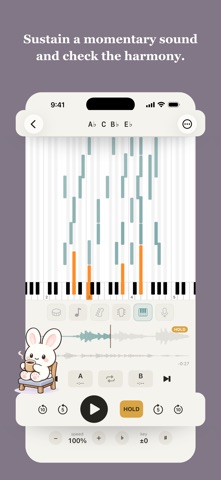
"What note is that, actually?" Import a song, pick the part you want to hear. micopi splits a song into parts, detects the pitch of each one, and shows what is being played on a piano roll. WHAT YOU CAN DO Visualize what each part plays Split a song into vocals, piano, bass, guitar and other, and lay out what each part plays on a piano roll. The notes scroll with the playback, so a glance while you listen tells you which note is sounding right now. The rise and fall of a phrase, the voicing of a chord, the timing of every note - all of it in plain sight. HOLD Stretch out the sound of a moment you want to keep hearing. Press HOLD and the note at that instant is held as a long tone. Through the fastest chord changes, you can take in every voicing one by one. Read a chord at a glance Note names (C E G, and so on) appear at the top of the screen, in sync with the piano roll. Rather than settle on one reading of the chord, micopi shows the note names one by one instead of a chord symbol. Both the piano roll and the note names follow the transpose setting. Practise with a minus-one track Press and hold to mute one part alone, and play a minus-one track to practise with, right away. Tempo & key change / A-B loop Change the playback speed from 25% to 150% with the pitch untouched, and the key from -12 to +12. Mark a start and end point around a hard passage, and A-B loop repeats just that stretch as many times as you need. Export to MIDI and audio Export the detected notes as MIDI and the separated stems as audio, part by part. Bring the exported files into notation software or a DAW, and there is that much more you can do. NOTHING LEAVES YOUR DEVICE micopi runs separation and pitch detection entirely inside your iPhone. No server is needed, so it can be a one-time purchase rather than a monthly subscription - a hundred songs a day, however many years from now, you pay once. And since it never talks to the outside, it works in a soundproof room with no reception, or on a plane mid-tour. BEFORE YOU BUY - THE HONEST PART What it is good at, and what it is not micopi is at its best on performances by roughly one to five players, on mostly acoustic instruments. Separation and pitch detection lose accuracy on tracks like these: Heavily distorted tones (metal distortion, clipping in the recording, and the like) Compressed audio from social media (screen recordings of timeline videos or live streams) Separation and detection take time Splitting into parts and detecting pitch takes time. The high-precision pass on the piano part of a 5-minute song measured about 1 minute 30 seconds on an iPhone 17 Pro. How long it takes varies a great deal with your iPhone's performance and temperature, and the song's note count. Accuracy is not perfect Compared to the most advanced models, our part-splitting has limits and parts can bleed together. Pitch detection, too, may miss notes or mistake overtones for notes. WHO IT'S FOR - Anyone who wants to take their time over piano voicings, fast passages, or vocal harmonies - Anyone who takes up transcribing to train their ear, only to give up along the way - Anyone who suspects a tool will not build the skill, and finds doing without one harder still PRIVACY Everything runs on your device, so your music is never sent anywhere. Every feature works in Airplane Mode. IMPORTING SONGS Import from your music library (songs purchased on iTunes), audio files in the Files app, or the audio from videos and screen recordings in your Camera Roll. Songs streamed or downloaded through an Apple Music subscription, and files in formats your iPhone cannot play, cannot be imported. Requires iOS 17.0 or later on iPhone.
Details