

Upkeep: Home & Car Maintenance
Yannick Wippert · Utilities
Independent analytics for this App Store listing. AppTracker is not affiliated with Yannick Wippert.
Chart standing · US
What changed · US
Listing changes AppTracker has observed for this app in this storefront — new versions, price moves, rating shifts, and store copy.
The archive is reachable again - Archived tasks and ended contracts now sit at the end of every object's task list — on the "Contracts & insurance" object as "Ended". Collected across all objects, they are under Settings › Archive. - An ended contract shows its provider, monthly cost and term right there in the row. Exactly what you look up when the next switch comes round. - Tapping one opens the task like any other, with its full history and every receipt. - There is a way back, too: "Restore" for archived tasks, "Undo cancellation" for contracts you cancelled. Editing a task - Every task now has "Edit" in its menu — title, interval, next due date, reminder and note in one place. Until now the title could only be reached through the interval tile. Smaller things - Deleting an object now says how many archived tasks would go with it, history and receipts included.
Price & rating history · US
Reconstructed from the listing changes AppTracker has observed in this storefront. A field is charted once it has changed more than once, and each line starts at the value it moved from.
Price · 1.99 USD now · 5 changes on record
In-app purchases · US
No in-app purchases.
Screenshots




Keywords this app targets
Search terms AppTracker associates with this app — estimates, not search volume. ❝ = in the app's title; a highlighted number is its current position for that term.
Similar apps
Competitors and close alternatives, as estimated by AppTracker.
 HomeKeep: Maintenance Tracker
Pedro Silva
1 shared topic · 1 shared title word
HomeKeep: Maintenance Tracker
Pedro Silva
1 shared topic · 1 shared title word
 Renewal: Home Keeper
Keith Braccia
1 shared topic · 1 shared title word
Renewal: Home Keeper
Keith Braccia
1 shared topic · 1 shared title word
 Motorist: Car Maintenance
Edovia Inc.
1 shared topic · 3 shared title words
Motorist: Car Maintenance
Edovia Inc.
1 shared topic · 3 shared title words
 Car Maintenance Tracker - MPG
Ivan Obodianskyi
1 shared topic · 3 shared title words
Car Maintenance Tracker - MPG
Ivan Obodianskyi
1 shared topic · 3 shared title words
 Little Duties: Chore Tracker
PolyNome Ltd
Little Duties: Chore Tracker
PolyNome Ltd
 Renewal Tracker
Higbee Aeronautics Ltd
Renewal Tracker
Higbee Aeronautics Ltd
 Home Maintenance Checklist
Matthew Williams
Home Maintenance Checklist
Matthew Williams
 Mileage Tracker & Maintenance
Damian Oliva
Mileage Tracker & Maintenance
Damian Oliva
About
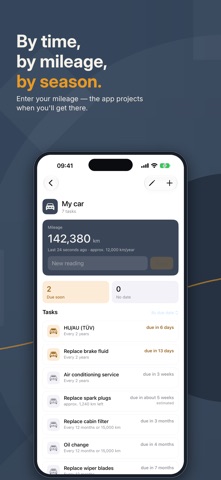
Some things happen so rarely that forgetting them is guaranteed. The annual boiler service. The oil change. The motorhome's leak test. Your car insurance's cancellation deadline. That's what Upkeep is for. BUY ONCE. THAT'S IT. No subscription, no ads, no servers. You pay once and use the app for as long as you like. Your data lives on your device and in your own iCloud — no account with us, no data collection. IT DOESN'T JUST REMIND — IT SUGGESTS Most apps remind you of what you already know. Upkeep suggests what needs doing around your home in the first place. That means over 190 ready-made maintenance tasks, each with a sensible interval and a short note explaining why. Where legal inspection duties apply, the legal basis is named — separately for Germany, Austria and Switzerland. Pick, set a start date, done. FOR EVERYTHING THAT NEEDS CARE House and flat – heating, smoke detectors, gutters, balcony solar Car and motorcycle – oil, inspection, tyres, brakes Motorhome – seals, gas check, winterising Garden and pool – irrigation, filters, water testing Contracts – cancellation deadlines, yearly review REMINDS YOU LIKE A GOOD MEMORY WOULD Time-based: boiler service yearly, electrical check every four years Mileage-based: oil changes by distance driven, with a projection Seasonal: gutters in autumn, tyre swaps in spring and autumn Cancellation deadlines: Upkeep counts backwards and reminds you before a contract auto-renews YOUR MAINTENANCE ARCHIVE Every completed task is logged with date, notes and cost. Photograph receipts right there, or share PDFs from Mail straight into the app. Over time this builds a complete history — valuable when selling your car or house, and for insurance claims. THE SAME DATA ON EVERY DEVICE What you enter on your iPhone is there on your iPad — through your own iCloud, with no account and no servers of ours. ALWAYS IN VIEW The widget shows what's next right on your home screen. On iPad, Upkeep makes use of the larger display with an adapted layout. WHO IS IT FOR? Anyone with a house, a flat, a car or a motorhome — and better things to do than memorise maintenance intervals. Note: References to legal inspection requirements refer to Germany, Austria and Switzerland and are provided without guarantee. Deadlines may vary by region, canton, building type and installation.
What's new · 1.2
The archive is reachable again - Archived tasks and ended contracts now sit at the end of every object's task list — on the "Contracts & insurance" object as "Ended". Collected across all objects, they are under Settings › Archive. - An ended contract shows its provider, monthly cost and term right there in the row. Exactly what you look up when the next switch comes round. - Tapping one opens the task like any other, with its full history and every receipt. - There is a way back, too: "Restore" for archived tasks, "Undo cancellation" for contracts you cancelled. Editing a task - Every task now has "Edit" in its menu — title, interval, next due date, reminder and note in one place. Until now the title could only be reached through the interval tile. Smaller things - Deleting an object now says how many archived tasks would go with it, history and receipts included.
Details