

Sagaseru: Searchable Recorder
Daisuke Yamaguchi · Utilities
Independent analytics for this App Store listing. AppTracker is not affiliated with Daisuke Yamaguchi.
Chart standing · US
What changed · US
Listing changes AppTracker has observed for this app in this storefront — new versions, price moves, rating shifts, and store copy.
Minor improvements.
In-app purchases · US
No in-app purchases.
Screenshots



Keywords this app targets
Search terms AppTracker associates with this app — estimates, not search volume. ❝ = in the app's title; a highlighted number is its current position for that term.
Similar apps
Competitors and close alternatives, as estimated by AppTracker.
 Recordus - AI Voice Recorder
Ricardo Dantas Goncalves
1 shared topic · 1 shared title word
Recordus - AI Voice Recorder
Ricardo Dantas Goncalves
1 shared topic · 1 shared title word
 Recorder Pro: Voice Recorder
Perception System
1 shared topic · 1 shared title word
Recorder Pro: Voice Recorder
Perception System
1 shared topic · 1 shared title word
 Whisper Notes: AI Transcribe
振训 池
1 shared topic
Whisper Notes: AI Transcribe
振训 池
1 shared topic
 Voice Recorder & Transcribe
Jakub Bartus
1 shared topic · 1 shared title word
Voice Recorder & Transcribe
Jakub Bartus
1 shared topic · 1 shared title word
 Turnscript - AI Transcripts
Jonathan Vogelbusch
2 shared topics
Turnscript - AI Transcripts
Jonathan Vogelbusch
2 shared topics
 Silent Scribe
Hua Yang
1 shared topic
Silent Scribe
Hua Yang
1 shared topic
 EZRecorder: Simple & Fast
RYNYUL
1 shared topic
EZRecorder: Simple & Fast
RYNYUL
1 shared topic
 Voice Recorder & Notes Pro
Linfei Ltd.
1 shared topic · 1 shared title word
Voice Recorder & Notes Pro
Linfei Ltd.
1 shared topic · 1 shared title word
About
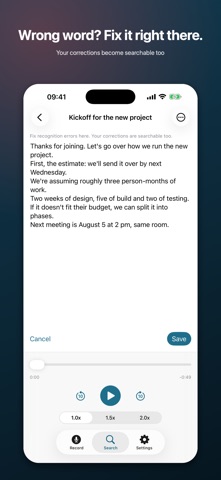
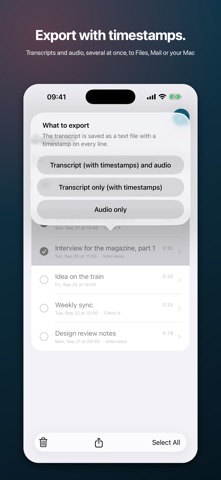
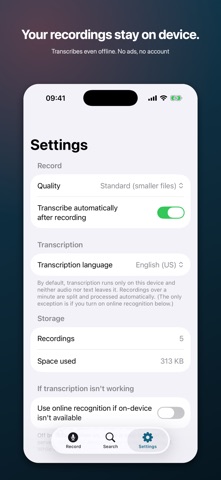
A voice recorder you can search by what you said. Find the exact moment without scrubbing through audio. One-time purchase. No subscriptions, no ads, no account. ■ Search across every recording Type "budget" and only the recordings where you said it appear. The matching sentence is pulled out and shown in the list, so you can tell which recording is the right one before opening it. No more inventing clever file names just to find things later. ■ Tap a line, hear that moment The transcript is laid out one sentence per line, each stamped with its time. Tap it and playback jumps there. The line currently playing is highlighted and scrolls into view. Find the 30 seconds that matter in a one-hour meeting. ■ Fix the transcript yourself Speech recognition is never perfect, so this app is built around correcting it. Fix a name or a technical term once and you can search for it from then on. Your edits become searchable too. ■ Export with timestamps (new) Select several recordings and export their transcripts and audio in one go. Every line of the transcript file starts with its time, like [12:34], so you can still find where something was said after moving it to your notes or your Mac. Send it to Files, Mail, AirDrop or anywhere in the iOS share sheet. ■ Recordings and transcripts stay on your device By default, transcription runs entirely on your iPhone; your audio and transcripts never leave it. Works in airplane mode. No sign-up, no ads. To improve the app, only anonymous usage data (such as which screens are opened) is counted with Google Analytics (you can turn this off in Settings). (Settings has an "also use online recognition" option for devices without an on-device model. It is off by default; only when you turn it on is audio sent to Apple.) ■ You can always tell it is recording A pulsing red indicator, large elapsed time, and a live input meter stay on screen, so you never discover afterwards that nothing was captured. ■ Effortless organizing - Rename anything, any time (one swipe) - Group into folders and filter by them - Multi-select to delete or export in bulk, with select-all - Batch-transcribe everything not yet processed ■ Playback - 1.0x, 1.5x and 2.0x speed - Skip forward and back 10 seconds - Copy the transcript Made for people who record meetings, interviews, lectures and spoken ideas, and want to actually use them afterwards. Note: Transcription uses the iOS speech recognition engine. Some devices or languages may download a recognition model on first use. Transcription languages: English (US), Japanese, German, French, Spanish, Korean, Chinese (Taiwan) This app has no cloud sync by design - recordings cannot be lost in a sync failure if there is no sync.
What's new · 1.5
Minor improvements.
Details