

Recordus - AI Voice Recorder
Ricardo Dantas Goncalves · Productivity
Independent analytics for this App Store listing. AppTracker is not affiliated with Ricardo Dantas Goncalves.
Chart standing · US
What changed · US
Listing changes AppTracker has observed for this app in this storefront — new versions, price moves, rating shifts, and store copy.
New: Private Cloud AI. Turn it on in Settings and Recordus Pro can run summaries, action items, titles, tags, transcript enhancement and Ask answers on a larger model on Apple's servers. Only text is sent, never your audio, and transcription always stays on this device. It's off by default and needs a device that supports Apple Intelligence with iOS 27 or macOS 27; your daily allowance comes from your iCloud account, and Recordus switches back to the on-device model once it's spent. If your device can't run on-device transcription or Apple Intelligence, Recordus now tells you right after setup, along with exactly what still works: recording, playback, search, folders, tags, iCloud sync and export. It stays available in Settings › Device Compatibility, with steps to request a refund if the app isn't right for your device. Also fixed: blank Apple Intelligence status icons in Settings and Ask. Siri, Shortcuts and Spotlight are more reliable now that they share one data store with the rest of the app.
In-app purchases · US
What this app sells inside itself, grouped by kind and priced for this storefront.
Screenshots



Keywords this app targets
Search terms AppTracker associates with this app — estimates, not search volume. ❝ = in the app's title; a highlighted number is its current position for that term.
Similar apps
Competitors and close alternatives, as estimated by AppTracker.
 Voice Recorder & Transcribe
Jakub Bartus
3 shared topics · 3 shared title words
Voice Recorder & Transcribe
Jakub Bartus
3 shared topics · 3 shared title words
 Recorder Pro: Voice Recorder
Perception System
2 shared topics · 1 shared title word
Recorder Pro: Voice Recorder
Perception System
2 shared topics · 1 shared title word
 Voice Recorder & Audio Editor
TapMedia Ltd
1 shared topic · 3 shared title words
Voice Recorder & Audio Editor
TapMedia Ltd
1 shared topic · 3 shared title words
 Awesome Voice Recorder - PRO
Newkline Co., Ltd.
1 shared topic · 3 shared title words
Awesome Voice Recorder - PRO
Newkline Co., Ltd.
1 shared topic · 3 shared title words
 Synopsule
Sunny Nagra
2 shared topics
Synopsule
Sunny Nagra
2 shared topics
 Note AI: Smart Note Taker
HUBX YAZILIM HIZMETLERI ANONIM SIRKETI
3 shared topics · 1 shared title word
Note AI: Smart Note Taker
HUBX YAZILIM HIZMETLERI ANONIM SIRKETI
3 shared topics · 1 shared title word
 You Record Pro
Eval'das Sichyunas
2 shared topics
You Record Pro
Eval'das Sichyunas
2 shared topics
 Just Press Record
Open Planet Software
1 shared topic
Just Press Record
Open Planet Software
1 shared topic
About
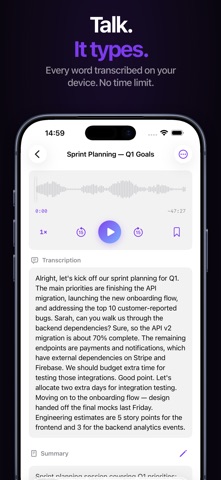
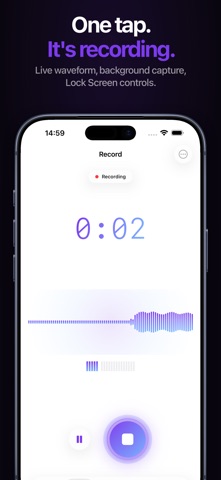
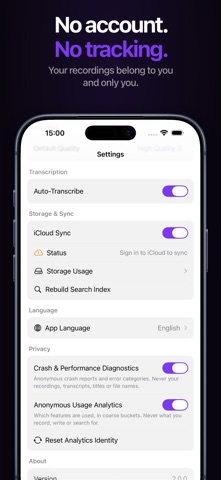
Your voice is full of ideas, decisions, and moments worth keeping. Recordus captures them all, then goes further, turning recordings into organized, searchable, actionable content using on-device AI. Nothing to sign up for. ▸ RECORD One tap. That's it. A beautiful live waveform responds to your voice in real time. Keep recording in the background, on your Lock Screen, or from your Apple Watch. Recordus never misses a moment. • Live waveform visualization • Pause & resume anytime • Background recording with Live Activity & Dynamic Island • Record from Siri, Widgets, or Apple Watch • Multiple quality settings up to lossless ▸ TRANSCRIBE Every word, captured and searchable. Recordus uses Apple's latest on-device speech engine, with no duration limits. • Automatic transcription as you record • 30+ languages supported • Word-by-word highlight during playback • Tap any word to jump to that exact moment • Edit transcriptions freely ▸ ASK Ask a question about your recordings and get an answer in plain language, with the recordings it came from. Tap a source to hear that exact moment. • Ask about one recording, a folder, a date range, or everything • Every answer cites its sources, so you can check it • Runs on Apple Intelligence • Optional Private Cloud AI. Off by default, and it never receives your audio • Optional subscription, with a 7 day free trial • Requires a device that supports Apple Intelligence ▸ UNDERSTAND This is where Recordus goes beyond recording. AI reads your transcription and instantly generates: • Smart summaries: the TL;DR of every recording • Action items: to-dos extracted from meetings automatically • Auto-tags: meetings, ideas, lectures, personal notes • Intelligent titles: no more "Recording 47" Powered by Apple Intelligence on supported devices (iPhone 16 and later, iPad and Mac with Apple silicon). On other devices, Recordus uses fast built-in text analysis, so you still get summaries, tags, and action items. ▸ FIND ANYTHING Your recordings are only useful if you can find them. Recordus makes every recording searchable by title, transcription, and tags. • Full-text search across your entire library • Browse by tag with visual tag cloud • Siri: "Get my last transcription from Recordus" ▸ ALL YOUR APPLE DEVICES Record on your wrist. Transcribe on your phone. Review on your Mac. Recordus works seamlessly across your entire Apple ecosystem. • iPhone & iPad with adaptive layouts • Mac support included • Watch recordings transfer straight to your iPhone, automatically ▸ PRIVACY BY DESIGN No accounts. No tracking. Transcription always happens on this device. Your recordings belong to you and only you. Recordus reads only your own recordings. Turn on Private Cloud AI (Recordus Pro, Apple Intelligence hardware, iOS 27 or macOS 27) and summaries, action items, titles, tags, transcript enhancement and Ask answers can run on a larger model on Apple's servers. Only text is sent, never your audio. It's off until you switch it on. Your daily allowance is tied to your iCloud account, and Recordus falls back to the on-device model once it runs out. Recordus does collect anonymous crash reports and usage analytics. Both are disclosed the first time you open the app, both can be switched off in Settings, and neither ever includes your audio, transcriptions, titles, or searches. App Store Privacy Label: Data Not Linked to You. ▸ WHAT YOU PAY FOR Recordus is a one-time purchase. Recording, transcription, summaries, action items, tags, search, folders, iCloud sync, export, widgets, Shortcuts and the Apple Watch app are all included, on every device. No ads, no accounts, no upsells inside the features you bought. Ask is the one exception. It is a separate optional subscription, because it is a large piece of new work rather than a lock on something that used to be free. Everything above works exactly as it did without it. Terms of Use: https://recordus.app/terms
What's new · 2.0.2
New: Private Cloud AI. Turn it on in Settings and Recordus Pro can run summaries, action items, titles, tags, transcript enhancement and Ask answers on a larger model on Apple's servers. Only text is sent, never your audio, and transcription always stays on this device. It's off by default and needs a device that supports Apple Intelligence with iOS 27 or macOS 27; your daily allowance comes from your iCloud account, and Recordus switches back to the on-device model once it's spent. If your device can't run on-device transcription or Apple Intelligence, Recordus now tells you right after setup, along with exactly what still works: recording, playback, search, folders, tags, iCloud sync and export. It stays available in Settings › Device Compatibility, with steps to request a refund if the app isn't right for your device. Also fixed: blank Apple Intelligence status icons in Settings and Ask. Siri, Shortcuts and Spotlight are more reliable now that they share one data store with the rest of the app.
Details