

reh·cord
Rory Johnston · Music
Independent analytics for this App Store listing. AppTracker is not affiliated with Rory Johnston.
Chart standing · US
What changed · US
Listing changes AppTracker has observed for this app in this storefront — new versions, price moves, rating shifts, and store copy.
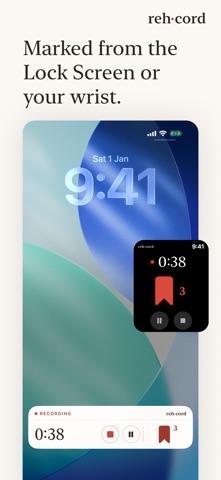
A new Home screen. Starting a session is the first line on the paper, with your most recent sessions beside it. The iPad gets its own layout rather than a stretched phone. Start a recording from the Lock Screen with the new reh·cord widget. Pin a notebook to keep it at the top of the shelf. Pins sync between your devices. Tap a recording’s upload ring to pause the upload; tap it again to carry on. How to use reh·cord, in Settings, is rewritten: the Lock Screen widget, markers, your voice, playback, notebooks and notes, sharing, and what iCloud does. After an app update, the transcriber prepares itself quietly at launch instead of in the middle of your first short transcription. Also: the transcript no longer shifts sideways while it follows playback, spoken moments show as a thin line under the waveform, notebook covers keep one size when you resize the window on iPad, and a sync indicator appears beside Notebooks while the library catches up.
In-app purchases · US
No in-app purchases.
Screenshots


Similar apps
Competitors and close alternatives, as estimated by AppTracker.




About
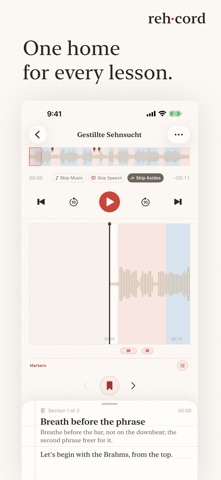
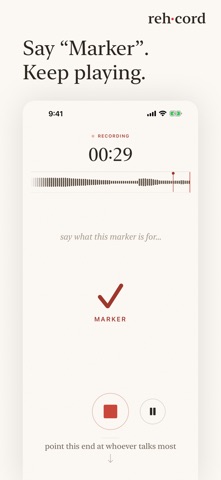
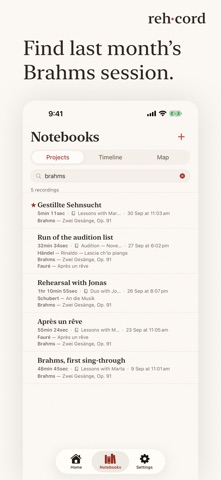
Lessons end up everywhere. A voice memo here, a video there, advice you half remember. reh·cord gives them one home: recorded, written down, and kept in notebooks. Everything is made on the device. Nothing is sent to reh·cord, because there is nothing to send it to. RECORDING Press record and play. reh·cord writes down the speech and not the playing, so an hour of rehearsal comes back as a few readable pages. When something matters, press Marker on the Lock Screen, in the Dynamic Island or on your watch. Or say "Marker" out loud, hands still on the instrument. READ IT BACK A recording opens as pages you can read. The talking falls into sections, each with a one-line summary in the style you choose, and the words follow along as it plays. Your markers are there too, right where you left them. NOTEBOOKS Every recording goes in a notebook, with a cover you choose. Add the piece and the composer to your session, and the names you use become suggestions next time. When you need last month's Brahms, search finds it by title, piece, composer, rehearsal location or notebook. MADE FOR APPLE WATCH Record, pause and mark the moment from your wrist while the phone does the recording. A glance shows how far in you are and what you have marked. IPHONE, IPAD AND MAC One library on every screen, kept in step through your own iCloud if you turn sync on. A stronger device can quietly take over the transcribing for a weaker one. And recordings can live in your iCloud instead of filling up your phone. No account. No ads. No analytics. No servers.
What's new · 1.1.0
A new Home screen. Starting a session is the first line on the paper, with your most recent sessions beside it. The iPad gets its own layout rather than a stretched phone. Start a recording from the Lock Screen with the new reh·cord widget. Pin a notebook to keep it at the top of the shelf. Pins sync between your devices. Tap a recording’s upload ring to pause the upload; tap it again to carry on. How to use reh·cord, in Settings, is rewritten: the Lock Screen widget, markers, your voice, playback, notebooks and notes, sharing, and what iCloud does. After an app update, the transcriber prepares itself quietly at launch instead of in the middle of your first short transcription. Also: the transcript no longer shifts sideways while it follows playback, spoken moments show as a thin line under the waveform, notebook covers keep one size when you resize the window on iPad, and a sync indicator appears beside Notebooks while the library catches up.
Details