

Redact: Blur Video & Photos
Anh Trinh · Photo & Video
Independent analytics for this App Store listing. AppTracker is not affiliated with Anh Trinh.
Chart standing · US
What changed · US
Listing changes AppTracker has observed for this app in this storefront — new versions, price moves, rating shifts, and store copy.
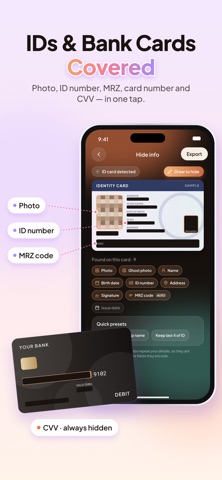
A fresh new look, and a new way to stay private. • Redesigned app — cleaner, smoother, easier to use. • NEW: Hide Info — cover phone numbers, bank cards, QR codes and plates in your screenshots. • Rotate, resize and duplicate covers right on the photo or video. • Smoother editing and bug fixes.
In-app purchases · US
What this app sells inside itself, grouped by kind and priced for this storefront.
Screenshots



Keywords this app targets
Search terms AppTracker associates with this app — estimates, not search volume. ❝ = in the app's title; a highlighted number is its current position for that term.
Similar apps
Competitors and close alternatives, as estimated by AppTracker.


About
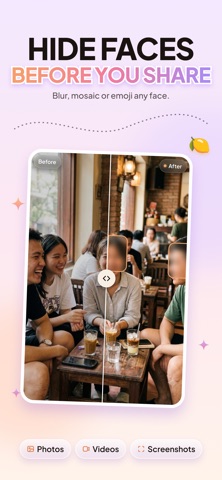
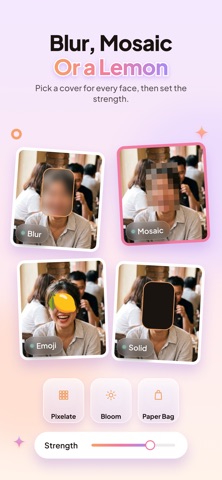
Blur It hides faces in your photos and videos in one tap — and nothing ever leaves your iPhone. No account, no cloud, no upload. Every frame is processed on device, so your private moments stay private. WHAT YOU CAN DO - Auto face blur — AI finds every face in a photo or video and covers it instantly - Mosaic, pixelate or soft blur — pick the look you want - Emoji and sticker covers — playful instead of censored - Manual brush — trace over anything you want gone - Shape tools — rectangle and oval for precise censoring - Object tracking — follow a moving subject through the whole clip - Hide license plates, ID cards, addresses and chat names - Redact text in documents and screenshots before you share - Adjust blur strength and pixel size to taste BUILT FOR SHARING Export up to 4K in MP4 or MOV with metadata stripped, so location and device data never travel with your file. Share straight to Instagram, TikTok, Messages or anywhere else. PRIVACY, NOT JUST A PROMISE Most blur tools send your media to a server to process it. Blur It never does. There is no upload step, so there is nothing to leak — it even works in airplane mode. HOW IT WORKS 1. Pick a photo or video 2. Faces are detected automatically 3. Choose mosaic, blur or emoji 4. Save or share Questions or feedback? Reach us at davaco.app@gmail.com Terms of Use: https://davaco.app/blurit/term-service Privacy Policy: https://davaco.app/blurit/privacy-policy
What's new · 2.0
A fresh new look, and a new way to stay private. • Redesigned app — cleaner, smoother, easier to use. • NEW: Hide Info — cover phone numbers, bank cards, QR codes and plates in your screenshots. • Rotate, resize and duplicate covers right on the photo or video. • Smoother editing and bug fixes.
Details